Feature engineering is the work of turning raw data into inputs a model can learn from: filling gaps, putting numbers on comparable scales, turning categories and dates into numbers, combining columns into more meaningful ones, and removing features that add noise or leak the answer. On tabular data, good features often matter more than the choice of algorithm, because a model can only find patterns that its inputs make visible.
This guide collects 101 techniques, grouped by the kind of data they apply to. Each entry explains what the technique does, when it helps, and shows a short, runnable Python example. The snippets were run with Python 3.13, scikit-learn 1.9.0, pandas 3.0.3 and NumPy 2.3.5, and the text under each one is what it printed. They use tiny inline tables, synthetic data or datasets bundled with scikit-learn, so they run offline.
Which techniques matter depends on the model. Tree ensembles such as random forests and gradient boosting do not need scaling or monotonic transforms, handle interactions on their own and (in modern libraries) handle missing values natively. Linear models, neural networks, k-nearest neighbors and SVMs depend much more on scaling, encoding and explicit interactions. Each entry notes which models benefit most. For background on the models themselves, see 100 machine learning algorithms explained.
The golden rule: learn transformations from training data only
Every transformation that learns something from data (a mean for imputation, a scale, a category list, a target average) must be fitted on the training data only and then applied to validation and test data. Fitting it on the full dataset leaks information about the test set into training and makes your scores too optimistic. The simplest way to obey this rule is to put every step inside a scikit-learn Pipeline, so cross-validation refits the steps on each training fold (scikit-learn: common pitfalls).
import numpy as np
import pandas as pd
from sklearn.compose import ColumnTransformer
from sklearn.impute import SimpleImputer
from sklearn.linear_model import LogisticRegression
from sklearn.model_selection import cross_val_score
from sklearn.pipeline import make_pipeline
from sklearn.preprocessing import OneHotEncoder, StandardScaler

rng = np.random.default_rng(0)
df = pd.DataFrame({
    "age": rng.integers(18, 80, 500).astype(float),
    "income": rng.lognormal(10, 0.5, 500),
    "plan": rng.choice(["basic", "plus", "pro"], 500),
})
df.loc[rng.random(500) < 0.1, "age"] = np.nan                  # 10% missing ages
y = ((df["plan"] == "pro") | (df["income"] > 30_000)).astype(int)

preprocess = ColumnTransformer([
    ("num", make_pipeline(SimpleImputer(strategy="median"), StandardScaler()), ["age", "income"]),
    ("cat", OneHotEncoder(handle_unknown="ignore"), ["plan"]),
])
model = make_pipeline(preprocess, LogisticRegression(max_iter=1000))
print("mean CV accuracy:", round(cross_val_score(model, df, y, cv=5).mean(), 3))
mean CV accuracy: 0.992
Most snippets below show a single transformer on its own so the effect is easy to see. In a real project, put them inside a pipeline like this one.
Missing values
1. Measure missingness before deciding what to do
Look at how much is missing, in which columns and for which rows. Missing values are often not random: a blank "date of last purchase" may mean "never purchased".
import numpy as np
import pandas as pd

df = pd.DataFrame({"age": [34, np.nan, 51, 28, np.nan], "income": [52, 61, np.nan, 40, 75],
                   "churned": [0, 1, 0, 0, 1]})
print(df.isna().mean().round(2).to_dict())
print("churn rate when age is missing:", df.loc[df["age"].isna(), "churned"].mean(),
      "| when present:", round(df.loc[df["age"].notna(), "churned"].mean(), 2))
{'age': 0.4, 'income': 0.2, 'churned': 0.0}
churn rate when age is missing: 1.0 | when present: 0.0
When it helps: always, first. If missingness is related to the target, keep that information (technique 4).
2. Mean or median imputation
Replace missing numbers with the column's mean or median, learned from the training data. The median is safer for skewed columns.
import numpy as np
from sklearn.impute import SimpleImputer

X_train = np.array([[1.0], [2.0], [np.nan], [100.0]])
for strategy in ("mean", "median"):
    print(strategy, SimpleImputer(strategy=strategy).fit_transform(X_train).ravel())
mean [  1.           2.          34.33333333 100.        ]
median [  1.   2.   2. 100.]
When it helps: a quick, robust default for linear models and neural networks. It shrinks variance and weakens correlations, so pair it with a missing indicator when missingness may be informative.
3. Most-frequent or constant imputation for categories
Fill missing categories with the most common value, or with an explicit "missing" category, which is usually better because it keeps the information that the value was absent.
import numpy as np
from sklearn.impute import SimpleImputer

colors = np.array([["red"], ["blue"], [np.nan], ["red"]], dtype=object)
print(SimpleImputer(strategy="most_frequent").fit_transform(colors).ravel())
print(SimpleImputer(strategy="constant", fill_value="missing").fit_transform(colors).ravel())
['red' 'blue' 'red' 'red']
['red' 'blue' 'missing' 'red']
When it helps: any categorical column with gaps, before one-hot or target encoding.
4. Missing-indicator features
Add a binary column that says whether the value was missing, alongside the imputed value.
import numpy as np
from sklearn.impute import SimpleImputer

X = np.array([[5.0], [np.nan], [7.0], [np.nan]])
print(SimpleImputer(strategy="median", add_indicator=True).fit_transform(X))
[[5. 0.]
 [6. 1.]
 [7. 0.]
 [6. 1.]]
When it helps: when the fact that a value is missing predicts the target, as with an empty field on an application form. It lets linear models learn a separate effect for missing rows.
5. k-nearest-neighbors imputation
Fill each missing value with the average of that feature among the most similar rows.
import numpy as np
from sklearn.impute import KNNImputer

X = np.array([[1.0, 2.0], [1.1, np.nan], [8.0, 9.0], [8.2, 9.1]])
print(KNNImputer(n_neighbors=1).fit_transform(X))
[[1.  2. ]
 [1.1 2. ]
 [8.  9. ]
 [8.2 9.1]]
When it helps: features that are correlated with other features, on small to medium datasets. Scale features first, because distances drive the choice of neighbors. It is slow on large data.
6. Iterative (model-based) imputation
Model each feature with missing values as a function of the others, and repeat in rounds, in the spirit of multiple imputation by chained equations (MICE) (van Buuren and Groothuis-Oudshoorn, 2011).
import numpy as np
from sklearn.experimental import enable_iterative_imputer  # noqa: F401
from sklearn.impute import IterativeImputer

rng = np.random.default_rng(0)
x = rng.normal(size=200)
X = np.c_[x, 2 * x + rng.normal(0, 0.1, 200)]     # second column is about 2 times the first
X[:20, 1] = np.nan
filled = IterativeImputer(random_state=0).fit_transform(X)
print("imputed / first column (should be near 2):", np.round(filled[:5, 1] / filled[:5, 0], 2))
imputed / first column (should be near 2): [1.91 2.07 1.98 1.89 2.01]
When it helps: strongly related features where a simple median would throw away information. The scikit-learn implementation is still marked experimental.
7. Forward fill and backward fill for time series
Carry the last known value forward in time, which matches how many readings behave (a price or a status stays the same until it changes).
import numpy as np
import pandas as pd

s = pd.Series([10.0, np.nan, np.nan, 12.0, np.nan], index=pd.date_range("2026-01-01", periods=5))
print(s.ffill().tolist(), "| limited to one step:", s.ffill(limit=1).tolist())
[10.0, 10.0, 10.0, 12.0, 12.0] | limited to one step: [10.0, 10.0, nan, 12.0, 12.0]
When it helps: sensor readings, prices and states. Never use backward fill for features you will use to predict the future: it copies future values into the past.
8. Group-wise imputation
Fill a gap with the median of a relevant group (for example, the median price of the same product category) instead of the global median.
import numpy as np
import pandas as pd

df = pd.DataFrame({"category": ["phone", "phone", "laptop", "laptop", "phone"],
                   "price": [500, np.nan, 1200, np.nan, 700]})
df["price_filled"] = df["price"].fillna(df.groupby("category")["price"].transform("median"))
print(df)
  category   price  price_filled
0    phone   500.0         500.0
1    phone     NaN         600.0
2   laptop  1200.0        1200.0
3   laptop     NaN        1200.0
4    phone   700.0         700.0
When it helps: heterogeneous data where groups differ a lot. Compute the group medians on training data only.
9. Let the model handle missing values natively
Histogram gradient boosting in scikit-learn (and XGBoost, LightGBM and CatBoost) learns which branch missing values should follow at each split, so no imputation is needed.
import numpy as np
from sklearn.ensemble import HistGradientBoostingClassifier

rng = np.random.default_rng(0)
X = rng.normal(size=(1000, 3))
y = (X[:, 0] > 0).astype(int)
X[rng.random(1000) < 0.2, 0] = np.nan                       # 20% missing in the key feature
model = HistGradientBoostingClassifier(random_state=0).fit(X[:800], y[:800])
print("test accuracy with NaNs left in place:", round(model.score(X[800:], y[800:]), 3))
test accuracy with NaNs left in place: 0.895
When it helps: tree ensembles on data with many gaps, where the missingness pattern itself may be informative.
Scaling and numeric transformations
10. Standardization (z-scores)
Subtract the mean and divide by the standard deviation, so each feature has mean 0 and standard deviation 1.
import numpy as np
from sklearn.preprocessing import StandardScaler

X = np.array([[1.0, 1000.0], [2.0, 2000.0], [3.0, 3000.0]])
Z = StandardScaler().fit_transform(X)
print(Z.round(3), "| means:", Z.mean(axis=0).round(3), "| stds:", Z.std(axis=0).round(3))
[[-1.225 -1.225]
 [ 0.     0.   ]
 [ 1.225  1.225]] | means: [0. 0.] | stds: [1. 1.]
When it helps: linear models with regularization, SVMs, k-NN, k-means, PCA and neural networks, all of which are sensitive to feature scale. Trees do not need it.
11. Min-max scaling
Rescale each feature to a fixed range, usually 0 to 1.
import numpy as np
from sklearn.preprocessing import MinMaxScaler

X = np.array([[10.0], [20.0], [15.0], [30.0]])
print(MinMaxScaler().fit_transform(X).ravel())
[0. 0.5 0.25 1. ]
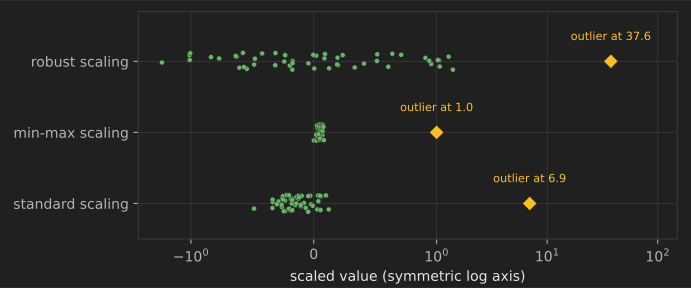
When it helps: inputs that must be bounded, such as pixel intensities for neural networks. It is sensitive to outliers (see the figure above), and new values outside the training range fall outside 0–1 unless you set clip=True.
12. Robust scaling
Subtract the median and divide by the interquartile range, so outliers have little influence on the scale.
import numpy as np
from sklearn.preprocessing import RobustScaler, StandardScaler

X = np.array([[1.0], [2.0], [3.0], [4.0], [1000.0]])
print("standard:", StandardScaler().fit_transform(X).ravel().round(2))
print("robust:  ", RobustScaler().fit_transform(X).ravel().round(2))
standard: [-0.5 -0.5 -0.5 -0.5  2. ]
robust:   [ -1.   -0.5   0.    0.5 498.5]
When it helps: features with outliers that you want to keep, for scale-sensitive models.
13. Max-absolute scaling for sparse data
Divide each feature by its largest absolute value. It does not shift the data, so zeros stay zero and sparse matrices stay sparse.
from scipy.sparse import csr_matrix
from sklearn.preprocessing import MaxAbsScaler

X = csr_matrix([[0, 4.0], [0, -2.0], [5.0, 0]])
print(MaxAbsScaler().fit_transform(X).toarray())
[[ 0.   1. ]
 [ 0.  -0.5]
 [ 1.   0. ]]
When it helps: sparse inputs such as word counts, where centering would destroy sparsity.
14. Row normalization (unit norm)
Scale each row (not each column) to length 1, so only the direction of the vector matters.
import numpy as np
from sklearn.preprocessing import Normalizer

counts = np.array([[2.0, 2.0, 0.0], [20.0, 20.0, 0.0]])   # same proportions, ten times longer
print(Normalizer(norm="l2").fit_transform(counts).round(3))
[[0.707 0.707 0.   ]
 [0.707 0.707 0.   ]]
When it helps: text vectors and other count profiles compared with cosine similarity, where document length should not matter.
15. Log transform
Apply to compress large values and spread out small ones.
import numpy as np

incomes = np.array([20_000, 35_000, 50_000, 80_000, 2_000_000])
print("raw ratio max/median:", round(incomes.max() / np.median(incomes), 1))
print("log1p values:", np.log1p(incomes).round(2))
raw ratio max/median: 40.0
log1p values: [ 9.9  10.46 10.82 11.29 14.51]
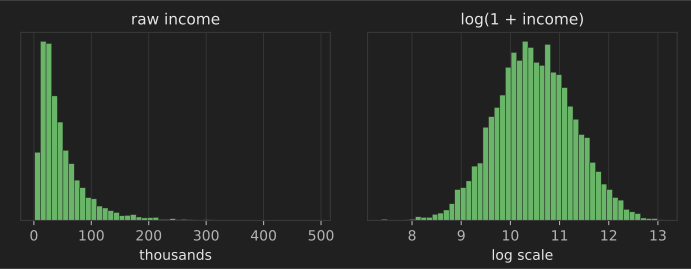
When it helps: right-skewed, positive quantities such as incomes, prices, counts and durations, especially for linear models. Use log1p when zeros occur.
16. Power transforms (Box–Cox and Yeo–Johnson)
Find the power transformation that makes a feature as close to normally distributed as possible. Box–Cox needs strictly positive values; Yeo–Johnson also handles zero and negative values.
import numpy as np
from scipy.stats import skew
from sklearn.preprocessing import PowerTransformer

rng = np.random.default_rng(0)
x = rng.exponential(scale=2.0, size=(1000, 1))
pt = PowerTransformer(method="yeo-johnson").fit(x)
print(f"skewness before {skew(x.ravel()):.2f}, after {skew(pt.transform(x).ravel()):.2f}, lambda {pt.lambdas_[0]:.2f}")
skewness before 2.19, after 0.05, lambda -0.32
When it helps: models that work best with roughly Gaussian inputs, such as linear and Gaussian models, when you do not know which transform to pick.
17. Quantile transform
Map each feature through its empirical cumulative distribution so the result is uniform, or normal after a second mapping. It is robust to outliers because it uses only ranks.
import numpy as np
from sklearn.preprocessing import QuantileTransformer

rng = np.random.default_rng(0)
x = np.r_[rng.normal(size=995), [50, 60, 70, 80, 90]].reshape(-1, 1)    # five extreme outliers
qt = QuantileTransformer(n_quantiles=100, output_distribution="normal", random_state=0)
z = qt.fit_transform(x).ravel()
print("largest transformed values:", np.sort(z)[-3:].round(2))
largest transformed values: [2.83 3.05 5.2 ]
When it helps: strongly skewed or multi-modal features for linear models and neural networks. It distorts distances and linear relationships, so check that it helps on validation data.
18. Clipping and winsorizing
Cap values at chosen percentiles (learned on training data) so extreme values cannot dominate.
import numpy as np

rng = np.random.default_rng(0)
train = np.r_[rng.normal(50, 10, 990), rng.normal(500, 50, 10)]
low, high = np.percentile(train, [1, 99])
print(f"caps learned on training data: {low:.1f} to {high:.1f}")
print("new values clipped:", np.clip([20, 55, 900], low, high).round(1))
caps learned on training data: 25.8 to 84.0
new values clipped: [25.8 55.  84. ]
When it helps: data-entry errors and heavy tails in linear models and neural networks. Keep the uncapped value if extremes are meaningful, for example in fraud detection.
19. Rank transform
Replace values by their rank (or percentile) within the training data.
import pandas as pd

sales = pd.Series([120, 15, 300, 15, 9000])
print(sales.rank(pct=True).tolist())
[0.6, 0.3, 0.8, 0.3, 1.0]
When it helps: when only the order matters, or to compare features measured on wildly different scales. It is a simple version of technique 17.
20. Transform the target
For skewed regression targets, train on and convert predictions back. TransformedTargetRegressor does both steps automatically.
import numpy as np
from sklearn.compose import TransformedTargetRegressor
from sklearn.linear_model import LinearRegression
from sklearn.model_selection import cross_val_score

rng = np.random.default_rng(0)
X = rng.uniform(0, 3, size=(500, 1))
y = np.exp(1 + X[:, 0] + rng.normal(0, 0.3, 500))       # multiplicative noise
plain = cross_val_score(LinearRegression(), X, y, cv=5, scoring="neg_median_absolute_error").mean()
logged = cross_val_score(TransformedTargetRegressor(LinearRegression(), func=np.log1p, inverse_func=np.expm1),
                         X, y, cv=5, scoring="neg_median_absolute_error").mean()
print(f"median absolute error: raw target {-plain:.2f}, log target {-logged:.2f}")
median absolute error: raw target 5.16, log target 2.24
When it helps: prices, sales and durations whose errors grow with their size. Note that back-transformed predictions estimate the median rather than the mean.
Binning and splines
21. Equal-width binning
Cut a numeric feature into intervals of equal width.
import numpy as np
from sklearn.preprocessing import KBinsDiscretizer

ages = np.array([[18], [22], [35], [47], [64], [90]])
binner = KBinsDiscretizer(n_bins=3, encode="ordinal", strategy="uniform", quantile_method="averaged_inverted_cdf")
print(binner.fit_transform(ages).ravel(), "| edges:", binner.bin_edges_[0].round(1))
[0. 0. 0. 1. 1. 2.] | edges: [18. 42. 66. 90.]
When it helps: making non-linear effects learnable for linear models, and for reporting. Equal widths can leave some bins nearly empty.
22. Quantile binning
Cut a feature so each bin holds roughly the same number of training rows.
import numpy as np
from sklearn.preprocessing import KBinsDiscretizer

rng = np.random.default_rng(0)
x = rng.exponential(size=(1000, 1))
binner = KBinsDiscretizer(n_bins=4, encode="ordinal", strategy="quantile", quantile_method="averaged_inverted_cdf")
codes = binner.fit_transform(x).ravel()
print("rows per bin:", np.bincount(codes.astype(int)), "| edges:", binner.bin_edges_[0].round(2))
rows per bin: [250 250 250 250] | edges: [0. 0.3 0.74 1.4 8.15]
When it helps: skewed features, where equal-width bins would put most rows in one bin.
23. Domain-defined bins
Use boundaries that mean something in the domain, such as age bands used in regulation or clinical thresholds.
import pandas as pd

bmi = pd.Series([17.0, 22.5, 27.0, 31.2])
print(pd.cut(bmi, bins=[0, 18.5, 25, 30, 100], labels=["under", "healthy", "over", "obese"], right=False).tolist())
['under', 'healthy', 'over', 'obese']
When it helps: interpretable models and reports where stakeholders expect standard categories.
24. Tree-based binning
Fit a shallow decision tree of the target on one feature and use its split points as bin edges, so bins are chosen where the target actually changes.
import numpy as np
from sklearn.tree import DecisionTreeClassifier

rng = np.random.default_rng(0)
age = rng.uniform(18, 80, size=(2000, 1))
default = (rng.random(2000) < np.where(age[:, 0] < 30, 0.3, np.where(age[:, 0] < 55, 0.1, 0.2))).astype(int)
tree = DecisionTreeClassifier(max_leaf_nodes=3, min_samples_leaf=100, random_state=0).fit(age, default)
edges = sorted(t for t in tree.tree_.threshold if t != -2)
print("learned bin edges:", np.round(edges, 1), "(true change points 30 and 55)")
learned bin edges: [29.4 55.3] (true change points 30 and 55)
When it helps: building scorecard-style bins for logistic regression. Fit the tree on training data only, or the bins leak the target.
25. Spline features
Represent a numeric feature with a set of smooth piecewise-polynomial basis functions, so a linear model can fit a flexible curve without the wild swings of high-degree polynomials.
import numpy as np
from sklearn.linear_model import LinearRegression
from sklearn.pipeline import make_pipeline
from sklearn.preprocessing import SplineTransformer

rng = np.random.default_rng(0)
x = rng.uniform(0, 10, size=(300, 1))
y = np.sin(x[:, 0]) + rng.normal(0, 0.2, 300)
for name, model in [("linear", LinearRegression()),
                    ("splines", make_pipeline(SplineTransformer(n_knots=8, degree=3), LinearRegression()))]:
    print(f"{name}: R^2 {model.fit(x, y).score(x, y):.3f}")
linear: R^2 0.001
splines: R^2 0.921
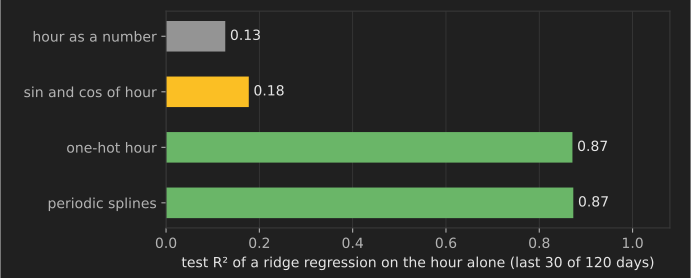
When it helps: smooth non-linear effects in linear and generalized linear models; periodic splines (extrapolation="periodic") also handle cyclical features such as hour of day.
Categorical encoding
26. One-hot encoding
Create one binary column per category.
import pandas as pd
from sklearn.preprocessing import OneHotEncoder

df = pd.DataFrame({"city": ["Paris", "Lyon", "Paris", "Nice"]})
enc = OneHotEncoder(sparse_output=False).fit(df)
print(enc.get_feature_names_out().tolist())
print(enc.transform(df))
['city_Lyon', 'city_Nice', 'city_Paris']
[[0. 0. 1.]
 [1. 0. 0.]
 [0. 0. 1.]
 [0. 1. 0.]]
When it helps: nominal categories with a modest number of values, for linear models and neural networks. It creates many columns for high-cardinality features.
27. Handle unknown and infrequent categories
Production data will contain categories never seen in training. Tell the encoder to ignore them, and group rare categories together so the model does not overfit to them.
import pandas as pd
from sklearn.preprocessing import OneHotEncoder

train = pd.DataFrame({"browser": ["chrome"] * 50 + ["firefox"] * 30 + ["opera"] * 2 + ["vivaldi"]})
enc = OneHotEncoder(handle_unknown="infrequent_if_exist", min_frequency=5, sparse_output=False).fit(train)
print(enc.get_feature_names_out().tolist())
print(enc.transform(pd.DataFrame({"browser": ["firefox", "brand_new_browser"]})))
['browser_chrome', 'browser_firefox', 'browser_infrequent_sklearn']
[[0. 1. 0.]
 [0. 0. 1.]]
When it helps: always, in production pipelines. An unseen category should not crash the service.
28. Ordinal encoding with an explicit order
Map ordered categories to integers in their natural order.
import pandas as pd
from sklearn.preprocessing import OrdinalEncoder

sizes = pd.DataFrame({"size": ["M", "S", "XL", "L"]})
enc = OrdinalEncoder(categories=[["S", "M", "L", "XL"]])
print(enc.fit_transform(sizes).ravel())
[1. 0. 3. 2.]
When it helps: genuinely ordered categories (sizes, education levels, ratings). For unordered categories, arbitrary integer codes impose a fake order on linear models, although tree models usually cope.
29. Count and frequency encoding
Replace each category with how often it appears in the training data.
import pandas as pd

train = pd.Series(["NY", "NY", "LA", "SF", "NY", "LA"])
freq = train.value_counts(normalize=True)
print(train.map(freq).round(2).tolist())
print("unseen category ->", pd.Series(["Boston"]).map(freq).fillna(0).tolist())
[0.5, 0.5, 0.33, 0.17, 0.5, 0.33]
unseen category -> [0.0]
When it helps: high-cardinality features where popularity itself is predictive, as with common versus rare merchants in fraud detection. Different categories with the same count become indistinguishable.
30. Target encoding with cross-fitting
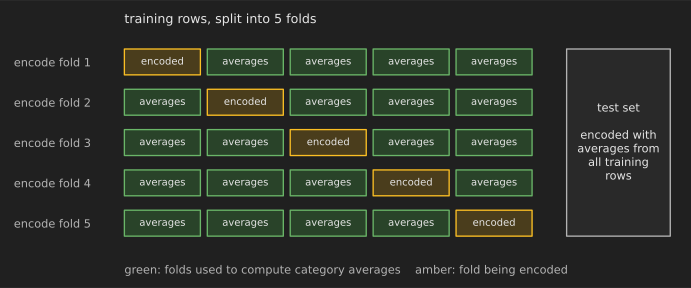
Replace each category with the average target value for that category, shrunk toward the global average for rare categories. To avoid leakage, each training row's encoding must be computed from other folds. scikit-learn's TargetEncoder does this cross-fitting automatically in fit_transform.
import numpy as np
from sklearn.linear_model import LogisticRegression
from sklearn.model_selection import cross_val_score, train_test_split
from sklearn.preprocessing import TargetEncoder

rng = np.random.default_rng(0)
X = rng.integers(0, 2000, size=(5000, 1))        # 2,000 IDs that carry no signal
y = rng.integers(0, 2, size=5000)                 # random labels
X_train, X_test, y_train, y_test = train_test_split(X, y, random_state=0)

enc = TargetEncoder(random_state=0)
naive = enc.fit(X_train, y_train).transform(X_train)          # wrong: each row sees its own label
cross_fitted = enc.fit_transform(X_train, y_train)            # right: out-of-fold encodings
for name, Z in [("naive", naive), ("cross-fitted", cross_fitted)]:
    model = LogisticRegression().fit(Z, y_train)
    print(f"{name:13s} train accuracy {model.score(Z, y_train):.3f} | test accuracy {model.score(enc.transform(X_test), y_test):.3f}")
naive         train accuracy 0.768 | test accuracy 0.495
cross-fitted  train accuracy 0.507 | test accuracy 0.497
The naive encoding makes pure noise look predictive on the training data; cross-fitting shows the truth.
When it helps: high-cardinality categories (ZIP codes, product IDs, merchants) for any model. See Micci-Barreca (2001) for the original smoothing scheme.
31. Weight of evidence
For binary targets, encode each category (or bin) as in that category. It is the standard encoding in credit scorecards, where it pairs with logistic regression.
import numpy as np
import pandas as pd

df = pd.DataFrame({"employment": ["salaried"] * 60 + ["self"] * 25 + ["none"] * 15,
                   "bad": [0] * 55 + [1] * 5 + [0] * 18 + [1] * 7 + [0] * 7 + [1] * 8})
counts = pd.crosstab(df["employment"], df["bad"]) + 0.5        # 0.5 avoids division by zero
woe = np.log((counts[1] / counts[1].sum()) / (counts[0] / counts[0].sum()))
print(woe.round(2).to_dict())
{'none': 1.46, 'salaried': -0.98, 'self': 0.43}
When it helps: interpretable credit-risk models. Like target encoding, compute it on training data only.
32. Feature hashing
Map categories (or words) to a fixed number of columns with a hash function, without storing a vocabulary (Weinberger et al., 2009).
from sklearn.feature_extraction import FeatureHasher

hasher = FeatureHasher(n_features=8, input_type="string")
X = hasher.transform([["user=42", "device=ios"], ["user=7", "device=android"]])
print(X.toarray())
[[ 0.  0. -1.  1.  0.  0.  0.  0.]
 [ 1. -1.  0.  0.  0.  0.  0.  0.]]
When it helps: very high-cardinality or streaming data, such as ad-click logs with billions of user–item combinations. Collisions mix unrelated categories, and features cannot be traced back to names.
33. Native categorical support in gradient boosting
Histogram gradient boosting can split on categories directly, grouping them into the best two subsets at each split, instead of using one-hot columns.
import numpy as np
import pandas as pd
from sklearn.ensemble import HistGradientBoostingRegressor

rng = np.random.default_rng(0)
df = pd.DataFrame({"store": pd.Categorical(rng.choice(list("ABCDEFGHIJ"), 2000)), "promo": rng.integers(0, 2, 2000)})
effects = dict(zip("ABCDEFGHIJ", rng.normal(0, 5, 10)))
y = df["store"].map(effects).astype(float) + 3 * df["promo"] + rng.normal(0, 1, 2000)
model = HistGradientBoostingRegressor(categorical_features="from_dtype", random_state=0).fit(df[:1500], y[:1500])
print("test R^2:", round(model.score(df[1500:], y[1500:]), 3))
test R^2: 0.969
When it helps: tabular data with many categorical columns, especially ones with dozens of levels.
34. Group rare categories
Merge categories that appear fewer than a minimum number of times into "other".
import pandas as pd

s = pd.Series(["visa"] * 40 + ["mastercard"] * 30 + ["amex"] * 3 + ["diners"] * 1)
counts = s.value_counts()
rare = counts[counts < 5].index
print(s.where(~s.isin(rare), "other").value_counts().to_dict())
{'visa': 40, 'mastercard': 30, 'other': 4}
When it helps: before one-hot or target encoding, so the model does not learn from a handful of rows. Technique 27 does this inside the encoder.
35. Learned category embeddings
In a neural network, give each category a learned dense vector instead of a one-hot column, so similar categories can end up with similar vectors (Guo and Berkhahn, 2016).
import torch

torch.manual_seed(0)
n_stores, dim = 1000, 8
embedding = torch.nn.Embedding(n_stores, dim)       # 1,000 stores -> 8 numbers each
store_ids = torch.tensor([3, 3, 512])
print(embedding(store_ids).shape, "| parameters:", sum(p.numel() for p in embedding.parameters()))
torch.Size([3, 8]) | parameters: 8000
When it helps: neural networks on high-cardinality categories (users, products, stores). The embeddings can also be reused as features in other models.
36. Cyclical encoding of ordered categories
Days of the week and months repeat: Sunday is next to Monday. Encode them as points on a circle (technique 45 explains the math).
import numpy as np
import pandas as pd

day = pd.Series([0, 1, 5, 6])                         # Monday=0 ... Sunday=6
angle = 2 * np.pi * day / 7
print(pd.DataFrame({"day": day, "sin": np.sin(angle).round(3), "cos": np.cos(angle).round(3)}))
   day    sin    cos
0    0  0.000  1.000
1    1  0.782  0.623
2    5 -0.975 -0.223
3    6 -0.782  0.623
When it helps: linear models and neural networks that should treat the end of a cycle as close to its start.
37. Crossed categorical features
Combine two categories into one ("city × device") so a linear model can learn effects that depend on both.
import pandas as pd

df = pd.DataFrame({"city": ["Paris", "Paris", "Lyon"], "device": ["ios", "android", "ios"]})
df["city_x_device"] = df["city"] + "_" + df["device"]
print(df["city_x_device"].tolist())
['Paris_ios', 'Paris_android', 'Lyon_ios']
When it helps: wide linear models for recommendation and advertising, where crosses capture specific combinations, as in Google's "Wide & Deep" model (Cheng et al., 2016). Hash them (technique 32) when there are many.
Interactions, ratios and aggregates
38. Polynomial features
Add squares and products of features so a linear model can fit curves and interactions.
import numpy as np
from sklearn.preprocessing import PolynomialFeatures

X = np.array([[2.0, 3.0]])
poly = PolynomialFeatures(degree=2, include_bias=False).fit(X)
print(poly.get_feature_names_out(["a", "b"]).tolist(), poly.transform(X))
['a', 'b', 'a^2', 'a b', 'b^2'] [[2. 3. 4. 6. 9.]]
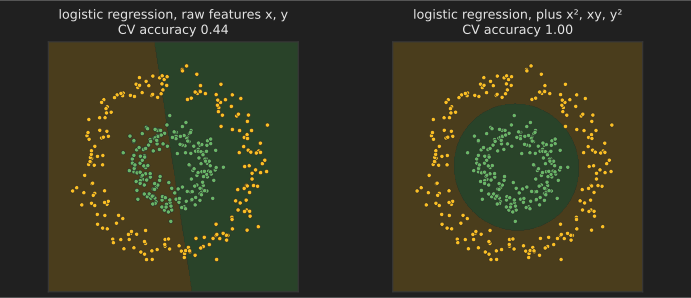
When it helps: linear models on low-dimensional data. The number of features grows quickly with degree and dimension.
39. Interaction-only features
Add products of pairs of features without squares.
import numpy as np
from sklearn.preprocessing import PolynomialFeatures

X = np.array([[1.0, 2.0, 3.0]])
inter = PolynomialFeatures(degree=2, interaction_only=True, include_bias=False).fit(X)
print(inter.get_feature_names_out(["price", "discount", "season"]).tolist())
['price', 'discount', 'season', 'price discount', 'price season', 'discount season']
When it helps: when you expect one feature's effect to depend on another (a discount works better in a particular season) but not curvature in each.
40. Ratios
Divide one quantity by another to create a rate or intensity.
import pandas as pd

df = pd.DataFrame({"debt": [10_000, 50_000, 5_000], "income": [40_000, 60_000, 10_000]})
df["debt_to_income"] = (df["debt"] / df["income"]).round(2)
print(df)
    debt  income  debt_to_income
0  10000   40000            0.25
1  50000   60000            0.83
2   5000   10000            0.50
When it helps: finance (debt-to-income), web analytics (conversions per visit), engineering (power-to-weight). Ratios often generalize better than either raw value, and tree models struggle to learn them from the parts. Guard against division by zero.
41. Differences
Subtract related quantities: price minus competitor price, today minus the user's average.
import pandas as pd

df = pd.DataFrame({"our_price": [9.99, 12.50, 7.00], "competitor_price": [10.49, 11.00, 7.00]})
df["price_gap"] = df["our_price"] - df["competitor_price"]
print(df["price_gap"].round(2).tolist())
[-0.5, 1.5, 0.0]
When it helps: whenever the relative value matters more than the absolute one.
42. Domain formulas
Encode known relationships directly, such as body-mass index, or the time a delivery driver needs at a given speed.
import pandas as pd

df = pd.DataFrame({"weight_kg": [70, 95], "height_m": [1.75, 1.80]})
df["bmi"] = (df["weight_kg"] / df["height_m"] ** 2).round(1)
print(df["bmi"].tolist())
[22.9, 29.3]
When it helps: almost always. Domain knowledge is the cheapest source of good features, and it makes models easier to explain.
43. Group-by aggregate features
Summarize each entity's history (a customer's average order, a merchant's fraud rate) and attach it to each row.
import pandas as pd

orders = pd.DataFrame({"customer": ["a", "a", "b", "b", "b"], "amount": [20, 40, 5, 10, 300]})
orders["customer_mean"] = orders.groupby("customer")["amount"].transform("mean")
orders["amount_vs_usual"] = (orders["amount"] / orders["customer_mean"]).round(2)
print(orders)
  customer  amount  customer_mean  amount_vs_usual
0        a      20           30.0             0.67
1        a      40           30.0             1.33
2        b       5          105.0             0.05
3        b      10          105.0             0.10
4        b     300          105.0             2.86
When it helps: transactional data. To avoid leakage, compute aggregates from training data only or from past events only (technique 95).
Dates and times
44. Extract calendar components
Split timestamps into year, month, day of week, hour and similar parts.
import pandas as pd

ts = pd.Series(pd.to_datetime(["2026-03-14 09:30", "2026-12-25 18:05"]))
print(pd.DataFrame({"month": ts.dt.month, "dayofweek": ts.dt.dayofweek, "hour": ts.dt.hour,
                    "is_weekend": ts.dt.dayofweek >= 5, "quarter": ts.dt.quarter}))
   month  dayofweek  hour  is_weekend  quarter
0      3          5     9        True        1
1     12          4    18       False        4
When it helps: any timestamp. Raw timestamps are almost never useful features on their own.
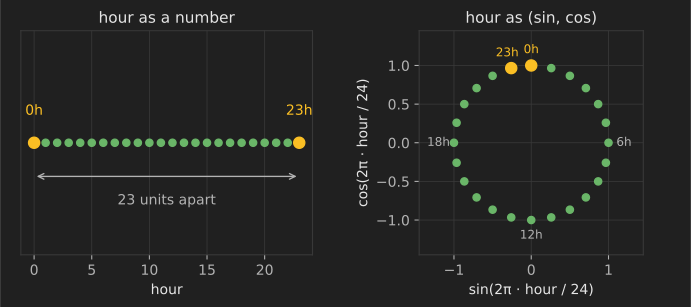
45. Cyclical sine and cosine encoding
Map a cyclical value with period to .
import numpy as np

hours = np.array([0, 6, 12, 23])
enc = np.c_[np.sin(2 * np.pi * hours / 24), np.cos(2 * np.pi * hours / 24)]
print("distance 23h to 0h, raw:", abs(23 - 0), "| encoded:", round(float(np.linalg.norm(enc[3] - enc[0])), 3))
distance 23h to 0h, raw: 23 | encoded: 0.261
When it helps: hour of day, day of week, month and wind direction, for linear models, k-NN and neural networks. Trees can use raw hours, but they need several splits to capture the wrap-around.
46. Time since an event (recency)
Measure how long ago something happened: days since last purchase, minutes since last login.
import pandas as pd

events = pd.DataFrame({"customer": ["a", "b"], "last_purchase": pd.to_datetime(["2026-09-01", "2026-10-15"])})
as_of = pd.Timestamp("2026-10-19")
events["days_since_purchase"] = (as_of - events["last_purchase"]).dt.days
print(events)
  customer last_purchase  days_since_purchase
0        a    2026-09-01                   48
1        b    2026-10-15                    4
When it helps: churn, fraud, maintenance and marketing models, where recency is often the strongest feature. Compute it relative to the prediction time, not the data-extraction time.
47. Holiday and special-event flags
Mark days with public holidays, promotions, paydays or local events.
import pandas as pd

holidays = pd.to_datetime(["2026-12-25", "2026-01-01"])
dates = pd.Series(pd.date_range("2026-12-23", periods=4))
print(pd.DataFrame({"date": dates.dt.date, "is_holiday": dates.isin(holidays),
                    "days_to_christmas": (pd.Timestamp("2026-12-25") - dates).dt.days}))
         date  is_holiday  days_to_christmas
0  2026-12-23       False                  2
1  2026-12-24       False                  1
2  2026-12-25        True                  0
3  2026-12-26       False                 -1
When it helps: retail, energy and transport forecasting. Libraries such as holidays provide country calendars; distance to the next holiday often matters as much as the day itself.
48. Lag features
Use past values of the target or of other series as features: yesterday's sales, last week's sales.
import pandas as pd

sales = pd.DataFrame({"sales": [10, 12, 15, 14, 18, 20]}, index=pd.date_range("2026-01-01", periods=6))
sales["lag_1"] = sales["sales"].shift(1)
sales["lag_7"] = sales["sales"].shift(7)              # all NaN here: not enough history yet
print(sales.head(4))
            sales  lag_1  lag_7
2026-01-01     10    NaN    NaN
2026-01-02     12   10.0    NaN
2026-01-03     15   12.0    NaN
2026-01-04     14   15.0    NaN
When it helps: forecasting with tree models and linear models. The lag must be available at prediction time: to forecast seven days ahead, you cannot use yesterday's value.
49. Rolling-window statistics
Compute moving averages, standard deviations, minimums and maximums over a past window.
import pandas as pd

s = pd.Series([10, 12, 15, 14, 18, 20, 19], index=pd.date_range("2026-01-01", periods=7))
features = pd.DataFrame({"value": s, "mean_3d": s.shift(1).rolling(3).mean(), "std_3d": s.shift(1).rolling(3).std().round(2)})
print(features)
            value    mean_3d  std_3d
2026-01-01     10        NaN     NaN
2026-01-02     12        NaN     NaN
2026-01-03     15        NaN     NaN
2026-01-04     14  12.333333    2.52
2026-01-05     18  13.666667    1.53
2026-01-06     20  15.666667    2.08
2026-01-07     19  17.333333    3.06
The shift(1) makes each row use only earlier days; without it, the window would include the value being predicted.
When it helps: smoothing noisy signals and capturing recent trends in forecasting, fraud and monitoring.
50. Expanding-window statistics
Compute statistics over all history up to each point, such as a customer's lifetime average so far.
import pandas as pd

df = pd.DataFrame({"customer": ["a", "a", "a", "b", "b"], "amount": [10, 30, 20, 100, 50]})
df["avg_before"] = df.groupby("customer")["amount"].transform(lambda s: s.shift(1).expanding().mean())
print(df)
  customer  amount  avg_before
0        a      10         NaN
1        a      30        10.0
2        a      20        20.0
3        b     100         NaN
4        b      50       100.0
When it helps: entity histories in fraud and personalization, without leaking the current row.
51. Differencing and percentage change
Use the change from the previous period instead of the level.
import pandas as pd

price = pd.Series([100.0, 102.0, 99.0, 105.0])
print("diff:", price.diff().tolist(), "| pct_change:", price.pct_change().round(4).tolist())
diff: [nan, 2.0, -3.0, 6.0] | pct_change: [nan, 0.02, -0.0294, 0.0606]
When it helps: trending series, where the level drifts but changes are stable, and financial data, where returns matter more than prices.
52. Exponentially weighted averages
Average the past with weights that decay over time, so recent values count most.
import pandas as pd

s = pd.Series([10, 10, 10, 30, 30])
print("simple mean:", s.expanding().mean().round(2).tolist())
print("EWM (span 2):", s.ewm(span=2, adjust=False).mean().round(2).tolist())
simple mean: [10.0, 10.0, 10.0, 15.0, 18.0]
EWM (span 2): [10.0, 10.0, 10.0, 23.33, 27.78]
When it helps: tracking recent behavior that changes over time; it needs no fixed window.
53. Fourier terms for seasonality
Add sine and cosine terms at several frequencies of a seasonal period to model smooth seasonal shapes, such as yearly patterns in daily data.
import numpy as np
import pandas as pd

t = np.arange(365)
fourier = pd.DataFrame({f"{fn}_{k}": f(2 * np.pi * k * t / 365.25)
                        for k in (1, 2, 3) for fn, f in (("sin", np.sin), ("cos", np.cos))})
print(fourier.shape, fourier.columns.tolist())
(365, 6) ['sin_1', 'cos_1', 'sin_2', 'cos_2', 'sin_3', 'cos_3']
When it helps: long seasonal periods, where one-hot encoding (365 days) would be too many features. Forecasting tools such as Prophet use this idea (Taylor and Letham, 2018).
54. Durations between timestamps
Subtract two timestamps in the same row: order to delivery, admission to discharge.
import pandas as pd

df = pd.DataFrame({"ordered": pd.to_datetime(["2026-10-01 10:00", "2026-10-02 16:30"]),
                   "shipped": pd.to_datetime(["2026-10-02 09:00", "2026-10-05 08:00"])})
df["hours_to_ship"] = (df["shipped"] - df["ordered"]).dt.total_seconds() / 3600
print(df["hours_to_ship"].tolist())
[23.0, 63.5]
When it helps: operations data. Only use durations that are known at prediction time; a duration that ends after the prediction moment is a leak.
Text features
55. Bag of words
Count how often each word appears in each document.
from sklearn.feature_extraction.text import CountVectorizer

docs = ["the cat sat", "the cat sat on the cat"]
vec = CountVectorizer()
print(vec.fit_transform(docs).toarray(), vec.get_feature_names_out().tolist())
[[1 0 1 1]
 [2 1 1 2]] ['cat', 'on', 'sat', 'the']
When it helps: a fast baseline for text classification with linear models or naive Bayes.
56. TF-IDF weighting
Weight each word count by how rare the word is across documents, so common words count less.
from sklearn.feature_extraction.text import TfidfVectorizer

docs = ["the refund was quick", "the delivery was late", "late delivery again", "quick refund"]
vec = TfidfVectorizer()
X = vec.fit_transform(docs)
row = dict(zip(vec.get_feature_names_out().tolist(), X.toarray()[1].round(2).tolist()))
print({w: v for w, v in row.items() if v > 0})
{'delivery': 0.5, 'late': 0.5, 'the': 0.5, 'was': 0.5}
When it helps: search, document similarity and text classification baselines, where TF-IDF with logistic regression is hard to beat on small data.
57. Word n-grams
Include sequences of two or three words, so "not good" is a feature and not just "not" and "good".
from sklearn.feature_extraction.text import CountVectorizer

vec = CountVectorizer(ngram_range=(1, 2))
vec.fit(["not good at all"])
print(vec.get_feature_names_out().tolist())
['all', 'at', 'at all', 'good', 'good at', 'not', 'not good']
When it helps: sentiment and intent classification, where word order and negation matter.
58. Character n-grams
Use sequences of characters, which capture spelling variants, typos, word pieces and languages.
from sklearn.feature_extraction.text import TfidfVectorizer

vec = TfidfVectorizer(analyzer="char_wb", ngram_range=(3, 3))
vec.fit(["colour", "color"])
print(sorted(vec.get_feature_names_out().tolist()))
[' co', 'col', 'lor', 'lou', 'olo', 'or ', 'our', 'ur ']
When it helps: short or noisy text (product titles, usernames, search queries), language identification and misspellings.
59. Text statistics
Add simple counts: length, number of words, share of capital letters, number of exclamation marks, number of links.
import pandas as pd

texts = pd.Series(["WIN A FREE PRIZE NOW!!!", "Lunch at noon?"])
print(pd.DataFrame({"chars": texts.str.len(), "words": texts.str.split().str.len(),
                    "upper_share": texts.apply(lambda t: sum(c.isupper() for c in t) / len(t)).round(2),
                    "exclamations": texts.str.count("!")}))
   chars  words  upper_share  exclamations
0     23      5         0.70             3
1     14      3         0.07             0
When it helps: spam, abuse and quality models, where style signals complement the words themselves.
60. Hashing vectorizer
Turn text into a fixed-size sparse vector with a hash function, with no vocabulary to store.
from sklearn.feature_extraction.text import HashingVectorizer

vec = HashingVectorizer(n_features=2 ** 10, alternate_sign=False)
X = vec.transform(["streaming text needs no vocabulary", "new words just hash somewhere"])
print(X.shape, "| non-zero entries per row:", X.getnnz(axis=1))
(2, 1024) | non-zero entries per row: [5 5]
When it helps: streaming or very large corpora, and online learning with partial_fit.
61. Latent semantic analysis features
Reduce a TF-IDF matrix to a few dense dimensions with truncated SVD, so related words share dimensions.
from sklearn.decomposition import TruncatedSVD
from sklearn.feature_extraction.text import TfidfVectorizer
from sklearn.pipeline import make_pipeline

docs = ["cheap flights to paris", "cheap airline tickets", "airline tickets to paris",
        "easy pasta recipe", "pasta recipe with tomato", "easy tomato soup recipe"]
lsa = make_pipeline(TfidfVectorizer(), TruncatedSVD(n_components=2, random_state=0))
print(lsa.fit_transform(docs).round(2))
[[ 0.    0.71]
 [ 0.    0.79]
 [-0.    0.88]
 [ 0.84 -0.  ]
 [ 0.79 -0.  ]
 [ 0.79 -0.  ]]
When it helps: dense, compact text features for models that do not handle sparse input well, and for clustering documents.
62. Pretrained sentence embeddings
Encode each text with a pretrained language model into a dense vector that captures meaning, then use the vector as features.
# requires: pip install sentence-transformers (not run for this article; downloads a model)
from sentence_transformers import SentenceTransformer

model = SentenceTransformer("all-MiniLM-L6-v2")
vectors = model.encode(["The parcel arrived broken", "My order was damaged"])
print(vectors.shape)   # two 384-dimensional vectors that are close together
When it helps: semantic similarity, clustering and classification with few labels, where bag-of-words misses synonyms. Embeddings from the Sentence Transformers library are a common starting point.
63. Keyword and pattern flags
Add binary features for domain-specific patterns found with regular expressions: a price, an order number, a URL, an account-closure phrase.
import pandas as pd

msgs = pd.Series(["Please cancel my account", "Order #12345 is late", "see https://example.com"])
print(pd.DataFrame({"mentions_cancel": msgs.str.contains(r"\bcancel", case=False),
                    "has_order_id": msgs.str.contains(r"#\d{5}"),
                    "has_url": msgs.str.contains(r"https?://")}))
   mentions_cancel  has_order_id  has_url
0             True         False    False
1            False          True    False
2            False         False     True
When it helps: support-ticket routing, compliance checks and spam filtering, where a few known patterns carry most of the signal.
64. Text normalization
Lowercase, strip accents and standardize whitespace and numbers before vectorizing, so variants of the same word count together.
from sklearn.feature_extraction.text import CountVectorizer

vec = CountVectorizer(strip_accents="unicode", lowercase=True)
vec.fit(["Café", "cafe", "CAFÉ"])
print(vec.get_feature_names_out().tolist())
['cafe']
When it helps: user-generated text with inconsistent spelling. Do less normalization for pretrained transformers, which have their own tokenizers.
Images, audio and sensor signals
65. Pixel normalization
Scale pixel values to 0–1, or standardize each channel with its training-set mean and standard deviation.
import numpy as np

rng = np.random.default_rng(0)
images = rng.integers(0, 256, size=(100, 32, 32, 3)).astype(np.float32)
mean, std = images.mean(axis=(0, 1, 2)), images.std(axis=(0, 1, 2))   # one value per color channel
normalized = (images - mean) / std
print("per-channel mean after:", normalized.mean(axis=(0, 1, 2)).round(3))
per-channel mean after: [ 0. 0. -0.]
When it helps: any neural network on images. When fine-tuning a pretrained model, use the normalization that model was trained with.
66. Gradient-orientation histograms
Summarize an image by how often edges point in each direction, the idea behind HOG features (Dalal and Triggs, 2005). The snippet computes a simple whole-image version with NumPy; skimage.feature.hog computes the full method.
import numpy as np
from sklearn.datasets import load_digits

digit = load_digits().images[0]                              # an 8 x 8 image of a zero
gy, gx = np.gradient(digit)
magnitude, angle = np.hypot(gx, gy), np.rad2deg(np.arctan2(gy, gx)) % 180
hist, _ = np.histogram(angle, bins=6, range=(0, 180), weights=magnitude)
print("edge strength by orientation (0-180 degrees in 6 bins):", (hist / hist.sum()).round(2))
edge strength by orientation (0-180 degrees in 6 bins): [0.37 0.2 0.09 0.11 0.1 0.13]
When it helps: classical image classifiers (SVMs, boosting) on small datasets, and fast object detection on limited hardware.
67. Color histograms
Count how many pixels fall into each color range.
import numpy as np

rng = np.random.default_rng(0)
image = rng.integers(0, 256, size=(64, 64, 3))
image[:, :32, 1] = 220                                        # left half is strongly green
features = np.concatenate([np.histogram(image[..., c], bins=4, range=(0, 256))[0] for c in range(3)])
print("4-bin histograms for R, G, B:", features)
4-bin histograms for R, G, B: [1056 997 1024 1019 539 472 501 2584 1030 994 1050 1022]
When it helps: image retrieval, product-color classification and quality checks, where color matters and shape does not.
68. Pretrained CNN embeddings
Pass images through a pretrained network and use the activations before its final layer as features for a simple model.
# not run for this article: downloads pretrained weights (about 45 MB)
import torch
from torchvision.models import ResNet18_Weights, resnet18

weights = ResNet18_Weights.DEFAULT
model = resnet18(weights=weights).eval()
model.fc = torch.nn.Identity()                     # drop the classifier, keep 512 features
with torch.no_grad():
    features = model(weights.transforms()(torch.rand(3, 300, 300)).unsqueeze(0))
print(features.shape)                              # torch.Size([1, 512])
When it helps: small image datasets, where a linear model or boosting on pretrained features often beats training a network from scratch.
69. Frequency-domain features (FFT)
Transform a signal into its frequency content with the fast Fourier transform and use the dominant frequencies and their energy as features.
import numpy as np

fs = 1000                                                   # samples per second
t = np.arange(0, 1, 1 / fs)
vibration = np.sin(2 * np.pi * 50 * t) + 0.5 * np.sin(2 * np.pi * 120 * t)
spectrum = np.abs(np.fft.rfft(vibration))
freqs = np.fft.rfftfreq(len(t), 1 / fs)
print("dominant frequencies (Hz):", sorted(freqs[np.argsort(spectrum)[-2:]].tolist()))
dominant frequencies (Hz): [50.0, 120.0]
When it helps: vibration-based fault detection, audio and EEG, where problems appear as energy at specific frequencies.
70. Window statistics for sensor signals
Cut a signal into windows and summarize each with mean, standard deviation, range, peak count and similar statistics.
import numpy as np
import pandas as pd

rng = np.random.default_rng(0)
signal = np.r_[rng.normal(0, 0.1, 200), rng.normal(0, 1.0, 200)]     # calm, then shaking
windows = signal.reshape(-1, 100)
print(pd.DataFrame({"mean": windows.mean(1).round(2), "std": windows.std(1).round(2),
                    "range": np.ptp(windows, axis=1).round(2)}))
   mean   std  range
0  0.01  0.10   0.43
1 -0.01  0.10   0.42
2 -0.14  1.12   6.17
3 -0.04  0.92   5.80
When it helps: activity recognition from wearables and predictive maintenance. Keep windows from the same recording session out of both training and test sets.
Geospatial features
71. Haversine distance
Compute the great-circle distance between two latitude–longitude points on Earth.
import numpy as np

def haversine_km(lat1, lon1, lat2, lon2):
    lat1, lon1, lat2, lon2 = map(np.radians, (lat1, lon1, lat2, lon2))
    a = np.sin((lat2 - lat1) / 2) ** 2 + np.cos(lat1) * np.cos(lat2) * np.sin((lon2 - lon1) / 2) ** 2
    return 2 * 6371 * np.arcsin(np.sqrt(a))

print(f"Paris to London: {haversine_km(48.8566, 2.3522, 51.5074, -0.1278):.0f} km")
Paris to London: 344 km
When it helps: delivery times, taxi fares and travel demand. Straight-line distance is a strong feature even though roads are longer.
72. Distance to points of interest
Measure how far each location is from something that matters: the city center, the coast, the nearest store or station.
import numpy as np
from sklearn.neighbors import BallTree

stations = np.radians([[48.8443, 2.3744], [48.8809, 2.3553]])      # two Paris railway stations
homes = np.radians([[48.85, 2.35], [48.87, 2.36]])
dist, idx = BallTree(stations, metric="haversine").query(homes, k=1)
print("km to nearest station:", (dist.ravel() * 6371).round(2), "| station index:", idx.ravel())
km to nearest station: [1.89 1.26] | station index: [0 1]
When it helps: real estate, retail site selection and logistics.
73. Bearing and direction
Compute the compass direction of travel between two points.
import numpy as np

def bearing_deg(lat1, lon1, lat2, lon2):
    lat1, lon1, lat2, lon2 = map(np.radians, (lat1, lon1, lat2, lon2))
    x = np.sin(lon2 - lon1) * np.cos(lat2)
    y = np.cos(lat1) * np.sin(lat2) - np.sin(lat1) * np.cos(lat2) * np.cos(lon2 - lon1)
    return (np.degrees(np.arctan2(x, y)) + 360) % 360

print(f"Paris to London bearing: {bearing_deg(48.8566, 2.3522, 51.5074, -0.1278):.0f} degrees")
Paris to London bearing: 330 degrees
When it helps: traffic and travel-time models where direction matters, for example commuter flows into a city in the morning. Encode the angle cyclically (technique 45).
74. Spatial grid cells
Snap coordinates to a grid (or to geohash or H3 cells) and use the cell as a categorical feature or as a key for aggregates.
import numpy as np
import pandas as pd

pts = pd.DataFrame({"lat": [40.7128, 40.7130, 40.7580], "lon": [-74.0060, -74.0055, -73.9855]})
cell = 0.01                                                     # about 1 km in latitude
pts["cell"] = (np.floor(pts["lat"] / cell).astype(int).astype(str) + "_" +
               np.floor(pts["lon"] / cell).astype(int).astype(str))
print(pts)
       lat      lon        cell
0  40.7128 -74.0060  4071_-7401
1  40.7130 -74.0055  4071_-7401
2  40.7580 -73.9855  4075_-7399
When it helps: turning raw coordinates into neighborhoods that models can learn effects for, and computing local statistics.
75. Rotated coordinates
Add latitude and longitude rotated by several angles, so tree models can make diagonal splits more easily.
import numpy as np

lat, lon = np.array([40.71, 40.76]), np.array([-74.00, -73.98])
for angle in (15, 30, 45):
    a = np.radians(angle)
    print(angle, "->", (lon * np.cos(a) - lat * np.sin(a)).round(3))
15 -> [-82.015 -82.009]
30 -> [-84.441 -84.449]
45 -> [-81.112 -81.133]
When it helps: tree ensembles on location data whose structure runs diagonally, such as Manhattan's street grid; some top solutions in Kaggle taxi-trip competitions reported using such features.
76. Neighborhood aggregates
Summarize the surroundings of each location: the average price of the 10 nearest sold homes, the number of shops within 500 meters.
import numpy as np
from sklearn.neighbors import NearestNeighbors

rng = np.random.default_rng(0)
coords = rng.uniform(0, 10, size=(500, 2))
price = 100 + 20 * coords[:, 0] + rng.normal(0, 10, 500)            # prices rise to the east
nn = NearestNeighbors(n_neighbors=11).fit(coords)
_, idx = nn.kneighbors(coords)
neighbor_mean = price[idx[:, 1:]].mean(axis=1)                       # exclude the home itself
print("correlation of neighbor average with own price:", round(np.corrcoef(neighbor_mean, price)[0, 1], 3))
correlation of neighbor average with own price: 0.981
When it helps: real estate and local demand. Use only training rows (and only past sales) as neighbors, and never include the row's own target.
Feature selection
Removing useless features can improve accuracy, speed up training and make models easier to explain. Feature selection must happen inside cross-validation; selecting features on the full dataset first is a classic leak (see project 8 in 101 machine learning projects).
77. Remove constant and near-constant features
Drop features whose variance is below a threshold.
import numpy as np
from sklearn.feature_selection import VarianceThreshold

X = np.array([[0, 1, 5.0], [0, 1, 3.0], [0, 1, 8.0], [0, 0, 1.0]])
sel = VarianceThreshold(threshold=0.2).fit(X)
print("kept columns:", sel.get_support(indices=True), "| variances:", sel.variances_.round(3))
kept columns: [2] | variances: [0. 0.188 6.688]
When it helps: wide datasets with many unused flags or one-hot columns of rare categories.
78. Remove highly correlated duplicates
Drop one of each pair of features whose correlation exceeds a threshold.
import numpy as np
import pandas as pd

rng = np.random.default_rng(0)
a = rng.normal(size=200)
df = pd.DataFrame({"a": a, "a_copy": a * 2 + rng.normal(0, 0.01, 200), "b": rng.normal(size=200)})
corr = df.corr().abs()
upper = corr.where(np.triu(np.ones(corr.shape, dtype=bool), k=1))
print("drop:", [c for c in upper.columns if (upper[c] > 0.95).any()])
drop: ['a_copy']
When it helps: linear models with unstable coefficients, and to simplify explanations. Trees tolerate correlated features but split importance between them.
79. Univariate statistical tests
Keep the features with the strongest individual relationship to the target, measured by an F-test or chi-squared test.
from sklearn.datasets import load_breast_cancer
from sklearn.feature_selection import SelectKBest, f_classif

data = load_breast_cancer()
sel = SelectKBest(f_classif, k=3).fit(data.data, data.target)
print([str(n) for n in data.feature_names[sel.get_support()]])
['mean concave points', 'worst perimeter', 'worst concave points']
When it helps: a quick first filter on very wide data. It ignores interactions and redundancy between features.
80. Mutual information
Rank features by mutual information with the target, which also detects non-linear relationships.
import numpy as np
from sklearn.feature_selection import f_regression, mutual_info_regression

rng = np.random.default_rng(0)
X = rng.uniform(-3, 3, size=(1000, 3))
y = X[:, 0] ** 2 + rng.normal(0, 0.1, 1000)        # depends on feature 0, but not linearly
print("F-test scores:     ", f_regression(X, y)[0].round(1))
print("mutual information:", mutual_info_regression(X, y, random_state=0).round(3))
F-test scores:      [0.5 0.  0. ]
mutual information: [2.889 0.    0.   ]
When it helps: screening features when relationships may be curved, as here, where the F-test misses the U-shaped effect.
81. L1-based selection
Fit a lasso or L1-penalized logistic regression and keep the features with non-zero coefficients.
from sklearn.datasets import load_breast_cancer
from sklearn.feature_selection import SelectFromModel
from sklearn.linear_model import LogisticRegression
from sklearn.pipeline import make_pipeline
from sklearn.preprocessing import StandardScaler

X, y = load_breast_cancer(return_X_y=True)
pipe = make_pipeline(StandardScaler(), SelectFromModel(LogisticRegression(penalty="l1", C=0.05, solver="liblinear")))
print("features kept:", pipe.fit(X, y)[-1].get_support().sum(), "of", X.shape[1])
features kept: 7 of 30
When it helps: wide data where you want a sparse, explainable model.
82. Recursive feature elimination
Repeatedly fit a model, drop the least important features, and refit, choosing the number to keep by cross-validation with RFECV.
from sklearn.datasets import make_classification
from sklearn.feature_selection import RFECV
from sklearn.linear_model import LogisticRegression

X, y = make_classification(n_samples=500, n_features=20, n_informative=4, n_redundant=0, random_state=0)
rfe = RFECV(LogisticRegression(max_iter=1000), cv=5).fit(X, y)
print("features selected:", rfe.n_features_, "| indices:", rfe.get_support(indices=True))
features selected: 5 | indices: [ 3 4 6 11 19]
When it helps: medium-sized feature sets where you can afford many refits.
83. Sequential feature selection
Add (or remove) one feature at a time, keeping the change that most improves cross-validated performance.
import numpy as np
from sklearn.datasets import load_diabetes
from sklearn.feature_selection import SequentialFeatureSelector
from sklearn.linear_model import LinearRegression

data = load_diabetes()
sfs = SequentialFeatureSelector(LinearRegression(), n_features_to_select=3, direction="forward", cv=5)
names = np.array(data.feature_names)
print(names[sfs.fit(data.data, data.target).get_support()].tolist())
['bmi', 'bp', 's5']
When it helps: small feature sets with any model; it is expensive but model-agnostic.
84. Permutation importance
Shuffle one feature at a time on validation data and measure how much the score drops (Breiman, 2001; scikit-learn guide).
import numpy as np
from sklearn.ensemble import RandomForestRegressor
from sklearn.inspection import permutation_importance
from sklearn.model_selection import train_test_split

rng = np.random.default_rng(0)
X = rng.normal(size=(1000, 3))
y = 3 * X[:, 0] + X[:, 1] + rng.normal(0, 0.5, 1000)       # feature 2 is noise
X_tr, X_val, y_tr, y_val = train_test_split(X, y, random_state=0)
model = RandomForestRegressor(random_state=0).fit(X_tr, y_tr)
result = permutation_importance(model, X_val, y_val, n_repeats=10, random_state=0)
print("importance (drop in R^2):", result.importances_mean.round(3))
importance (drop in R^2): [1.833 0.169 0. ]
When it helps: checking which features a trained model relies on. Correlated features share importance, so a feature can look unimportant when a near-copy exists.
85. Shadow-feature selection (Boruta-style)
Add shuffled copies ("shadows") of every feature, fit a model, and keep only real features more important than the best shadow (Kursa and Rudnicki, 2010).
import numpy as np
from sklearn.ensemble import RandomForestClassifier
from sklearn.datasets import make_classification

X, y = make_classification(n_samples=1000, n_features=10, n_informative=3, n_redundant=0, shuffle=False, random_state=0)
rng = np.random.default_rng(0)
shadows = rng.permuted(X, axis=0)                              # break any link to the target
forest = RandomForestClassifier(n_estimators=300, random_state=0).fit(np.hstack([X, shadows]), y)
imp = forest.feature_importances_
print("real features beating every shadow:", np.where(imp[:10] > imp[10:].max())[0], "(informative: 0, 1, 2)")
real features beating every shadow: [0 1 2] (informative: 0, 1, 2)
When it helps: an "all-relevant" selection that separates real signal from noise, rather than the smallest predictive set. The boruta package repeats this many times with statistical tests.
86. Stability selection
Run a selection method on many random subsamples and keep the features chosen most often (Meinshausen and Bühlmann, 2010).
import numpy as np
from sklearn.datasets import make_regression
from sklearn.linear_model import Lasso

X, y = make_regression(n_samples=200, n_features=15, n_informative=4, noise=20, random_state=0)
rng = np.random.default_rng(0)
counts = np.zeros(15)
for _ in range(100):
    rows = rng.choice(200, 100, replace=False)
    counts += Lasso(alpha=5.0).fit(X[rows], y[rows]).coef_ != 0
print("selection frequency:", (counts / 100).round(2))
selection frequency: [0.04 0.01 1.   0.   0.   0.   0.   0.19 1.   1.   0.01 0.   1.   0.
 0.02]
When it helps: when you need a reliable list of important features, for example in biomarker discovery, rather than one model's arbitrary picks among correlated features.
Dimensionality reduction and learned features
87. PCA components as features
Replace many correlated features with a few principal components.
from sklearn.datasets import load_digits
from sklearn.decomposition import PCA
from sklearn.linear_model import LogisticRegression
from sklearn.model_selection import cross_val_score
from sklearn.pipeline import make_pipeline
from sklearn.preprocessing import StandardScaler

X, y = load_digits(return_X_y=True)
for k in (5, 20, 40):
    pipe = make_pipeline(StandardScaler(), PCA(n_components=k), LogisticRegression(max_iter=2000))
    print(f"{k} components: accuracy {cross_val_score(pipe, X, y, cv=5).mean():.3f}")
5 components: accuracy 0.771
20 components: accuracy 0.899
40 components: accuracy 0.914
When it helps: many correlated numeric features, noisy sensors, or when a model trains too slowly. Components are harder to explain than original features.
88. Distances to cluster centers
Fit k-means and use each point's distances to the cluster centers (or its cluster label) as features.
import numpy as np
from sklearn.cluster import KMeans
from sklearn.datasets import make_moons
from sklearn.linear_model import LogisticRegression
from sklearn.model_selection import cross_val_score
from sklearn.pipeline import make_pipeline

X, y = make_moons(n_samples=500, noise=0.2, random_state=0)
plain = cross_val_score(LogisticRegression(), X, y, cv=5).mean()
clustered = cross_val_score(make_pipeline(KMeans(n_clusters=12, n_init=10, random_state=0), LogisticRegression(max_iter=1000)), X, y, cv=5).mean()
print(f"logistic regression: raw features {plain:.3f} | distances to 12 centers {clustered:.3f}")
logistic regression: raw features 0.868 | distances to 12 centers 0.934
When it helps: giving linear models a non-linear view of the data, and segment membership for customers.
89. Matrix-factorization (topic) features
Factor a user–item or document–word matrix and use the factors as features for each user or document.
import numpy as np
from sklearn.decomposition import NMF

rng = np.random.default_rng(0)
purchases = rng.poisson(0.5, size=(6, 8)).astype(float)       # 6 customers x 8 product types
purchases[:3, :4] += 5                                        # customers 0-2 buy mostly products 0-3
purchases[3:, 4:] += 5                                        # customers 3-5 buy mostly products 4-7
customer_factors = NMF(n_components=2, random_state=0, max_iter=1000).fit_transform(purchases)
print(customer_factors.round(2))
[[0.09 1.66]
 [0.09 1.52]
 [0.   1.59]
 [0.85 0.  ]
 [0.71 0.  ]
 [0.78 0.04]]
When it helps: summarizing sparse behavior (what a customer buys, what a document discusses) in a few numbers for downstream models.
90. Tree-leaf embeddings
Fit an ensemble of trees and encode each row by which leaf it lands in for each tree, one-hot encoded, then train a linear model on top. Facebook described this approach for ad click prediction (He et al., 2014).
from sklearn.datasets import make_classification
from sklearn.ensemble import RandomTreesEmbedding
from sklearn.linear_model import LogisticRegression
from sklearn.model_selection import cross_val_score
from sklearn.pipeline import make_pipeline

X, y = make_classification(n_samples=2000, n_features=10, n_informative=5, random_state=0)
plain = cross_val_score(LogisticRegression(max_iter=1000), X, y, cv=5).mean()
leaves = cross_val_score(make_pipeline(RandomTreesEmbedding(n_estimators=100, max_depth=4, random_state=0),
                                       LogisticRegression(max_iter=1000)), X, y, cv=5).mean()
print(f"logistic regression: raw {plain:.3f} | on tree-leaf features {leaves:.3f}")
logistic regression: raw 0.840 | on tree-leaf features 0.892
When it helps: combining the non-linearity of trees with the speed and online updating of linear models. Supervised versions fit gradient-boosted trees first.
91. Kernel approximation features
Map features through random Fourier features or the Nyström method so a linear model approximates a kernel SVM at a fraction of the cost.
from sklearn.datasets import make_circles
from sklearn.kernel_approximation import RBFSampler
from sklearn.linear_model import LogisticRegression
from sklearn.model_selection import cross_val_score
from sklearn.pipeline import make_pipeline

X, y = make_circles(n_samples=1000, factor=0.4, noise=0.1, random_state=0)
print("raw:", round(cross_val_score(LogisticRegression(), X, y, cv=5).mean(), 3),
      "| random Fourier features:", round(cross_val_score(make_pipeline(RBFSampler(gamma=1.0, n_components=300, random_state=0),
                                                                        LogisticRegression(max_iter=1000)), X, y, cv=5).mean(), 3))
raw: 0.488 | random Fourier features: 0.999
When it helps: large datasets where an exact kernel method is too slow (Rahimi and Recht, 2007).
92. Out-of-fold model predictions as features
Train a model on one feature group (say, text) and feed its out-of-fold predictions as a single feature into a second model with the other features.
import numpy as np
from sklearn.ensemble import HistGradientBoostingClassifier
from sklearn.feature_extraction.text import TfidfVectorizer
from sklearn.linear_model import LogisticRegression
from sklearn.model_selection import cross_val_predict
from sklearn.pipeline import make_pipeline

rng = np.random.default_rng(0)
n = 600
complaint = rng.integers(0, 2, n)
texts = np.where(complaint, "item broken refund please", "great product thanks")
amount = rng.uniform(5, 500, n)
churn = ((complaint == 1) & (amount > 100)).astype(int)
flip = rng.random(n) < 0.1
churn[flip] = 1 - churn[flip]                       # 10% label noise, as in real data
text_model = make_pipeline(TfidfVectorizer(), LogisticRegression())
text_score = cross_val_predict(text_model, texts, churn, cv=5, method="predict_proba")[:, 1]   # out of fold
X = np.c_[text_score, amount]
print("second-stage accuracy:", round(HistGradientBoostingClassifier(random_state=0).fit(X[:450], churn[:450]).score(X[450:], churn[450:]), 3))
second-stage accuracy: 0.847
When it helps: mixing data types (text, images, tables) in one model. The out-of-fold step is essential; in-sample predictions leak.
93. Anomaly scores as features
Add an unsupervised anomaly score (from isolation forest or a density model) as a feature for a supervised model.
import numpy as np
from sklearn.ensemble import IsolationForest

rng = np.random.default_rng(0)
X = np.vstack([rng.normal(0, 1, size=(990, 4)), rng.normal(4, 1, size=(10, 4))])
iso = IsolationForest(random_state=0).fit(X)
score = -iso.score_samples(X)                               # higher = more unusual
print("mean score, normal rows:", score[:990].mean().round(3), "| unusual rows:", score[990:].mean().round(3))
mean score, normal rows: 0.435 | unusual rows: 0.742
When it helps: fraud and fault detection, where "unusual compared with everything else" is informative even when labeled examples of the specific anomaly are scarce.
Relational data, leakage and feature management
94. Aggregate child tables into parent features
Real data lives in several tables. Summarize the "many" side (transactions) for each row of the "one" side (customers) with counts, sums, means and distinct counts, which is what tools such as Featuretools automate as "deep feature synthesis" (Kanter and Veeramachaneni, 2015).
import pandas as pd

tx = pd.DataFrame({"customer": ["a", "a", "b", "b", "b"], "amount": [20, 35, 5, 7, 400],
                   "merchant": ["m1", "m2", "m1", "m1", "m3"]})
features = tx.groupby("customer").agg(n_tx=("amount", "size"), total=("amount", "sum"),
                                      max_tx=("amount", "max"), n_merchants=("merchant", "nunique"))
print(features)
          n_tx  total  max_tx  n_merchants
customer
a            2     55      35            2
b            3    412     400            2
When it helps: customer, account and device models built on transaction or event tables.
95. Point-in-time correct joins
When joining features computed at different times, use only values that existed before the prediction time. pandas.merge_asof matches each event with the latest earlier feature value.
import pandas as pd

predictions = pd.DataFrame({"time": pd.to_datetime(["2026-10-01", "2026-10-10"]), "customer": ["a", "a"]})
balances = pd.DataFrame({"time": pd.to_datetime(["2026-09-28", "2026-10-05", "2026-10-12"]),
                         "customer": ["a", "a", "a"], "balance": [100, 250, 900]})
print(pd.merge_asof(predictions, balances, on="time", by="customer", direction="backward"))
        time customer  balance
0 2026-10-01        a      100
1 2026-10-10        a      250
The prediction on October 10 sees the balance from October 5, not the October 12 value that was not yet known.
When it helps: every model trained on historical snapshots. Getting this wrong is one of the most common sources of leakage in production models.
96. Remove features that leak the target
Drop any feature that is caused by the outcome or recorded after it: a "cancellation reason" when predicting cancellation, a "treatment given" when predicting diagnosis.
import numpy as np
import pandas as pd
from sklearn.ensemble import RandomForestClassifier
from sklearn.model_selection import cross_val_score

rng = np.random.default_rng(0)
df = pd.DataFrame({"tenure": rng.integers(1, 60, 1000), "support_calls": rng.poisson(2, 1000)})
churned = (rng.random(1000) < 0.2 + 0.05 * df["support_calls"].clip(0, 5)).astype(int)
df["refund_issued"] = churned & (rng.random(1000) < 0.9)      # recorded after the customer left
for cols in (["tenure", "support_calls", "refund_issued"], ["tenure", "support_calls"]):
    score = cross_val_score(RandomForestClassifier(random_state=0), df[cols], churned, cv=5, scoring="roc_auc").mean()
    print(f"{len(cols)} features: ROC AUC {score:.3f}")
3 features: ROC AUC 0.955
2 features: ROC AUC 0.547
A suspiciously high score is the usual symptom. For each top feature, ask: "Would I know this value at the moment I need the prediction?" The survey by Kapoor and Narayanan (2023) found leakage affecting hundreds of published papers.
97. Check feature drift with the population stability index
Compare each feature's distribution in recent data with its training distribution. The population stability index (PSI) is a common summary in credit modeling.
import numpy as np

def psi(expected, actual, bins=10):
    edges = np.quantile(expected, np.linspace(0, 1, bins + 1))
    e = np.histogram(np.clip(expected, edges[0], edges[-1]), edges)[0] / len(expected)
    a = np.histogram(np.clip(actual, edges[0], edges[-1]), edges)[0] / len(actual)
    e, a = np.clip(e, 1e-6, None), np.clip(a, 1e-6, None)
    return np.sum((a - e) * np.log(a / e))

rng = np.random.default_rng(0)
train = rng.normal(50, 10, 10_000)
print("same distribution:", round(psi(train, rng.normal(50, 10, 5_000)), 3),
      "| shifted:", round(psi(train, rng.normal(56, 12, 5_000)), 3))
same distribution: 0.002 | shifted: 0.293
A common rule of thumb treats PSI below 0.1 as stable and above 0.25 as a significant shift; these thresholds are conventions, not statistical tests.
When it helps: monitoring models in production and deciding when to retrain or revisit features.
98. One feature definition for training and serving
Define each feature once, in code shared by the training pipeline and the prediction service, so they cannot diverge ("training–serving skew").
import pandas as pd

def add_features(df: pd.DataFrame) -> pd.DataFrame:
    """The single source of truth for features, used in training and in the API."""
    out = df.copy()
    out["debt_to_income"] = out["debt"] / out["income"].where(out["income"] > 0)
    out["is_new_customer"] = out["tenure_months"] < 6
    return out

training_rows = pd.DataFrame({"debt": [5000], "income": [40000], "tenure_months": [3]})
api_request = {"debt": 5000, "income": 40000, "tenure_months": 3}
print(add_features(training_rows).equals(add_features(pd.DataFrame([api_request]))))
True
When it helps: every deployed model. Google's "Rules of Machine Learning" lists training–serving skew among the most common production problems (Zinkevich); feature stores exist largely to solve it.
99. Measure each feature group with an ablation
Remove one group of features at a time and measure the change in validation score, so you keep only features that earn their cost.
import numpy as np
from sklearn.datasets import load_diabetes
from sklearn.ensemble import HistGradientBoostingRegressor
from sklearn.model_selection import cross_val_score

data = load_diabetes()
groups = {"demographics": [0, 1], "body": [2, 3], "blood serum": [4, 5, 6, 7, 8, 9]}
full = cross_val_score(HistGradientBoostingRegressor(max_iter=100, random_state=0), data.data, data.target, cv=5).mean()
print(f"all features: R^2 {full:.3f}")
for name, cols in groups.items():
    keep = [i for i in range(10) if i not in cols]
    score = cross_val_score(HistGradientBoostingRegressor(max_iter=100, random_state=0), data.data[:, keep], data.target, cv=5).mean()
    print(f"without {name:12s}: R^2 {score:.3f} (change {score - full:+.3f})")
all features: R^2 0.375
without demographics: R^2 0.329 (change -0.046)
without body        : R^2 0.162 (change -0.214)
without blood serum : R^2 0.290 (change -0.085)
When it helps: deciding which data sources are worth paying for, collecting or maintaining. Report the variation across folds before trusting small changes.
100. Keep a feature dictionary
Document every feature: its definition, source, unit, when it is known, how missing values are handled, and who owns it.
import pandas as pd

feature_dictionary = pd.DataFrame([
    {"feature": "days_since_purchase", "definition": "prediction date minus last purchase date",
     "unit": "days", "available_at_prediction": True, "missing_means": "never purchased"},
    {"feature": "refund_issued", "definition": "refund processed for the account",
     "unit": "flag", "available_at_prediction": False, "missing_means": "n/a (excluded: leaks churn)"},
])
print(feature_dictionary[["feature", "available_at_prediction", "missing_means"]])
               feature  available_at_prediction                missing_means
0  days_since_purchase                     True              never purchased
1        refund_issued                    False  n/a (excluded: leaks churn)
When it helps: any team project; it is how you catch leaks, reproduce results and hand over models. It complements datasheets for datasets (Gebru et al., 2021).
101. Automated feature generation, with discipline
Generating many candidate features automatically (all ratios, all pairwise products, many aggregates) and then selecting the best can find useful features you would not think of. It can also find spurious ones, because with enough candidates some will look predictive by chance.
import numpy as np
from itertools import combinations
from sklearn.linear_model import LinearRegression
from sklearn.model_selection import cross_val_score

rng = np.random.default_rng(0)
X = rng.uniform(1, 10, size=(400, 6))
y = X[:, 0] / X[:, 1] + rng.normal(0, 0.1, 400)          # the true signal is a ratio
candidates = {f"x{i}/x{j}": X[:, i] / X[:, j] for i, j in combinations(range(6), 2)}
candidates.update({f"x{j}/x{i}": X[:, j] / X[:, i] for i, j in combinations(range(6), 2)})
scores = {name: cross_val_score(LinearRegression(), col.reshape(-1, 1), y, cv=5).mean() for name, col in candidates.items()}
best = sorted(scores, key=scores.get, reverse=True)[:3]
print("top generated features (CV R^2):", [(b, round(float(scores[b]), 3)) for b in best])
top generated features (CV R^2): [('x0/x1', 0.993), ('x5/x1', 0.332), ('x4/x1', 0.329)]
Here the search recovers the true ratio among 30 candidates. With hundreds of candidates and little data, confirm any discovery on a held-out set the search never saw, and prefer features you can explain.
When it helps: wide relational datasets and competitions. Keep the generation and selection inside cross-validation.
A checklist for feature engineering
- Understand the prediction moment. List what is known at that moment; anything else is off limits.
- Start with a baseline on the raw features, then add features in groups and measure each group (technique 99).
- Put every learned transformation in a pipeline, so cross-validation refits it on each fold.
- Match the technique to the model. Scale and encode carefully for linear models, neural networks and distance-based methods; for gradient-boosted trees, focus on informative new features, aggregates and leakage.
- Handle the unknown: unseen categories, missing values and out-of-range inputs will appear in production.
- Prefer features you can explain. They are easier to debug, monitor and defend.
- Monitor features after deployment for drift and broken upstream data (technique 97).
Where to go next
- See which models need which features in 100 machine learning algorithms explained.
- Practice on real data with 101 machine learning projects and 100 machine learning datasets.
- Learn the pandas operations behind many of these techniques in 100 pandas tips and tricks.
- See complete pipelines in 100 Python machine learning examples.
- See how features drive deployed systems in 100 machine learning applications across industries.
References
- scikit-learn developers. "Preprocessing data." scikit-learn User Guide. scikit-learn.org/stable/modules/preprocessing.html
- scikit-learn developers. "Common pitfalls and recommended practices." scikit-learn.org/stable/common_pitfalls.html
- Kuhn, M., & Johnson, K. (2019). Feature Engineering and Selection: A Practical Approach for Predictive Models. CRC Press. Free online: feat.engineering
- Zheng, A., & Casari, A. (2018). Feature Engineering for Machine Learning. O'Reilly Media.
- Micci-Barreca, D. (2001). "A preprocessing scheme for high-cardinality categorical attributes in classification and prediction problems." SIGKDD Explorations, 3(1). doi.org/10.1145/507533.507538
- Kapoor, S., & Narayanan, A. (2023). "Leakage and the reproducibility crisis in machine-learning-based science." Patterns, 4(9). doi.org/10.1016/j.patter.2023.100804
- Kaufman, S., Rosset, S., Perlich, C., & Stitelman, O. (2012). "Leakage in data mining: Formulation, detection, and avoidance." ACM Transactions on Knowledge Discovery from Data, 6(4). doi.org/10.1145/2382577.2382579
- pandas developers. pandas User Guide. pandas.pydata.org/docs/user_guide
- Zinkevich, M. "Rules of Machine Learning: Best Practices for ML Engineering." Google for Developers. developers.google.com/machine-learning/guides/rules-of-ml