Web scraping means using a program to read web pages and pull out the data you need: prices, listings, tables, articles or links. In Python, the right technique depends on where the data actually lives. Often it is in the HTML the server sends, sometimes in a JSON file the page loads in the background, and sometimes only in a browser after JavaScript runs. Picking the right technique first saves hours of fragile code.
This guide covers 10 techniques in the order you should consider them, each with a short program. Every example was run against live practice sites in October 2026: books.toscrape.com and quotes.toscrape.com, which exist so that people can learn scraping, plus python.org's robots.txt and one page of this site. The outputs shown are real. Library versions used: Requests 2.34, Beautiful Soup 4.15, lxml 6.1, parsel 1.12, pandas 3.0, HTTPX 0.28, Playwright 1.64 and Scrapy 2.19, with Python 3.13.
Before you scrape: is it allowed?
Scraping public pages is common and often legitimate, but it is not automatically allowed. This is general information, not legal advice; the rules depend on your country, the site and what you do with the data. Check four things first:
- Is there an official route? An API, a data download, an RSS feed or a sitemap is more reliable than scraping and makes your intentions clear (technique 1).
- The site's terms of service. Many sites forbid automated access or commercial reuse of their content. Breaking the terms can get you blocked or create legal risk.
- Copyright and personal data. Facts such as prices are treated differently from articles, photos and reviews, which are usually protected by copyright. Personal data, such as names, emails and profiles, stays covered by data protection law, such as the GDPR in the EU and UK, however it was collected; the UK's regulator, for example, has examined the lawful basis for web scraping in its generative AI consultation response.
- Load on the site. Never send more requests than a person browsing would, and stop if you see errors or rate-limit responses (technique 8).
This guide does not cover getting around logins, paywalls, CAPTCHAs or bot detection. If a site works hard to stop automated access, treat that as a "no" and look for an official data source or ask the owner.
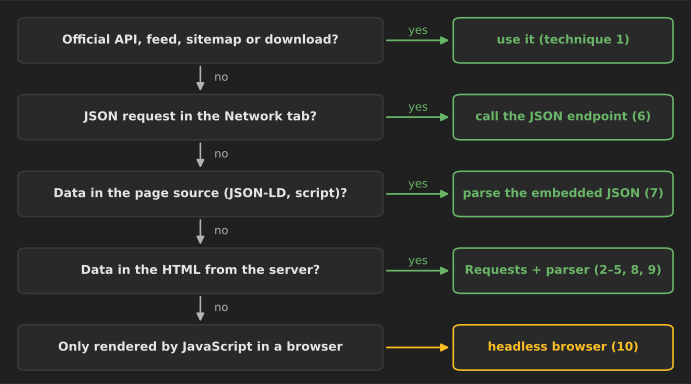
Install the libraries used below in a virtual environment:
pip install requests beautifulsoup4 lxml parsel pandas httpx playwright scrapy
python -m playwright install chromium
1. Check robots.txt, sitemaps and official APIs first
robots.txt is a plain-text file at the root of a site that tells automated clients which paths they should not crawl. It is standardized as the Robots Exclusion Protocol in RFC 9309 (2022). The standard is explicit that these rules are not access control, but respecting them is the baseline of polite scraping. Python's standard library can read it with urllib.robotparser (documentation):
from urllib.parse import urljoin
from urllib.robotparser import RobotFileParser

USER_AGENT = "my-research-bot/1.0 (you@example.com)"


def robots_for(site: str) -> RobotFileParser:
    parser = RobotFileParser(urljoin(site, "/robots.txt"))
    parser.read()  # a missing robots.txt (404) means no restrictions
    return parser


rp = robots_for("https://www.python.org/")
for url in ["https://www.python.org/downloads/", "https://www.python.org/webstats/"]:
    print(url, "allowed" if rp.can_fetch(USER_AGENT, url) else "disallowed")
print("crawl delay:", rp.crawl_delay(USER_AGENT))
print("sitemaps:", rp.site_maps())

rp2 = robots_for("https://books.toscrape.com/")
print("books.toscrape:", rp2.can_fetch(USER_AGENT, "https://books.toscrape.com/catalogue/page-2.html"))
Output:
https://www.python.org/downloads/ allowed
https://www.python.org/webstats/ disallowed
crawl delay: None
sitemaps: None
books.toscrape: True
Two details from RFC 9309 matter in practice. A robots.txt that returns a 4xx status (books.toscrape.com returns 404) means there are no restrictions. A 5xx status means the whole site should be treated as off-limits until the file can be read. Also look for a Sitemap: line or /sitemap.xml: a sitemap lists the URLs a site wants crawled, which is often a better starting point than following links. And always check for an API or data download; the 15 automation scripts article includes an example of pulling API data into a CSV.
2. Parse static HTML with Requests and Beautiful Soup
When the data is in the HTML the server sends, the classic combination is Requests to download the page and Beautiful Soup to parse it. Open the page in your browser, right-click an item and choose Inspect to find the tags and classes that wrap the data you want.
import requests
from bs4 import BeautifulSoup

URL = "https://books.toscrape.com/"
HEADERS = {"User-Agent": "my-research-bot/1.0 (you@example.com)"}

response = requests.get(URL, headers=HEADERS, timeout=15)
response.raise_for_status()
soup = BeautifulSoup(response.content, "lxml")  # bytes: lets Beautiful Soup detect the encoding

books = []
for card in soup.select("article.product_pod"):
    link = card.h3.a
    books.append({
        "title": link["title"],                       # full title is in the attribute
        "price": card.select_one(".price_color").get_text(strip=True),
        "rating": card.select_one("p.star-rating")["class"][1],  # e.g. "Three"
        "url": requests.compat.urljoin(URL, link["href"]),
    })

print(len(books), "books")
for book in books[:3]:
    print(book)
Output (first three of 20):
20 books
{'title': 'A Light in the Attic', 'price': '£51.77', 'rating': 'Three', 'url': 'https://books.toscrape.com/catalogue/a-light-in-the-attic_1000/index.html'}
{'title': 'Tipping the Velvet', 'price': '£53.74', 'rating': 'One', 'url': 'https://books.toscrape.com/catalogue/tipping-the-velvet_999/index.html'}
{'title': 'Soumission', 'price': '£50.10', 'rating': 'One', 'url': 'https://books.toscrape.com/catalogue/soumission_998/index.html'}
A real bug we hit while testing: the first version used response.text, and every price came out as £51.77. The server sends Content-Type: text/html without a character set, so Requests falls back to ISO-8859-1 for HTML and decodes the UTF-8 pound sign wrongly. Passing the raw bytes (response.content) lets Beautiful Soup detect the encoding from the page itself. Alternatively, set response.encoding = response.apparent_encoding before reading response.text. If text looks garbled, check the encoding first.
Other habits shown above: set a timeout on every request (Requests waits forever by default), call raise_for_status() so an error page is not parsed as data, read full values from attributes such as title when the visible text is shortened, and turn relative links into absolute URLs with urljoin.
3. Select precisely with CSS selectors and XPath
Beautiful Soup supports CSS selectors through select(). For more complex selections, parsel, the selector library behind Scrapy, supports both CSS selectors and XPath on top of the fast lxml parser:
import requests
from parsel import Selector

html = requests.get("https://quotes.toscrape.com/", timeout=15).text
sel = Selector(text=html)

# CSS: short and readable for classes and nesting
for quote in sel.css("div.quote")[:2]:
    print(quote.css("span.text::text").get())
    print("  by", quote.css("small.author::text").get(),
          "| tags:", quote.css("a.tag::text").getall())

# XPath: can select by text and walk to siblings, which CSS cannot
print(sel.xpath('//small[@class="author" and text()="Albert Einstein"]'
                '/following-sibling::a/@href').get())
print(sel.xpath('//li[@class="next"]/a/@href').get())
Output:
“The world as we have created it is a process of our thinking. It cannot be changed without changing our thinking.”
  by Albert Einstein | tags: ['change', 'deep-thoughts', 'thinking', 'world']
“It is our choices, Harry, that show what we truly are, far more than our abilities.”
  by J.K. Rowling | tags: ['abilities', 'choices']
/author/Albert-Einstein
/page/2/
Use CSS for most selections; it is shorter and easier to read. Use XPath when you need to select by text content, move to siblings or parents, or apply conditions CSS cannot express, such as "the link next to the author whose name is Albert Einstein". Prefer selectors based on meaningful classes or attributes over long paths such as div > div:nth-child(3) > span, which break as soon as the layout changes.
4. Read HTML tables directly with pandas
If the data is in an HTML <table>, pandas.read_html turns every table on a page into a DataFrame in one call. It needs lxml (or html5lib) installed (pandas documentation).
from io import StringIO

import pandas as pd
import requests

url = "https://books.toscrape.com/catalogue/a-light-in-the-attic_1000/index.html"
response = requests.get(url, timeout=15)
response.encoding = response.apparent_encoding  # the server sends no charset
html = response.text
tables = pd.read_html(StringIO(html))   # one DataFrame per <table>; needs lxml
info = tables[0].set_index(0)[1]        # two columns: field name, value
print(len(tables), "table(s)")
print(info[["UPC", "Price (excl. tax)", "Availability"]].to_dict())
Output:
1 table(s)
{'UPC': 'a897fe39b1053632', 'Price (excl. tax)': '£51.77', 'Availability': 'In stock (22 available)'}
Recent pandas versions want literal HTML wrapped in StringIO, as above, rather than passed as a plain string. read_html also accepts a match= argument to pick the table that contains a given word. It works best on simple, well-formed tables; merged cells and tables used for page layout usually need manual parsing.
5. Follow pagination and crawl politely
Listings are usually split across pages. Find the "next" link on each page and follow it until there is none, keeping track of URLs you have already visited so a loop cannot run forever:
import time
from urllib.parse import urljoin

import requests
from bs4 import BeautifulSoup


def crawl_category(start_url: str, max_pages: int = 50, delay: float = 1.0) -> list[dict]:
    session = requests.Session()
    session.headers["User-Agent"] = "my-research-bot/1.0 (you@example.com)"
    url, seen, rows = start_url, set(), []
    while url and url not in seen and len(seen) < max_pages:
        seen.add(url)
        soup = BeautifulSoup(session.get(url, timeout=15).content, "lxml")
        for card in soup.select("article.product_pod"):
            rows.append({"title": card.h3.a["title"],
                         "price": card.select_one(".price_color").text})
        next_link = soup.select_one("li.next > a")
        url = urljoin(url, next_link["href"]) if next_link else None  # relative -> absolute
        time.sleep(delay)  # one request per second keeps the load on the server low
    print(f"{len(seen)} pages, {len(rows)} books")
    return rows


rows = crawl_category("https://books.toscrape.com/catalogue/category/books/mystery_3/index.html")
print(rows[0], rows[-1], sep="\n")
Output:
2 pages, 32 books
{'title': 'Sharp Objects', 'price': '£47.82'}
{'title': "1st to Die (Women's Murder Club #1)", 'price': '£53.98'}
The max_pages limit and the one-second pause are deliberate. A crawler with no limit can follow calendar or filter links into millions of near-identical pages; the cap keeps a mistake small. A requests.Session reuses the network connection between requests, which is faster for you and lighter for the server. Some sites paginate with page numbers in the URL (?page=3) instead; generating those URLs is simpler, but stop when a page comes back empty.
6. Find the hidden JSON API in the browser's Network tab
Many modern pages load their data from a JSON endpoint after the page opens. Calling that endpoint directly is often faster and more reliable than parsing HTML, because JSON already has structure. To find it:
- Open the page, press F12 to open developer tools and choose the Network tab.
- Filter by Fetch/XHR and reload the page, or scroll and click to trigger more loading.
- Click each request and look at the Response tab for the data you want. Copy its URL and parameters.
On quotes.toscrape.com/scroll, scrolling triggers requests to /api/quotes?page=N, which return JSON with a has_next flag:
import time

import requests

API = "https://quotes.toscrape.com/api/quotes"

session = requests.Session()
session.headers["User-Agent"] = "my-research-bot/1.0 (you@example.com)"
quotes, page = [], 1
while True:
    data = session.get(API, params={"page": page}, timeout=15).json()
    for q in data["quotes"]:
        quotes.append({"author": q["author"]["name"], "tags": q["tags"], "text": q["text"]})
    if not data["has_next"]:
        break
    page += 1
    time.sleep(0.5)

print(f"{len(quotes)} quotes from {page} pages")
print(quotes[0]["author"], quotes[0]["tags"])
Output:
100 quotes from 10 pages
Albert Einstein ['change', 'deep-thoughts', 'thinking', 'world']
Two caveats. Internal endpoints are undocumented: they can change without notice, so check responses and fail clearly when fields are missing. And an endpoint that needs a login token or short-lived signature is a sign the site does not intend public automated access; respect that.
7. Extract embedded JSON and JSON-LD from the page source
Even when a page is built by JavaScript, the data is often already inside the HTML, in a <script> tag. Two common cases:
- JSON-LD structured data, which many sites add for search engines, using the schema.org vocabulary for products, articles, events and recipes.
- Application state embedded as a JavaScript variable or a JSON blob, such as the
__NEXT_DATA__script on sites built with Next.js.
Use View page source (not Inspect, which shows the page after JavaScript has run) and search for a value you can see on the page.
import json
import re

import requests
from bs4 import BeautifulSoup

# 1. JSON-LD structured data that many sites publish for search engines
html = requests.get("https://blogai.space/articles/python-libraries-for-data-science", timeout=15).text
soup = BeautifulSoup(html, "lxml")
for tag in soup.find_all("script", type="application/ld+json"):
    data = json.loads(tag.string)
    if data.get("@type") == "BlogPosting":
        print(data["headline"], "|", data["datePublished"], "|", data["author"]["name"])

# 2. Data embedded in a JavaScript variable: the page is rendered in the browser,
#    but the quotes are already in the HTML source.
html = requests.get("https://quotes.toscrape.com/js/", timeout=15).text
match = re.search(r"var data = (\[.*?\]);", html, re.DOTALL)
quotes = json.loads(match.group(1))
print(len(quotes), "quotes;", quotes[0]["author"]["name"])
Output:
100 Best Python Libraries for Data Science: A Complete Guide | 2026-10-17 | BlogAI Editors
10 quotes; Albert Einstein
The first part reads the BlogPosting JSON-LD from one of this site's own articles. The second reads the quotes that quotes.toscrape.com/js/ renders with JavaScript, without running a browser, because the data sits in a var data = [...] assignment in the HTML. A regular expression is fine for a simple assignment like this; for anything more complex, find the exact <script> tag with Beautiful Soup and pass its contents to json.loads.
8. Make requests robust: retries, rate limits and identification
Networks fail and servers get busy. A scraper that will run more than once needs to retry temporary errors, slow down when asked and identify itself:
import time

import requests
from requests.adapters import HTTPAdapter
from urllib3.util.retry import Retry


def polite_session() -> requests.Session:
    retry = Retry(
        total=4,
        backoff_factor=1,                       # retries at once, then waits 2, 4 and 8 seconds
        status_forcelist=[429, 500, 502, 503, 504],
        allowed_methods=["GET", "HEAD"],
        respect_retry_after_header=True,        # obey the server's Retry-After on 429/503
    )
    session = requests.Session()
    session.mount("https://", HTTPAdapter(max_retries=retry))
    session.headers.update({
        "User-Agent": "my-research-bot/1.0 (you@example.com)",  # say who you are
        "Accept-Language": "en",
    })
    return session


class RateLimiter:
    """Allow at most one request every `interval` seconds."""

    def __init__(self, interval: float):
        self.interval, self.last = interval, 0.0

    def wait(self) -> None:
        pause = self.interval - (time.monotonic() - self.last)
        if pause > 0:
            time.sleep(pause)
        self.last = time.monotonic()


session, limiter = polite_session(), RateLimiter(1.0)
start = time.monotonic()
for n in range(1, 4):
    limiter.wait()
    r = session.get(f"https://books.toscrape.com/catalogue/page-{n}.html", timeout=15)
    print(r.status_code, f"page {n} at t={time.monotonic() - start:.1f}s")
What each piece does:
- Retries with exponential backoff (an immediate retry, then waits of 2, 4 and 8 seconds, as we checked with urllib3 2.8) for temporary errors (429 Too Many Requests and 5xx), using urllib3's
Retry, which Requests uses underneath (urllib3 documentation). Withrespect_retry_after_header=True, it waits as long as the server asks. - A rate limiter so requests start at least one second apart, however quickly the previous one finished. Three test pages finished about 1.6, 1.8 and 2.9 seconds after the start; the first was slowest because it also opened the connection.
- An honest User-Agent with a way to contact you. Site owners are more likely to tolerate, or even help, a scraper they can identify.
Two more habits help both you and the site: cache pages while you develop your parser so you are not downloading the same page again and again (Scrapy's HTTPCACHE_ENABLED does this, as does the third-party requests-cache package), and send conditional requests with If-None-Match or If-Modified-Since when re-checking pages, so unchanged pages come back as a short 304 Not Modified.
9. Fetch many pages concurrently with asyncio and HTTPX
Downloading pages one after another wastes time waiting for the network. With HTTPX's async client and asyncio, you can have several requests in flight at once, while an asyncio.Semaphore caps how many:
import asyncio
import time

import httpx
from parsel import Selector

BASE = "https://books.toscrape.com/catalogue/page-{}.html"


async def fetch_page(client: httpx.AsyncClient, limit: asyncio.Semaphore, n: int) -> list[str]:
    async with limit:                    # at most 3 requests in flight
        response = await client.get(BASE.format(n))
        response.raise_for_status()
        await asyncio.sleep(0.5)         # small pause per slot keeps the rate modest
    return Selector(text=response.text).css("article.product_pod h3 a::attr(title)").getall()


async def main() -> None:
    limit = asyncio.Semaphore(3)
    headers = {"User-Agent": "my-research-bot/1.0 (you@example.com)"}
    async with httpx.AsyncClient(headers=headers, timeout=15) as client:
        start = time.perf_counter()
        pages = await asyncio.gather(*(fetch_page(client, limit, n) for n in range(1, 11)))
    titles = [t for page in pages for t in page]
    print(f"{len(titles)} titles from {len(pages)} pages in {time.perf_counter() - start:.1f}s")


asyncio.run(main())
Output:
200 titles from 10 pages in 5.1s
With three requests at a time and a half-second pause per slot, 10 pages took about 5 seconds. Raise concurrency carefully: three to five parallel requests is plenty for most sites, and more can look like an attack. For the same reason, combine concurrency with the retry and rate-limit ideas from technique 8. If you are new to async and await, question 19 in our Python interview questions explains how the event loop works.
10. Use a headless browser for JavaScript-only pages
When the data only exists after JavaScript runs, and you cannot find it in a JSON request or the page source, use a real browser controlled by code. Playwright drives Chromium, Firefox and WebKit, waits for elements to appear and can click, type and scroll:
from playwright.sync_api import sync_playwright

with sync_playwright() as p:
    browser = p.chromium.launch(headless=True)
    page = browser.new_page(user_agent="my-research-bot/1.0 (you@example.com)")
    page.goto("https://quotes.toscrape.com/js/")
    page.wait_for_selector("div.quote")          # wait until JavaScript has rendered the quotes
    quotes = page.locator("div.quote").evaluate_all(
        """cards => cards.map(c => ({
            text: c.querySelector('.text').innerText,
            author: c.querySelector('.author').innerText,
        }))"""
    )
    print(len(quotes), "quotes;", quotes[0]["author"])
    page.get_by_role("link", name="Next").click()
    page.wait_for_selector("div.quote")
    print("page 2 first author:", page.locator(".author").first.inner_text())
    browser.close()
Output:
10 quotes; Albert Einstein
page 2 first author: Marilyn Monroe
Browsers are powerful but expensive: each page loads all scripts, styles and images, so a browser-based scraper is much slower and uses far more memory than Requests. Use wait_for_selector (or Playwright's auto-waiting locators) instead of fixed sleep calls, and block images or fonts you do not need if speed matters. Selenium is the older alternative and remains widely used. Playwright's locators wait for elements automatically, which removes a common cause of flaky scripts.
Scaling up: when to use Scrapy
The techniques above are enough for small jobs. For crawls of thousands of pages that you will run repeatedly, Scrapy bundles them into one framework: scheduling, concurrency, retries, obeying robots.txt, automatic throttling, caching and exporting to JSON, CSV or databases. This spider crawls a category, follows each book's link and saves one JSON line per book:
import scrapy


class BooksSpider(scrapy.Spider):
    name = "books"
    start_urls = ["https://books.toscrape.com/catalogue/category/books/mystery_3/index.html"]
    custom_settings = {
        "ROBOTSTXT_OBEY": True,
        "AUTOTHROTTLE_ENABLED": True,        # adapts the delay to the server's response times
        "DOWNLOAD_DELAY": 1,
        "CONCURRENT_REQUESTS_PER_DOMAIN": 2,
        "HTTPCACHE_ENABLED": True,           # re-runs during development hit the local cache
        "USER_AGENT": "my-research-bot/1.0 (you@example.com)",
        "FEEDS": {"books.jsonl": {"format": "jsonlines", "overwrite": True}},
    }

    def parse(self, response):
        for card in response.css("article.product_pod"):
            yield response.follow(card.css("h3 a::attr(href)").get(), self.parse_book)
        yield from response.follow_all(css="li.next a", callback=self.parse)

    def parse_book(self, response):
        yield {
            "title": response.css("h1::text").get(),
            "price": response.css("p.price_color::text").get(),
            "upc": response.xpath('//th[text()="UPC"]/following-sibling::td/text()').get(),
            "url": response.url,
        }
scrapy runspider books_spider.py wrote 32 records to books.jsonl, each with title, price, UPC and URL. Scrapy also handled the missing character set correctly on its own. ROBOTSTXT_OBEY and AUTOTHROTTLE_ENABLED, which adjusts the delay to how quickly the server responds, are good defaults for every project (Scrapy settings). Scrapy 2.19, released in September 2026, added Python 3.15 support (release notes).
Clean, store and maintain your data
Scraping is the easy part; keeping the data useful is harder.
- Clean as you go. Strip whitespace, convert prices to numbers and dates to ISO format, and keep the raw text alongside the cleaned value when you are unsure.
- Save the source URL and the time you fetched each record. You will need both to debug and to explain where the data came from.
- Store results in a format that fits the size: CSV or JSON Lines for small jobs, SQLite or Parquet for larger ones. pandas reads all of them.
- Check for breakage. Sites change their HTML without warning. Count records per run and alert yourself when the count drops to zero or fields come back empty.
- Keep only what you need, especially when pages contain personal data.
Common mistakes
- Scraping HTML when an API or JSON endpoint exists. Check techniques 1, 6 and 7 first.
- Starting with a headless browser. It works, but it is the slowest and most fragile option.
- No timeouts, no limits, no delays. A scraper without them can hang forever or hammer a server.
- Ignoring encodings. Garbled characters such as
£usually mean the text was decoded with the wrong encoding (technique 2). - Brittle selectors. Long positional paths break with the smallest layout change.
- Not reading the terms. Technical ability to download a page is not permission to reuse its content.
Where to go next
- Turn scraped data into insight with the 20 best Python libraries for data science and machine learning and 100 pandas tips and tricks.
- Automate the rest of the workflow with 15 Python automation scripts to save time at work.
- Build a small book-price tracker as a first project; it is project 20 in our 25 Python projects for beginners.
- Many blogs in our directory publish RSS feeds, a scraping-free way to follow new posts; see how to follow technical blogs with RSS and the Programming and Technology category.
References
- Koster, M., Illyes, G., Zeller, H., & Sassman, L. (2022). RFC 9309: Robots Exclusion Protocol. IETF. rfc-editor.org
- Python Software Foundation. "urllib.robotparser — Parser for robots.txt." docs.python.org
- Requests. Requests: HTTP for Humans. requests.readthedocs.io
- Richardson, L. Beautiful Soup Documentation. crummy.com
- Scrapy developers. parsel documentation. parsel.readthedocs.io
- pandas development team. "pandas.read_html." pandas.pydata.org
- urllib3. "urllib3.util.Retry." urllib3.readthedocs.io
- Encode. HTTPX documentation. python-httpx.org
- Microsoft. Playwright for Python documentation. playwright.dev
- Scrapy developers. Scrapy documentation and release notes. docs.scrapy.org
- toscrape.com. Web scraping sandbox. toscrape.com
- Information Commissioner's Office. "Response to the consultation series on generative AI." ico.org.uk