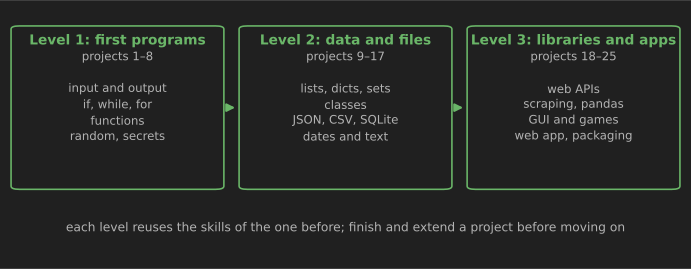
The fastest way to learn Python after the basics is to build small, complete programs, one after another, each a little harder than the last. This list gives you 25 projects in three levels. Each one says what you build, the skills it practices, a starter (tested code for the tricky part) and a stretch goal that turns a practice exercise into something worth showing.
Who it is for. You have done an introductory course or tutorial: you know variables, if, loops, lists and functions, but a blank file still feels intimidating. If you have never written Python, work through the first chapters of a free resource such as the official Python tutorial or Automate the Boring Stuff with Python first.
How we checked it. All starter code was run in October 2026 on Python 3.13, and outputs quoted below are real. Python 3.15 was released on 9 October 2026 (Python 3.15 release schedule); any version from 3.12 onward works for every project here. Projects 18–25 need free third-party libraries, installed with pip.
How to use this list
Learners and teachers repeat the same advice in community discussions such as r/learnpython: tutorials alone do not make you a programmer; writing a lot of imperfect code does. Treat that as experienced opinion rather than a measured fact, but it matches how most people describe getting unstuck. A few habits make the projects pay off:
- Build it before you look anything up. Struggle for 20–30 minutes, then search for the specific thing you are stuck on, not "how to build a to-do app".
- Finish, then extend. A small program that works end to end teaches more than an ambitious one that never runs. Each project's stretch goal is where the real learning happens.
- Type the starter code, do not paste it. It is short on purpose, and typing it makes you read every line.
- Use version control from project 1. Commit each working step with Git and push your best projects to GitHub; that history becomes your portfolio.
Set up once. Install Python from python.org, use an editor such as VS Code, Thonny or PyCharm, and create a virtual environment for each project that uses third-party libraries:
python -m venv .venv
# Windows: .venv\Scripts\activate    macOS/Linux: source .venv/bin/activate
pip install requests
Level 1: first programs (projects 1–8)
These use only the standard library and fit in one file. Focus on clear names, small functions and handling bad input.
1. Number guessing game
Build: the computer picks a random number; the player guesses until correct, with "too high" and "too low" hints and a count of attempts.
Skills: while loops, if/elif, converting and validating input, the random module.
import random


def play(low: int = 1, high: int = 100) -> int:
    secret = random.randint(low, high)
    attempts = 0
    while True:
        text = input(f"Guess a number between {low} and {high}: ")
        if not text.isdigit():
            print("Please type a whole number.")
            continue
        guess = int(text)
        attempts += 1
        if guess < secret:
            print("Too low.")
        elif guess > secret:
            print("Too high.")
        else:
            print(f"Correct! You needed {attempts} guesses.")
            return attempts


if __name__ == "__main__":
    play()
The isdigit() check matters: without it, typing a word crashes the program with ValueError. Stretch goal: add difficulty levels with different ranges and a limited number of guesses, and save the best score to a file.
2. Bill splitter and tip calculator
Build: enter a bill total, a tip percentage and the number of people; get each person's share. Skills: arithmetic, rounding, f-strings, and why floating-point numbers are not exact.
from decimal import Decimal, ROUND_HALF_UP

def split_bill(total: str, tip_percent: str, people: int) -> Decimal:
    total, tip = Decimal(total), Decimal(tip_percent) / 100
    share = total * (1 + tip) / people
    return share.quantize(Decimal("0.01"), rounding=ROUND_HALF_UP)

print(split_bill("84.60", "15", 3))                 # 32.43
print(0.1 + 0.2, Decimal("0.1") + Decimal("0.2"))   # 0.30000000000000004 0.3
The second line shows why money calculations use Decimal: binary floating-point numbers cannot represent 0.1 exactly (Python tutorial: floating-point arithmetic). Stretch goal: let each person add items they ordered and split shared items evenly.
3. Unit converter
Build: convert lengths (and then weights or temperatures) between units chosen by the user. Skills: dictionaries as lookup tables, functions with parameters, menus.
TO_METRES = {"mm": 0.001, "cm": 0.01, "m": 1, "km": 1000,
             "in": 0.0254, "ft": 0.3048, "mi": 1609.344}

def convert(value: float, from_unit: str, to_unit: str) -> float:
    return value * TO_METRES[from_unit] / TO_METRES[to_unit]

print(round(convert(5, "km", "mi"), 3), round(convert(6, "ft", "cm"), 1))   # 3.107 182.9
Converting through one base unit means you need one table entry per unit instead of one formula per pair. Temperatures do not work this way, because the scales have different zero points; handle them with their own formulas. Stretch goal: add a text menu and reject unknown units with a helpful message.
4. Rock, paper, scissors
Build: play best-of-five against the computer, with a running score.
Skills: random.choice, encoding game rules as data, loops with a score.
BEATS = {"rock": "scissors", "paper": "rock", "scissors": "paper"}

def winner(player: str, computer: str) -> str:
    if player == computer:
        return "draw"
    return "player" if BEATS[player] == computer else "computer"

print(winner("rock", "scissors"), winner("rock", "paper"), winner("paper", "paper"))
# player computer draw
Storing the rules in a dictionary replaces a long chain of if statements. Stretch goal: add "lizard" and "Spock" by changing only the data structure, so each move beats two others.
5. Mad Libs story generator
Build: ask the player for words (an adjective, an animal, a place) and drop them into a funny story.
Skills: string formatting, finding placeholders, dictionaries, input().
import string

STORY = "Today I saw a {adjective} {animal} {verb} across the {place}. It was {adjective2}!"


def blanks(template: str) -> list[str]:
    """Find the {names} in the template, in order."""
    return [name for _, name, _, _ in string.Formatter().parse(template) if name]


def fill(template: str, answers: dict[str, str]) -> str:
    return template.format(**answers)


if __name__ == "__main__":
    answers = {name: input(f"Give me a word for '{name}': ") for name in blanks(STORY)}
    print(fill(STORY, answers))
Typing "purple, llama, dance, library, loud" produced "Today I saw a purple llama dance across the library. It was loud!" Stretch goal: load several story templates from text files and pick one at random.
6. Secure password generator
Build: generate strong random passwords of a chosen length, guaranteed to include lowercase, uppercase and digits.
Skills: the secrets and string modules, loops with a condition, generator expressions.
import secrets
import string

def make_password(length: int = 16) -> str:
    alphabet = string.ascii_letters + string.digits + "!@#$%^&*-_"
    while True:
        password = "".join(secrets.choice(alphabet) for _ in range(length))
        if (any(c.islower() for c in password) and any(c.isupper() for c in password)
                and any(c.isdigit() for c in password)):
            return password

print(make_password())
Use secrets, not random, for anything security-related. The Python documentation says random is designed for modeling and simulation, not security or cryptography (secrets module). Stretch goal: add a passphrase mode that joins random words from a word list, and a command-line option for the length.
7. Dice rolling simulator
Build: roll two dice thousands of times and draw a text histogram of the totals.
Skills: random.randint, collections.Counter, loops, simple probability.
import random
from collections import Counter

rolls = [random.randint(1, 6) + random.randint(1, 6) for _ in range(10_000)]
counts = Counter(rolls)
for total in range(2, 13):
    print(f"{total:>2} {'#' * (counts[total] // 50)}")
The bars peak at 7, because six of the 36 combinations add up to 7, while only one gives 2 or 12. Stretch goal: compare the simulated frequencies with the exact probabilities and show how the gap shrinks as you add more rolls.
8. Pomodoro timer
Build: a countdown timer that alternates 25-minute work sessions with 5-minute breaks and prints the time remaining.
Skills: time.sleep, divmod, formatting numbers with leading zeros, loops.
def fmt(seconds: int) -> str:
    minutes, secs = divmod(seconds, 60)
    return f"{minutes:02d}:{secs:02d}"

print(fmt(25 * 60), fmt(59), fmt(61))   # 25:00 00:59 01:01
Loop from the total number of seconds down to zero, print fmt(remaining) with end="\r" so the line updates in place, and time.sleep(1) between updates. Stretch goal: play a sound or show a desktop notification at the end of each session, and log completed sessions to a file.
Level 2: data, files and classes (projects 9–17)
These programs remember things between runs and organize data with the right structures.
9. Hangman
Build: guess a hidden word letter by letter before you run out of lives. Skills: sets, string building, game loops, input validation.
def masked(word: str, guessed: set[str]) -> str:
    return " ".join(c if c in guessed else "_" for c in word)

print(masked("python", {"p", "o", "z"}))   # p _ _ _ o _
A set is the natural type for guessed letters: membership tests are fast and duplicates are ignored. Stretch goal: load words from a file, choose by difficulty (word length) and draw the hangman in ASCII art.
10. Tic-tac-toe
Build: a two-player game in the terminal, then a computer opponent. Skills: lists as a board, nested data, checking win conditions, functions.
LINES = [(0, 1, 2), (3, 4, 5), (6, 7, 8), (0, 3, 6), (1, 4, 7), (2, 5, 8), (0, 4, 8), (2, 4, 6)]

def find_winner(board: list[str]) -> str | None:
    for a, b, c in LINES:
        if board[a] != " " and board[a] == board[b] == board[c]:
            return board[a]
    return None

print(find_winner(["X", "O", " ", " ", "X", "O", " ", " ", "X"]), find_winner([" "] * 9))   # X None
Listing the eight winning lines as data keeps the check to four lines. Stretch goal: make an unbeatable computer player with the minimax algorithm; tic-tac-toe is small enough to search every possible game.
11. To-do list that saves to a file
Build: a command-line to-do list where you can add, complete and remove tasks, saved between runs.
Skills: JSON files, pathlib, command-line arguments with sys.argv, list indexing.
import json
import sys
from pathlib import Path

TASKS_FILE = Path("tasks.json")


def load() -> list[dict]:
    if TASKS_FILE.exists():
        return json.loads(TASKS_FILE.read_text(encoding="utf-8"))
    return []


def save(tasks: list[dict]) -> None:
    TASKS_FILE.write_text(json.dumps(tasks, indent=2), encoding="utf-8")


def main(args: list[str]) -> None:
    tasks = load()
    command = args[0] if args else "list"
    if command == "add":
        tasks.append({"title": " ".join(args[1:]), "done": False})
    elif command == "done":
        tasks[int(args[1]) - 1]["done"] = True
    elif command == "remove":
        tasks.pop(int(args[1]) - 1)
    save(tasks)
    for number, task in enumerate(tasks, start=1):
        print(f"{number}. [{'x' if task['done'] else ' '}] {task['title']}")


if __name__ == "__main__":
    main(sys.argv[1:])
Running python todo.py add Buy milk, then python todo.py add Finish chapter 3, then python todo.py done 1 printed:
1. [x] Buy milk
2. [ ] Finish chapter 3
Stretch goal: handle a task number that does not exist without crashing, add due dates and switch to the argparse module for proper --help output.
12. Expense tracker with CSV
Build: record expenses with a date, category and amount, then print totals by category.
Skills: the csv module, defaultdict, sorting by value, formatted tables.
import csv
from collections import defaultdict

totals = defaultdict(float)
with open("expenses.csv", newline="", encoding="utf-8") as f:
    for row in csv.DictReader(f):            # columns: date, category, amount
        totals[row["category"]] += float(row["amount"])

for category, amount in sorted(totals.items(), key=lambda kv: kv[1], reverse=True):
    print(f"{category:<10} {amount:>8.2f}")
With four sample rows, it printed food 21.25, books 19.99 and transport 3.20. CSV files open directly in Excel or Google Sheets, which makes them a good first storage format. Stretch goal: add monthly totals and a budget per category that warns you when you go over; project 23 adds charts.
13. Quiz app from a JSON file
Build: a multiple-choice quiz that loads its questions from a JSON file, shuffles them and reports a score.
Skills: reading JSON into lists and dictionaries, random.shuffle, separating data from code.
Store each question as {"question": "...", "options": ["...", "..."], "answer": 1} in a list, load the file with json.load, loop through the shuffled questions, and compare the player's choice with the answer index. Keeping the questions in a data file means anyone can write a new quiz without touching the code. Stretch goal: record wrong answers and replay only those at the end.
14. Contact book with SQLite
Build: add, search, update and delete contacts stored in a database file.
Skills: SQL basics, the built-in sqlite3 module, parameterized queries, transactions.
import sqlite3

db = sqlite3.connect("contacts.db")
db.execute("CREATE TABLE IF NOT EXISTS contacts "
           "(id INTEGER PRIMARY KEY, name TEXT NOT NULL, phone TEXT, email TEXT)")

def add_contact(name, phone, email):
    with db:  # commits on success, rolls back on error
        db.execute("INSERT INTO contacts (name, phone, email) VALUES (?, ?, ?)", (name, phone, email))

def search(term):
    return db.execute("SELECT name, phone FROM contacts WHERE name LIKE ? ORDER BY name",
                      (f"%{term}%",)).fetchall()
Always pass values through ? placeholders, never by building SQL strings with f-strings (sqlite3 documentation). In our test, adding a contact named Robert'); DROP TABLE contacts;-- simply stored that odd name; the table survived, because the placeholder treats it as data, not SQL. Stretch goal: export contacts to CSV and import them back, skipping duplicates.
15. Word frequency analyzer
Build: find the most common words in a book.
Skills: reading text, regular expressions, Counter, filtering with a set of stop words.
import re
from collections import Counter

text = open("pride_and_prejudice.txt", encoding="utf-8").read()
body = text[text.find("*** START OF"):text.find("*** END OF")]    # skip the license text
words = re.findall(r"[a-z']+", body.lower())
STOPWORDS = {"the", "and", "of", "to", "a", "in", "her", "was", "she", "mrs", "miss"}  # extend this
counts = Counter(w for w in words if w not in STOPWORDS and len(w) > 2)
print(len(words), counts.most_common(5))
Download a plain-text book by hand from Project Gutenberg (its policy says the website is for human users and may block automated access). With a longer stop-word list, our run on Pride and Prejudice counted about 128,600 words, with "elizabeth" (645) and "darcy" (432) at the top. Stretch goal: compare two books by the same author, or track how often each main character is mentioned per chapter.
16. Text adventure game with classes
Build: explore connected rooms, pick up items and solve a small puzzle by typing commands such as go north and take key.
Skills: classes and objects, references between objects, parsing commands.
class Room:
    def __init__(self, name: str, description: str):
        self.name, self.description = name, description
        self.exits: dict[str, "Room"] = {}
        self.items: list[str] = []

    def connect(self, direction: str, other: "Room", back: str) -> None:
        self.exits[direction] = other
        other.exits[back] = self

hall = Room("Hall", "A dusty hall.")
library = Room("Library", "Shelves full of old books.")
hall.connect("north", library, "south")
library.items.append("key")
Each room holds references to its neighbors, so moving is just here = here.exits[direction]. Split each command with command.partition(" ") into a verb and a noun. Stretch goal: add a Player class with an inventory, a locked door that needs the key, and save and load the game with JSON.
17. Flashcards with spaced repetition
Build: a flashcard app that shows cards you get wrong more often and cards you know less often.
Skills: datetime and timedelta, dictionaries, a simple scheduling algorithm.
from datetime import date, timedelta

INTERVALS = {1: 1, 2: 2, 3: 4, 4: 8, 5: 16}  # box -> days until the next review

def review(card: dict, correct: bool, today: date) -> dict:
    box = min(card["box"] + 1, 5) if correct else 1
    return {**card, "box": box, "due": today + timedelta(days=INTERVALS[box])}

card = {"front": "hola", "back": "hello", "box": 1, "due": date(2026, 10, 21)}
card = review(card, True, date(2026, 10, 21)); print(card["box"], card["due"])   # 2 2026-10-23
card = review(card, True, card["due"]);        print(card["box"], card["due"])   # 3 2026-10-27
card = review(card, False, card["due"]);       print(card["box"], card["due"])   # 1 2026-10-28
This is the Leitner box system: a correct answer moves a card to a box reviewed less often, and a wrong answer sends it back to box 1. Stretch goal: store cards in JSON or SQLite and show only the cards due today.
Level 3: libraries, APIs and apps (projects 18–25)
Now you install third-party packages, talk to web services and build programs with a graphical or web interface.
18. Weather app using a free API
Build: type a city name and get the current temperature and wind speed. Skills: HTTP requests with Requests, JSON responses, chaining two API calls, handling "not found".
import requests

def current_weather(city: str) -> str:
    geo = requests.get("https://geocoding-api.open-meteo.com/v1/search",
                       params={"name": city, "count": 1}, timeout=10).json()
    if not geo.get("results"):
        return f"Could not find {city!r}."
    place = geo["results"][0]
    forecast = requests.get("https://api.open-meteo.com/v1/forecast", params={
        "latitude": place["latitude"], "longitude": place["longitude"],
        "current": "temperature_2m,wind_speed_10m",
    }, timeout=10).json()["current"]
    return (f"{place['name']}, {place.get('country', '')}: {forecast['temperature_2m']} °C, "
            f"wind {forecast['wind_speed_10m']} km/h")

print(current_weather("Pune"))
When we ran it, it printed Pune, India: 26.2 °C, wind 1.0 km/h, and an unknown city printed a friendly message instead of crashing. Open-Meteo needs no API key, but its free tier is for non-commercial use only (terms). Stretch goal: show a five-day forecast and cache results for ten minutes so repeated lookups do not call the API again.
19. Currency converter
Build: convert an amount between currencies using current exchange rates.
Skills: API parameters, error handling with raise_for_status(), returning several values.
import requests


def convert(amount: float, base: str, target: str) -> tuple[float, str]:
    r = requests.get(f"https://api.frankfurter.dev/v2/rate/{base}/{target}", timeout=10)
    r.raise_for_status()   # an unknown currency code returns an error status
    data = r.json()
    return round(amount * data["rate"], 2), data["date"]


print(convert(100, "USD", "INR"))
On 21 October 2026 this returned (9466.0, '2026-10-21'), and an unknown currency code such as ABC came back as a 422 error, which raise_for_status() turns into an exception. Frankfurter needs no API key and combines reference rates from central banks and other official sources, originally the European Central Bank. Its older /v1 API, still used in many tutorials, is deprecated in favor of /v2, used here. Reference rates are published daily, so they are fine for a hobby project but not for trading. Stretch goal: show the last 30 days of rates and the highest and lowest values.
20. Book price tracker (web scraping)
Build: collect titles and prices from a bookshop page and find the cheapest book. Skills: HTML parsing with Beautiful Soup, CSS selectors, cleaning text into numbers.
import requests
from bs4 import BeautifulSoup

response = requests.get("https://books.toscrape.com/", timeout=10)
soup = BeautifulSoup(response.content, "html.parser")  # bytes: let Beautiful Soup detect the encoding
prices = [(b.h3.a["title"], float(b.select_one(".price_color").text.lstrip("£")))
          for b in soup.select("article.product_pod")]
print(min(prices, key=lambda p: p[1]), len(prices))
It printed ('Starving Hearts (Triangular Trade Trilogy, #1)', 13.99) 20. books.toscrape.com is a practice site built for learning scraping. Our first attempt used response.text, and every price came out as £13.99, because the site does not declare its character encoding; passing response.content fixed it. Before scraping a real site, read its terms and robots.txt; our guide to Python web scraping techniques explains how. Stretch goal: follow the "next" links through all 50 pages, save prices to CSV daily and report changes.
21. Calculator with a graphical interface (Tkinter)
Build: a desktop calculator with buttons, using the Tkinter toolkit that ships with Python on Windows and macOS (some Linux distributions package it separately).
Skills: GUI layout with grid, event callbacks, and safe expression evaluation.
import ast
import operator
import tkinter as tk

OPS = {ast.Add: operator.add, ast.Sub: operator.sub, ast.Mult: operator.mul, ast.Div: operator.truediv}


def safe_eval(expression: str) -> float:
    """Evaluate + - * / and brackets only. Never pass user input to eval()."""
    def walk(node):
        if isinstance(node, ast.Expression):
            return walk(node.body)
        if isinstance(node, ast.Constant) and isinstance(node.value, (int, float)):
            return node.value
        if isinstance(node, ast.BinOp) and type(node.op) in OPS:
            return OPS[type(node.op)](walk(node.left), walk(node.right))
        if isinstance(node, ast.UnaryOp) and isinstance(node.op, ast.USub):
            return -walk(node.operand)
        raise ValueError("unsupported expression")
    return walk(ast.parse(expression, mode="eval"))


def build(root: tk.Tk) -> tk.Entry:
    root.title("Calculator")
    display = tk.Entry(root, font=("Segoe UI", 18), justify="right")
    display.grid(row=0, column=0, columnspan=4, sticky="nsew", padx=4, pady=4)

    def press(key: str) -> None:
        if key == "C":
            display.delete(0, tk.END)
        elif key == "=":
            try:
                result = safe_eval(display.get())
            except (ValueError, SyntaxError, ZeroDivisionError):
                result = "Error"
            display.delete(0, tk.END)
            display.insert(0, str(result))
        else:
            display.insert(tk.END, key)

    keys = ["7", "8", "9", "/", "4", "5", "6", "*", "1", "2", "3", "-", "C", "0", "=", "+"]
    for i, key in enumerate(keys):
        tk.Button(root, text=key, width=5, height=2, command=lambda k=key: press(k)).grid(
            row=1 + i // 4, column=i % 4, sticky="nsew")
    return display


if __name__ == "__main__":
    root = tk.Tk()
    build(root)
    root.mainloop()
The safe_eval function is the important lesson: many tutorials call eval() on whatever is typed, which would run any Python code a user enters. Parsing with ast and allowing only numbers and the four operators is safe. In our test, 2+3*(4-1) gave 11 and __import__("os") was rejected. Stretch goal: add keyboard input, a decimal point and a history panel.
22. Snake game with pygame
Build: the classic Snake game: steer with the arrow keys, eat food to grow, and do not run into yourself. Skills: a game loop, events, drawing shapes, frame timing, collision checks.
Install pygame-ce, the community edition of pygame, which publishes ready-made packages for current Python versions, including 3.15: pip install pygame-ce. You still write import pygame.
import random
import sys

import pygame

CELL, COLS, ROWS = 20, 30, 20


def main(max_frames: int | None = None) -> int:
    pygame.init()
    screen = pygame.display.set_mode((CELL * COLS, CELL * ROWS))
    clock = pygame.time.Clock()
    snake = [(COLS // 2, ROWS // 2)]
    direction = (1, 0)
    food = (5, 5)
    score, frames = 0, 0
    running = True
    while running:
        for event in pygame.event.get():
            if event.type == pygame.QUIT:
                running = False
            elif event.type == pygame.KEYDOWN:
                turns = {pygame.K_UP: (0, -1), pygame.K_DOWN: (0, 1),
                         pygame.K_LEFT: (-1, 0), pygame.K_RIGHT: (1, 0)}
                new = turns.get(event.key)
                if new and (new[0] != -direction[0] or new[1] != -direction[1]):
                    direction = new  # ignore a turn straight back into the body
        head = ((snake[0][0] + direction[0]) % COLS, (snake[0][1] + direction[1]) % ROWS)
        if head in snake:
            running = False  # the snake ran into itself
        snake.insert(0, head)
        if head == food:
            score += 1
            food = random.choice([(x, y) for x in range(COLS) for y in range(ROWS) if (x, y) not in snake])
        else:
            snake.pop()  # move forward without growing
        screen.fill((23, 23, 23))
        pygame.draw.rect(screen, (230, 180, 60), (food[0] * CELL, food[1] * CELL, CELL, CELL))
        for x, y in snake:
            pygame.draw.rect(screen, (106, 182, 104), (x * CELL, y * CELL, CELL - 1, CELL - 1))
        pygame.display.flip()
        clock.tick(10)  # 10 moves per second
        frames += 1
        if max_frames and frames >= max_frames:
            running = False
    pygame.quit()
    return score


if __name__ == "__main__":
    print("score:", main(int(sys.argv[1]) if len(sys.argv) > 1 else None))
The loop does the same four things every frame: read input, update the game state, draw, and wait (clock.tick(10) caps it at 10 moves a second). We ran it for 30 frames in a hidden window to check that it starts and runs without errors. Stretch goal: add a score display, a game-over screen and speed that increases as the snake grows.
23. Personal spending dashboard with pandas and Matplotlib
Build: load the expense CSV from project 12 and chart spending by category and by month.
Skills: pandas DataFrames, groupby, dates, charts with Matplotlib.
import matplotlib.pyplot as plt
import pandas as pd

df = pd.read_csv("expenses.csv", parse_dates=["date"])
by_category = df.groupby("category")["amount"].sum().sort_values()
ax = by_category.plot.barh(title="Spending by category")
ax.set_xlabel("Amount")
plt.tight_layout()
plt.savefig("spending.png")
Five lines replace the manual totals from project 12, and df.groupby(df["date"].dt.to_period("M")) gives monthly totals. This is the bridge from general Python into data analysis. Stretch goal: build the same view as an interactive web page with Streamlit, then work through our 101 Python data science projects.
24. URL shortener web app with Flask
Build: a small web service that turns long links into short codes and redirects visitors. Skills: web routes with Flask, HTTP methods and status codes, SQLite, input validation.
import secrets
import sqlite3

from flask import Flask, abort, redirect, request

app = Flask(__name__)
db = sqlite3.connect("links.db", check_same_thread=False)
db.execute("CREATE TABLE IF NOT EXISTS links (code TEXT PRIMARY KEY, url TEXT NOT NULL)")

@app.post("/shorten")
def shorten():
    url = request.form.get("url", "")
    if not url.startswith(("http://", "https://")):
        abort(400, "URL must start with http:// or https://")
    code = secrets.token_urlsafe(4)
    with db:
        db.execute("INSERT INTO links VALUES (?, ?)", (code, url))
    return {"short": request.host_url + code}

@app.get("/<code>")
def follow(code):
    row = db.execute("SELECT url FROM links WHERE code = ?", (code,)).fetchone()
    if row is None:
        abort(404)
    return redirect(row[0])
Using Flask's test client, shortening https://www.python.org/ returned status 200, following the code returned a 302 redirect to that address, an unknown code returned 404, and a javascript: link was rejected with 400. Run it with flask --app shortener run and open http://127.0.0.1:5000. One shared SQLite connection is fine for learning on your own machine; a real deployment would open a connection per request. Stretch goal: add an HTML form, click counts, and tests with app.test_client().
25. Package your own command-line tool
Build: turn one of your scripts into an installable command with its own --help, and add automated tests. Here it is a tool that sorts a folder's files by type, a simpler cousin of script 1 in our 15 Python automation scripts.
Skills: argparse, project layout, pyproject.toml, entry points, testing with pytest.
Lay the project out like this:
tidy/
├── pyproject.toml
├── src/tidy/__init__.py      (empty)
├── src/tidy/cli.py
└── tests/test_cli.py
pyproject.toml describes the package and creates a tidy command that calls main() (Python Packaging User Guide):
[build-system]
requires = ["hatchling"]
build-backend = "hatchling.build"

[project]
name = "tidy"
version = "0.1.0"
description = "Sort a folder's files into subfolders by type"
requires-python = ">=3.10"

[project.scripts]
tidy = "tidy.cli:main"
src/tidy/cli.py:
import argparse
import shutil
from pathlib import Path

GROUPS = {"Images": {".jpg", ".png"}, "Documents": {".pdf", ".docx", ".txt"}}


def destination_for(path: Path) -> str:
    for folder, suffixes in GROUPS.items():
        if path.suffix.lower() in suffixes:
            return folder
    return "Other"


def main(argv: list[str] | None = None) -> None:
    parser = argparse.ArgumentParser(prog="tidy", description="Sort files into subfolders by type.")
    parser.add_argument("folder", type=Path)
    parser.add_argument("--apply", action="store_true", help="move files (default: dry run)")
    args = parser.parse_args(argv)
    for path in sorted(args.folder.iterdir()):
        if path.is_file():
            target = args.folder / destination_for(path)
            print(f"{path.name} -> {target.name}/")
            if args.apply:
                target.mkdir(exist_ok=True)
                shutil.move(path, target / path.name)
tests/test_cli.py, using pytest's built-in tmp_path fixture so tests never touch your real files:
from pathlib import Path

from tidy.cli import destination_for, main


def test_destination_for_known_and_unknown_types():
    assert destination_for(Path("photo.JPG")) == "Images"
    assert destination_for(Path("notes.txt")) == "Documents"
    assert destination_for(Path("archive.xyz")) == "Other"


def test_dry_run_moves_nothing(tmp_path):
    (tmp_path / "a.pdf").write_text("x")
    main([str(tmp_path)])
    assert (tmp_path / "a.pdf").exists()


def test_apply_moves_files(tmp_path):
    (tmp_path / "a.pdf").write_text("x")
    main([str(tmp_path), "--apply"])
    assert (tmp_path / "Documents" / "a.pdf").exists()
Install it in editable mode with pip install -e . pytest, then run pytest (3 passed in our run) and tidy some-folder. One mistake we made along the way is worth knowing: with the project named tidy-folders, the Hatchling build backend refused to build, because it could not find a package folder matching that name. Naming the project tidy, like its folder, fixed it. Stretch goal: add a --undo option, set up GitHub Actions to run the tests on every push, and publish to TestPyPI to practice releasing.
What to do after these projects
- Pick a direction. Data analysis and machine learning, web development, automation and testing, and game development all start from these skills. For data, continue with the 20 best Python libraries for data science and machine learning. For work tasks, try the 15 Python automation scripts.
- Solve short puzzles regularly. Advent of Code publishes a new programming puzzle each day of December, and Exercism offers free exercises with mentor feedback.
- Read other people's code. Look at how small, well-maintained libraries structure their files and tests.
- Prepare for interviews with our 30 Python interview questions and answers, many of which explain behavior you will meet in these projects, such as mutable default arguments and scope.
- Follow people who write about Python, such as the blogs in our Programming and Technology category.
Common beginner mistakes
- Starting too big. "A social network" is not a beginner project. Build the smallest version that works, then extend it.
- Not handling bad input. Real users type letters into number fields; plan for it from project 1.
- Using
eval()on user input. See project 21 for a safe alternative. - Building SQL with f-strings. Use placeholders (project 14).
- Using
randomfor passwords or tokens. Usesecrets(projects 6 and 24). - Never reading error messages. The last line of a traceback names the error, and the lines above show where it happened. Recent Python versions add "Did you mean…?" suggestions to many errors.
References
- Python Software Foundation. The Python Tutorial. docs.python.org
- Python Software Foundation. "Floating-Point Arithmetic: Issues and Limitations." docs.python.org
- Python Software Foundation. "secrets — Generate secure random numbers for managing secrets." docs.python.org
- Python Software Foundation. "sqlite3 — DB-API 2.0 interface for SQLite databases." docs.python.org
- Python Software Foundation. "tkinter — Python interface to Tcl/Tk." docs.python.org
- Python Software Foundation. "ast — Abstract Syntax Trees." docs.python.org
- "PEP 790 – Python 3.15 Release Schedule." peps.python.org
- Python Packaging Authority. "Writing your pyproject.toml." Python Packaging User Guide. packaging.python.org
- Sweigart, A. Automate the Boring Stuff with Python (3rd ed.). No Starch Press. automatetheboringstuff.com
- Open-Meteo. "Terms and Privacy." open-meteo.com
- Frankfurter. Frankfurter exchange rate API. frankfurter.dev
- pygame community. pygame-ce documentation. pyga.me
- Pallets. Flask documentation. flask.palletsprojects.com
- Project Gutenberg. Pride and Prejudice by Jane Austen (eBook #1342). gutenberg.org