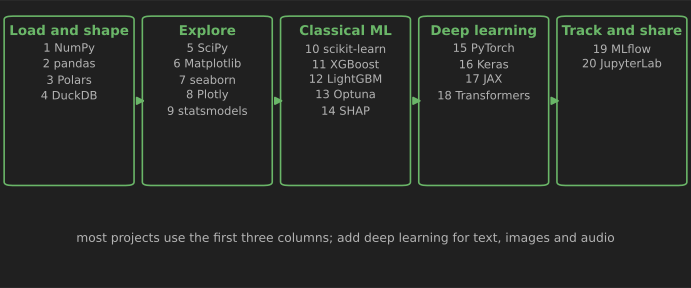
If you are learning data science or machine learning in Python, these are the 20 libraries to learn, roughly in this order: NumPy, pandas, Polars, DuckDB, SciPy, Matplotlib, seaborn, Plotly, statsmodels, scikit-learn, XGBoost, LightGBM, Optuna, SHAP, PyTorch, Keras, JAX, Hugging Face Transformers, MLflow and JupyterLab. Together they cover the full path from loading a file to training, explaining and tracking a model.
This article is a learning path, not a catalog. For each library you get what it is for, when to choose it over the alternatives and a short example. Every example below was run in October 2026 with the versions listed in the table, and the outputs shown are real. If you need a tool for a narrower job, such as time series, geospatial data or survival analysis, our 100 Python libraries for data science is the complete reference organized by task.
How these 20 were chosen. Each one is open source, actively maintained, widely used in industry and teaching, and does a job the others do not. "Best" here means "the strongest default for its role", not a winner of a benchmark: we did not rank libraries by download counts or stars. Your field may add others; that is fine once these basics are solid.
Versions used and how to install
| Library | Version tested | Released | Needs Python |
|---|---|---|---|
| NumPy | 2.5.4 | Oct 2026 | 3.12+ |
| pandas | 3.0.6 | Sep 2026 | 3.11+ |
| Polars | 2.0.0 | Oct 2026 | 3.10+ |
| DuckDB | 2.0.0 | Oct 2026 | 3.11+ |
| SciPy | 1.18.1 | Aug 2026 | 3.12+ |
| scikit-learn | 1.9.1 | Sep 2026 | 3.11+ |
| XGBoost / LightGBM | 3.4.1 / 4.7.0 | Aug / Jul 2026 | 3.12+ / 3.10+ |
| PyTorch | 2.14.1 | Sep 2026 | 3.10+ |
| Keras / JAX | 3.15.1 / 0.12.0 | Jul / Oct 2026 | 3.11+ / 3.12+ |
| Transformers | 5.20.2 | Oct 2026 | 3.10+ |
Versions, dates and minimum Python versions are from each project's page on PyPI on 21 October 2026; the examples ran on Python 3.13 on a Windows laptop without a GPU. Several libraries now require Python 3.11 or 3.12, so start a new project on a recent Python. Install into a virtual environment:
python -m venv .venv
# Windows: .venv\Scripts\activate    macOS/Linux: source .venv/bin/activate
pip install numpy pandas polars duckdb scipy matplotlib seaborn plotly statsmodels scikit-learn
pip install xgboost lightgbm optuna shap mlflow jupyterlab
pip install torch keras jax transformers   # large downloads; add when you reach deep learning
PyTorch publishes separate builds for CPU-only machines and for each GPU platform; use the selector on the PyTorch "Get Started" page to get the right command.
Load and shape data
1. NumPy
NumPy provides the n-dimensional array and fast vectorized math that almost every other library here builds on (Harris et al., 2020). Learn it first: arrays, broadcasting, indexing and the random number generator.
import numpy as np

rng = np.random.default_rng(42)                      # reproducible random numbers
heights = rng.normal(loc=170, scale=8, size=10_000)  # 10,000 simulated heights in cm
print(heights.mean().round(1), heights.std().round(1), (heights > 185).mean().round(3))

# Solve a least-squares problem: recover the weights that generated y
X = rng.normal(size=(200, 3))
y = X @ np.array([2.0, -1.0, 0.5]) + rng.normal(scale=0.1, size=200)
weights, *_ = np.linalg.lstsq(X, y, rcond=None)
print(weights.round(2))
Output: 169.9 8.1 0.031 (the mean, standard deviation and share above 185 cm) and [ 2. -1. 0.5], the exact weights used to generate the data. Use np.random.default_rng(seed) rather than the old np.random.seed functions. Our 101 NumPy examples go much further.
2. pandas
pandas is the standard library for labeled tables: reading CSV, Excel, SQL and Parquet files, cleaning, filtering, grouping, joining and time series. pandas 3.0, released in January 2026, made Copy-on-Write and a dedicated string data type the defaults (release notes).
import pandas as pd

sales = pd.DataFrame({
    "date": pd.to_datetime(["2026-09-01", "2026-09-01", "2026-09-02", "2026-09-02", "2026-09-03"]),
    "store": ["A", "B", "A", "B", "A"],
    "revenue": [120.0, 95.5, 130.0, None, 110.0],
})
# Fill the missing value with that store's median, then summarize per store
sales["revenue"] = sales["revenue"].fillna(sales.groupby("store")["revenue"].transform("median"))
print(sales.groupby("store")["revenue"].agg(["count", "sum", "mean"]))
       count    sum   mean
store
A          3  360.0  120.0
B          2  191.0   95.5
Store B's missing revenue was filled with B's own median (95.5), not the overall median. That kind of group-aware cleaning is where pandas shines. See our 100 pandas tips and tricks.
3. Polars
Polars is a DataFrame library written in Rust. Its lazy API builds a query plan, optimizes the whole pipeline and runs it on all CPU cores, which often makes it much faster than pandas on large tables. Polars 2.0 was released in October 2026.
import polars as pl

df = pl.DataFrame({"store": ["A", "B", "A", "B", "A"],
                   "revenue": [120.0, 95.5, 130.0, 101.0, 110.0]})
result = (
    df.lazy()                                  # build a query plan; nothing runs yet
    .filter(pl.col("revenue") > 100)
    .group_by("store")
    .agg(pl.col("revenue").sum().alias("total"), pl.len().alias("orders"))
    .sort("store")
    .collect()                                 # optimize the plan and run it
)
print(result)
shape: (2, 3)
┌───────┬───────┬────────┐
│ store ┆ total ┆ orders │
│ ---   ┆ ---   ┆ ---    │
│ str   ┆ f64   ┆ u32    │
╞═══════╪═══════╪════════╡
│ A     ┆ 360.0 ┆ 3      │
│ B     ┆ 101.0 ┆ 1      │
└───────┴───────┴────────┘
pandas or Polars? Learn pandas first, because most tutorials, libraries and existing code use it. Reach for Polars when pandas becomes slow or runs out of memory, or start new data pipelines in it if your team agrees. The expression API (pl.col(...)) is different, so budget time to learn it.
4. DuckDB
DuckDB is an analytical SQL database that runs inside your Python process. There is no server to set up: it queries CSV and Parquet files, pandas DataFrames and Polars frames directly, and can work with data larger than memory. Version 2.0 was published on PyPI in October 2026.
import duckdb
import pandas as pd

pd.DataFrame({"store": ["A", "B", "A", "B", "A"],
              "revenue": [120.0, 95.5, 130.0, 95.5, 110.0]}).to_csv("sales.csv", index=False)

# Query the file directly with SQL: no database server and no import step
print(duckdb.sql("""
    SELECT store, count(*) AS orders, sum(revenue) AS total
    FROM 'sales.csv'
    GROUP BY store
    ORDER BY total DESC
""").fetchall())
Output: [('A', 3, 360.0), ('B', 2, 191.0)]. If you already know SQL, DuckDB is often the quickest way to explore a large file. It also mixes well with pandas: run the heavy aggregation in SQL, then hand the small result to pandas or a plotting library.
Explore, visualize and test
5. SciPy
SciPy adds scientific algorithms on top of NumPy: statistics, optimization, integration, interpolation, signal processing, sparse matrices and linear algebra. Use it before writing a numerical method yourself.
import numpy as np
from scipy import stats
from scipy.optimize import minimize

rng = np.random.default_rng(0)
control = rng.normal(10.0, 2.0, size=40)
treatment = rng.normal(11.0, 2.0, size=40)
result = stats.ttest_ind(control, treatment, equal_var=False)  # Welch's t-test
print(f"t = {result.statistic:.2f}, p = {result.pvalue:.4f}")

best = minimize(lambda v: (v[0] - 3) ** 2 + (v[1] + 1) ** 2, x0=[0, 0])
print(best.x.round(3))
t = -4.02, p = 0.0001
[ 3. -1.]
The first line is a Welch's t-test comparing two simulated groups; the second is the minimum of a simple function, found numerically. scipy.stats also provides probability distributions and nonparametric tests. For the theory behind tests like this, see probability and statistics concepts for data science.
6. Matplotlib
Matplotlib is the foundational plotting library. It gives you control over every element of a figure and produces publication-quality images. pandas and seaborn draw their charts through it.
import matplotlib.pyplot as plt
import numpy as np

heights = np.random.default_rng(42).normal(170, 8, 10_000)
fig, ax = plt.subplots(figsize=(6, 3.5))
ax.hist(heights, bins=40)
ax.set(xlabel="Height (cm)", ylabel="People", title="Simulated heights")
fig.tight_layout()
fig.savefig("heights.png", dpi=150)
Learn the object-oriented style shown here (fig, ax = plt.subplots(), then methods on ax). It scales to multi-panel figures much better than calling plt.plot repeatedly.
7. seaborn
seaborn makes statistical charts from a DataFrame in one line: distributions, relationships, categorical comparisons and small multiples, with sensible defaults.
import seaborn as sns

tips = sns.load_dataset("tips")      # a small example dataset that seaborn downloads
grid = sns.relplot(data=tips, x="total_bill", y="tip", hue="smoker", col="time")
grid.savefig("tips.png")
print(tips.shape)
This draws tip against bill, colored by smoker and split into lunch and dinner panels, from seaborn's 244-row example dataset. seaborn's latest release, 0.13.2, dates from January 2024. It is mature and still works with current pandas and Matplotlib, but infrequent releases are worth knowing about when you choose libraries for a long-lived project.
8. Plotly
Plotly makes interactive charts with zoom, hover and filtering that work in notebooks and web pages. plotly.express is as quick as seaborn for common charts.
import plotly.express as px

gapminder = px.data.gapminder().query("year == 2007")   # example data bundled with Plotly
fig = px.scatter(gapminder, x="gdpPercap", y="lifeExp", size="pop", color="continent",
                 hover_name="country", log_x=True)
fig.write_html("life_expectancy.html", include_plotlyjs="cdn")  # an interactive web page
print(len(gapminder), "countries")
The script wrote an interactive bubble chart of life expectancy against income for 142 countries in 2007. Choose Plotly when people will explore the chart themselves, and Matplotlib or seaborn for static figures in reports and papers. Plotly's companion framework, Dash, turns charts into full dashboards.
9. statsmodels
statsmodels fits statistical models with full inference: coefficients, standard errors, confidence intervals, p-values and diagnostics. Use it when the question is "how much does X affect Y, and how sure are we?" rather than "predict Y as accurately as possible".
import seaborn as sns
import statsmodels.formula.api as smf

tips = sns.load_dataset("tips")
model = smf.ols("tip ~ total_bill + C(time)", data=tips).fit()   # R-style formula
print(model.params.round(3).to_dict())
print(model.conf_int().loc["total_bill"].round(3).tolist(), round(model.rsquared, 3))
{'Intercept': 0.924, 'C(time)[T.Dinner]': -0.007, 'total_bill': 0.105}
[0.09, 0.12] 0.457
Each extra dollar on the bill goes with about 10.5 cents more tip (95% confidence interval 9 to 12 cents), while lunch versus dinner makes almost no difference once the bill is accounted for. model.summary() prints the full regression table. statsmodels also covers generalized linear models, ANOVA and time series models such as ARIMA.
Classical machine learning
10. scikit-learn
scikit-learn is the core machine learning library for tabular data: preprocessing, pipelines, classification, regression, clustering, dimensionality reduction, model selection and metrics, all behind one consistent fit/predict interface (Pedregosa et al., 2011). If you learn one ML library well, make it this one.
from sklearn.datasets import load_breast_cancer
from sklearn.linear_model import LogisticRegression
from sklearn.model_selection import cross_val_score
from sklearn.pipeline import make_pipeline
from sklearn.preprocessing import StandardScaler

X, y = load_breast_cancer(return_X_y=True, as_frame=True)
model = make_pipeline(StandardScaler(), LogisticRegression(max_iter=1000))
scores = cross_val_score(model, X, y, cv=5, scoring="roc_auc")   # 5-fold cross-validation
print(f"ROC AUC: {scores.mean():.3f} ± {scores.std():.3f}")
Output: ROC AUC: 0.995 ± 0.004. Two habits shown here prevent most beginner mistakes: put preprocessing and the model in one pipeline, so scaling is learned only from training folds, and estimate performance with cross-validation instead of a single split (scikit-learn: common pitfalls). Our 100 Python machine learning examples are mostly scikit-learn.
11. XGBoost
XGBoost trains gradient-boosted decision trees, which are often the strongest models for tabular data (Chen and Guestrin, 2016; Grinsztajn et al., 2022). It has a scikit-learn-compatible interface, handles missing values and supports GPUs.
import xgboost as xgb
from sklearn.datasets import load_breast_cancer
from sklearn.metrics import roc_auc_score
from sklearn.model_selection import train_test_split

X, y = load_breast_cancer(return_X_y=True, as_frame=True)
X_train, X_test, y_train, y_test = train_test_split(X, y, test_size=0.2, random_state=0, stratify=y)
# Hold out part of the training data for early stopping; never early-stop on the test set
X_fit, X_val, y_fit, y_val = train_test_split(X_train, y_train, test_size=0.2, random_state=0,
                                              stratify=y_train)

model = xgb.XGBClassifier(n_estimators=1000, learning_rate=0.05, max_depth=4,
                          early_stopping_rounds=50, eval_metric="auc")
model.fit(X_fit, y_fit, eval_set=[(X_val, y_val)], verbose=False)
print("best iteration:", model.best_iteration)
print("test ROC AUC:", round(roc_auc_score(y_test, model.predict_proba(X_test)[:, 1]), 3))
best iteration: 30
test ROC AUC: 0.973
Note the separate validation split for early stopping. Early stopping on the test set is a common mistake: the test score then no longer measures performance on unseen data. On this small, clean dataset, the boosted model did not beat the logistic regression from section 10; on larger, messier tables with interactions between features, boosting usually pulls ahead. Always compare against a simple baseline.
12. LightGBM
LightGBM, from Microsoft, is another gradient-boosting library, designed for fast training on large datasets with histogram-based, leaf-wise tree growth (Ke et al., 2017).
import lightgbm as lgb
from sklearn.datasets import fetch_california_housing
from sklearn.metrics import mean_absolute_error
from sklearn.model_selection import train_test_split

X, y = fetch_california_housing(return_X_y=True, as_frame=True)   # downloaded on first use
X_train, X_test, y_train, y_test = train_test_split(X, y, test_size=0.2, random_state=0)
X_fit, X_val, y_fit, y_val = train_test_split(X_train, y_train, test_size=0.2, random_state=0)

model = lgb.LGBMRegressor(n_estimators=5000, learning_rate=0.05, num_leaves=31, verbose=-1)
model.fit(X_fit, y_fit, eval_X=(X_val,), eval_y=(y_val,),
          callbacks=[lgb.early_stopping(100, verbose=False)])
print("trees:", model.best_iteration_)
print("test MAE:", round(mean_absolute_error(y_test, model.predict(X_test)), 3))  # in $100,000s
trees: 1310
test MAE: 0.288
On the California housing data, the typical error is about 0.29, or roughly $29,000, since prices are in units of $100,000. A version note: LightGBM 4.7 deprecates the eval_set argument used in most tutorials in favor of eval_X and eval_y, as shown above; the old form still works but prints a warning. XGBoost, LightGBM and CatBoost (which handles categorical features natively) usually perform similarly, so pick one, learn its parameters well and move on.
13. Optuna
Optuna searches for good hyperparameters. You define the search space in ordinary Python inside an objective function, and Optuna proposes promising values with algorithms such as the tree-structured Parzen estimator, and can stop unpromising trials early.
import optuna
from sklearn.datasets import load_breast_cancer
from sklearn.ensemble import RandomForestClassifier
from sklearn.model_selection import cross_val_score

X, y = load_breast_cancer(return_X_y=True)
optuna.logging.set_verbosity(optuna.logging.WARNING)


def objective(trial):
    model = RandomForestClassifier(
        n_estimators=trial.suggest_int("n_estimators", 50, 300),
        max_depth=trial.suggest_int("max_depth", 2, 12),
        min_samples_leaf=trial.suggest_int("min_samples_leaf", 1, 10),
        random_state=0, n_jobs=-1,
    )
    return cross_val_score(model, X, y, cv=3, scoring="roc_auc").mean()


study = optuna.create_study(direction="maximize", sampler=optuna.samplers.TPESampler(seed=0))
study.optimize(objective, n_trials=20)
print(round(study.best_value, 4), study.best_params)
Output: 0.9901 {'n_estimators': 150, 'max_depth': 11, 'min_samples_leaf': 1} after 20 trials. Tuning usually gives smaller gains than better features or more data, so tune last, keep a held-out test set out of the search, and fix the sampler's seed when you want reproducible results.
14. SHAP
SHAP explains predictions by assigning each feature a contribution for each row, based on Shapley values from game theory (Lundberg and Lee, 2017). It is the most common way to explain tree models to stakeholders and to debug them.
import numpy as np
import pandas as pd
import shap
import xgboost as xgb
from sklearn.datasets import load_breast_cancer
from sklearn.model_selection import train_test_split

X, y = load_breast_cancer(return_X_y=True, as_frame=True)
X_train, X_test, y_train, y_test = train_test_split(X, y, test_size=0.2, random_state=0, stratify=y)
model = xgb.XGBClassifier(n_estimators=200, learning_rate=0.05, max_depth=4).fit(X_train, y_train)

explanation = shap.TreeExplainer(model)(X_test)      # one SHAP value per row and feature
importance = pd.Series(np.abs(explanation.values).mean(axis=0), index=X_test.columns)
top = importance.sort_values(ascending=False).head(3)
print({name: round(float(value), 3) for name, value in top.items()})
# In a notebook, shap.plots.beeswarm(explanation) draws the usual summary chart
Output: {'worst concave points': 1.474, 'worst perimeter': 1.083, 'mean concave points': 0.986}, the three features with the largest average effect on this model's predictions. Remember what SHAP measures: how the model uses a feature, not whether the feature causes the outcome in the real world. Correlated features can also share or swap credit.
Deep learning
15. PyTorch
PyTorch is the most widely used deep learning framework in research and increasingly in production. Tensors work like NumPy arrays that can run on a GPU, and automatic differentiation computes gradients for you. Most modern model libraries, including Hugging Face Transformers, are built on it.
import torch
from torch import nn

torch.manual_seed(0)
X = torch.randn(512, 4)
y = (X[:, 0] + X[:, 1] > 0).float().unsqueeze(1)    # label: is x0 + x1 positive?

model = nn.Sequential(nn.Linear(4, 16), nn.ReLU(), nn.Linear(16, 1))
optimizer = torch.optim.Adam(model.parameters(), lr=0.01)
loss_fn = nn.BCEWithLogitsLoss()

for epoch in range(200):            # the training loop is written out explicitly
    optimizer.zero_grad()
    loss = loss_fn(model(X), y)
    loss.backward()                 # automatic differentiation computes the gradients
    optimizer.step()

accuracy = ((model(X) > 0).float() == y).float().mean().item()
print(f"loss {loss.item():.3f}, training accuracy {accuracy:.3f}")
Output: loss 0.036, training accuracy 1.000. Writing the training loop yourself, as here, is more code than scikit-learn but shows exactly what happens at each step. It also means you control everything: custom losses, architectures and training schedules. In real projects you would also load data in batches with a DataLoader and measure accuracy on held-out data, not the training set.
16. Keras
Keras is a high-level API for defining and training neural networks with compile and fit. Since Keras 3 it runs on JAX, TensorFlow or PyTorch as interchangeable backends; the example below used the PyTorch backend.
import os
os.environ["KERAS_BACKEND"] = "torch"   # or "jax" or "tensorflow"; set before importing keras

import keras
import numpy as np

rng = np.random.default_rng(0)
X = rng.normal(size=(512, 4)).astype("float32")
y = (X[:, 0] + X[:, 1] > 0).astype("float32")

model = keras.Sequential([
    keras.Input(shape=(4,)),
    keras.layers.Dense(16, activation="relu"),
    keras.layers.Dense(1, activation="sigmoid"),
])
model.compile(optimizer="adam", loss="binary_crossentropy", metrics=["accuracy"])
history = model.fit(X, y, epochs=30, batch_size=32, validation_split=0.2, verbose=0)
print("validation accuracy:", round(history.history["val_accuracy"][-1], 3))
Output: validation accuracy: 0.981. Choose Keras when you want standard architectures with little code, or a model that can move between backends. Choose plain PyTorch when you need full control or want to follow the latest research code.
17. JAX
JAX combines a NumPy-like API with composable transformations: grad for derivatives, jit for compilation with XLA, and vmap for automatic vectorization. It is popular for research and large-scale training on GPUs and TPUs.
import jax
import jax.numpy as jnp


def loss(w, x, y):
    return jnp.mean((x @ w - y) ** 2)


grad_fn = jax.jit(jax.grad(loss))           # differentiate, then compile with XLA

x = jax.random.normal(jax.random.PRNGKey(0), (100, 3))
y = x @ jnp.array([1.0, -2.0, 0.5])
w = jnp.zeros(3)
for _ in range(200):                        # plain gradient descent
    w = w - 0.1 * grad_fn(w, x, y)
print(jnp.round(w, 3))
Output: [ 1. -2. 0.5], the true weights recovered by gradient descent. JAX uses pure functions and immutable arrays, which takes some adjustment. Neural network libraries such as Flax are built on it.
18. Hugging Face Transformers
Transformers gives you thousands of pretrained models for text, images, audio and more, through one interface. Its pipeline function is the fastest way to apply a pretrained model:
from transformers import pipeline

# Downloads a small pretrained model (about 270 MB) from the Hugging Face Hub on first use
classifier = pipeline("sentiment-analysis",
                      model="distilbert/distilbert-base-uncased-finetuned-sst-2-english")
for result in classifier(["The delivery was fast and the support team was helpful.",
                          "The app crashes every time I open it."]):
    print(result["label"], round(result["score"], 4))
POSITIVE 0.9997
NEGATIVE 0.9996
Pin the model name as shown rather than relying on a pipeline's default model, which can change between releases. Check each model's license and model card before using it in a product. Fine-tuning a pretrained model on your own labeled data usually beats training from scratch when you have little data.
Track experiments and share work
19. MLflow
MLflow records what you tried: parameters, metrics, models and files for every training run, so you can compare runs and reproduce the best one. It also includes a model registry and a web interface (mlflow ui).
import mlflow
from sklearn.datasets import load_breast_cancer
from sklearn.linear_model import LogisticRegression
from sklearn.metrics import roc_auc_score
from sklearn.model_selection import train_test_split
from sklearn.pipeline import make_pipeline
from sklearn.preprocessing import StandardScaler

mlflow.set_tracking_uri("sqlite:///mlflow.db")   # a local database file
mlflow.set_experiment("breast-cancer")

X, y = load_breast_cancer(return_X_y=True)
X_train, X_test, y_train, y_test = train_test_split(X, y, random_state=0, stratify=y)
for C in [0.01, 0.1, 1.0]:
    with mlflow.start_run(run_name=f"logreg-C{C}"):
        model = make_pipeline(StandardScaler(), LogisticRegression(C=C, max_iter=1000))
        model.fit(X_train, y_train)
        mlflow.log_param("C", C)
        mlflow.log_metric("test_auc", roc_auc_score(y_test, model.predict_proba(X_test)[:, 1]))

runs = mlflow.search_runs(experiment_names=["breast-cancer"])
print(runs[["params.C", "metrics.test_auc"]].round(4).to_string(index=False))
params.C  metrics.test_auc
     1.0            0.9952
     0.1            0.9929
    0.01            0.9849
A version note we hit while testing: with MLflow 3.17, the old default of storing runs in a local ./mlruns folder raised an error saying the file-based backend is in maintenance mode, and recommended a database backend such as sqlite:///mlflow.db. The example above uses SQLite for that reason. Many tutorials still show the folder-based setup.
20. JupyterLab
JupyterLab is the interactive environment where most data science happens: notebooks that mix code, output, charts and notes. Install it and start it with jupyter lab.
Notebooks are excellent for exploring and explaining, and poor at version control and reuse. A good habit: explore in a notebook, then move code you will reuse into .py modules that the notebook imports, and restart and run the notebook from top to bottom before you share it, so hidden state does not fool you. VS Code and other editors can also open notebooks directly.
Which libraries to learn first
You do not need all 20 at once. A practical order:
- Weeks 1–4: NumPy, pandas and Matplotlib in JupyterLab. Load, clean, summarize and plot real data.
- Weeks 5–8: scikit-learn, with seaborn for exploration and SciPy or statsmodels when you need statistical tests.
- Next: XGBoost or LightGBM for tabular problems, Optuna and SHAP to tune and explain them, MLflow to keep track.
- When your data outgrows memory: Polars or DuckDB.
- When you work with text, images or audio: PyTorch (or Keras) and Transformers. JAX is mostly worth learning for research or very large-scale training.
The fastest way to learn any of them is a project with real data. Our 101 Python data science projects and 101 machine learning projects give you ideas with public datasets.
Common mistakes when choosing libraries
- Installing everything into one global Python. Use one virtual environment per project and pin versions in
requirements.txtorpyproject.toml. - Reaching for deep learning on tabular data first. Gradient-boosted trees are usually stronger and much cheaper on ordinary tables.
- Copying old tutorials without checking versions. We hit two changes while testing this article (LightGBM's
eval_setdeprecation and MLflow's file store). Read the release notes of the libraries you depend on. - Learning tools instead of solving problems. A finished project with pandas and scikit-learn teaches more than a dozen half-read library tutorials.
Where to go next
- Browse 100 more tools by task in 100 Python libraries for data science.
- Learn how the models work in 100 machine learning algorithms explained.
- Collect your own datasets with 10 Python web scraping techniques.
- Prepare for data roles with 30 Python interview questions and answers.
- Find practitioners writing about these tools in the Programming and Technology and Artificial Intelligence categories.
References
- Harris, C. R., et al. (2020). "Array programming with NumPy." Nature, 585, 357–362. doi.org/10.1038/s41586-020-2649-2
- pandas development team. "What's new in 3.0.0." pandas.pydata.org
- Pedregosa, F., et al. (2011). "Scikit-learn: Machine Learning in Python." Journal of Machine Learning Research, 12, 2825–2830. jmlr.org
- scikit-learn developers. "Common pitfalls and recommended practices." scikit-learn.org
- Chen, T., & Guestrin, C. (2016). "XGBoost: A Scalable Tree Boosting System." KDD 2016. doi.org/10.1145/2939672.2939785
- Ke, G., et al. (2017). "LightGBM: A Highly Efficient Gradient Boosting Decision Tree." NeurIPS 2017. papers.nips.cc
- Grinsztajn, L., Oyallon, E., & Varoquaux, G. (2022). "Why do tree-based models still outperform deep learning on typical tabular data?" arxiv.org/abs/2207.08815
- Akiba, T., et al. (2019). "Optuna: A Next-generation Hyperparameter Optimization Framework." KDD 2019. arxiv.org/abs/1907.10902
- Lundberg, S. M., & Lee, S.-I. (2017). "A Unified Approach to Interpreting Model Predictions." NeurIPS 2017. arxiv.org/abs/1705.07874
- Paszke, A., et al. (2019). "PyTorch: An Imperative Style, High-Performance Deep Learning Library." NeurIPS 2019. arxiv.org/abs/1912.01703
- Wolf, T., et al. (2020). "Transformers: State-of-the-Art Natural Language Processing." EMNLP 2020: System Demonstrations. aclanthology.org
- Seabold, S., & Perktold, J. (2010). "statsmodels: Econometric and statistical modeling with Python." Proceedings of the 9th Python in Science Conference. doi.org/10.25080/Majora-92bf1922-011
- Python Package Index (PyPI). Project pages for each library, accessed 21 October 2026. pypi.org