A good chart answers one question at a glance. Most charts that fail do so for the same few reasons: the wrong chart type for the question, too much decoration, no clear point, or colors that some readers cannot tell apart. This guide gives you 10 techniques that fix those problems, each with why it works, how to apply it and, where it helps, a before-and-after example.
Who it is for. Analysts, students and anyone who makes charts in Excel, Google Sheets, Power BI, Tableau, Python or R. The techniques are tool-independent; two short Python examples show how to apply them in matplotlib.
About the evidence and examples. The advice draws on graphical perception research (how accurately people read different visual encodings), long-standing design practice and accessibility standards, all linked below. Where something is a design convention rather than a research finding, we say so. The example charts use small invented numbers (sales for five regions) so the techniques are easy to see; they describe no real company. The Python snippets were run with matplotlib 3.11.1 and NumPy 2.3.5 in October 2026.
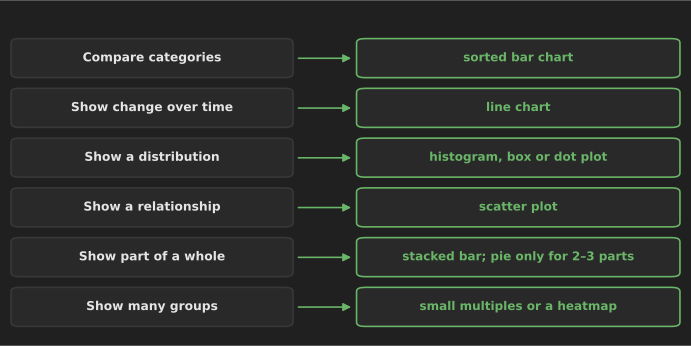
1. Start from the question, then choose the chart
Why it works. Every chart type is built for a kind of comparison. Once you know whether you are comparing categories, showing change, a distribution, a relationship or a part of a whole, the choice is mostly made. The Financial Times' Visual Vocabulary organizes charts this way, into nine relationships: deviation, correlation, ranking, distribution, change over time, part-to-whole, magnitude, spatial and flow.
How to apply it. Before opening any tool, write the chart's message as a sentence, such as "West is the only region whose sales fell this year". If you cannot write the sentence, you are still exploring; keep analyzing before designing.
2. Prefer position and length: bar charts for comparisons
Why it works. In Cleveland and McGill's experiments, people judged values most accurately from position along a common scale, then length, and much less accurately from angle, area and color intensity (Cleveland and McGill, 1984). A 2010 crowdsourced replication by Heer and Bostock found a similar ranking (Heer and Bostock, 2010). That is why bar and dot charts usually beat pie charts, bubble charts and 3D effects for comparing values.
How to apply it.
- Sort the bars by value unless the categories have a natural order (months, age groups).
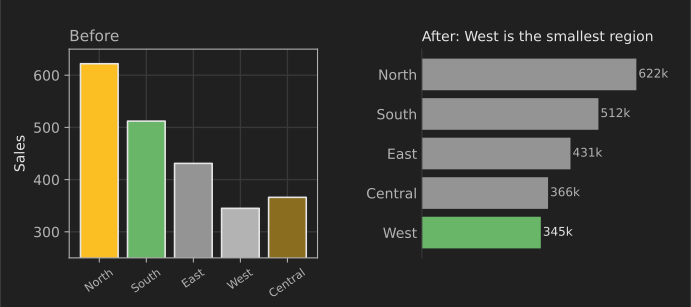
- Start the value axis at zero. A bar's length is the value, so a truncated axis exaggerates differences. In the "before" chart below, the axis starts at 250, so West's bar looks about a quarter the height of North's, although West's sales are 55% of North's.
- Use horizontal bars when category names are long, so labels stay readable without rotation.
- Use pie charts sparingly, for two or three parts at most, where "about half" or "a quarter" is the message. For anything else, a bar chart or a 100% stacked bar compares parts more accurately.
3. Use line charts for change over time
Why it works. A line connects observations in order, so the eye reads slope, direction and turning points immediately.
How to apply it.
- Put time on the horizontal axis, running left to right, with evenly spaced intervals. If data is missing for a period, show the gap rather than silently connecting across it.
- A line chart's axis does not need to start at zero, because readers judge slope and position, not length. Choose a range that shows meaningful variation without exaggerating noise, and say so if the range is narrow.
- Avoid dual-axis charts (two different y-axes). The apparent relationship between the lines depends on how each axis was scaled, which is an arbitrary choice. Use two charts stacked with a shared x-axis, or index both series to 100 at a start date.
- Compare complete periods only. A partial final month looks like a collapse.
- Keep it to a few lines. With more, use technique 6 (highlight) or 8 (small multiples).
4. Show the distribution, not just the average
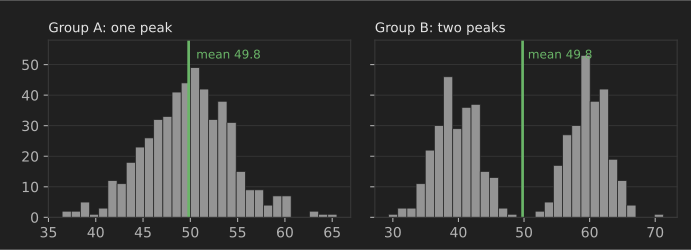
Why it works. An average hides the shape of the data: skew, outliers, clusters and gaps. Anscombe's famous quartet is four datasets with nearly identical means, variances and correlations that look completely different when plotted (Anscombe, 1973).
How to apply it. Use a histogram for one group, box plots or strip (dot) plots to compare several groups, and show individual points when there are fewer than a few hundred. Try more than one bin width on a histogram, because the bins can hide or invent peaks.
The two groups below have the same mean, 49.8, but group B is two separate populations, and almost nobody in it is near the average:
import matplotlib.pyplot as plt
import numpy as np

rng = np.random.default_rng(1)
a = rng.normal(50, 5, 500)                          # one peak
b = np.concatenate([rng.normal(40, 3, 250), rng.normal(60, 3, 250)])  # two peaks
print(f"means: {a.mean():.1f} vs {b.mean():.1f}")  # almost the same average

fig, axes = plt.subplots(1, 2, figsize=(7, 2.6), sharey=True)
for ax, data, title in zip(axes, [a, b], ["Group A", "Group B"]):
    ax.hist(data, bins=30, color="#9e9e9e")
    ax.axvline(data.mean(), color="#6ab668", linewidth=2)
    ax.set_title(title, loc="left")
fig.tight_layout()
fig.savefig("distributions.png", dpi=150)
means: 49.8 vs 49.8
For techniques that summarize distributions numerically, see descriptive statistics and exploratory analysis in our techniques guide.
5. Use scatter plots for relationships
Why it works. A scatter plot shows every observation of two numeric variables at once, so you see the direction and strength of a relationship, curvature, clusters and outliers, none of which a correlation coefficient alone reveals.
How to apply it.
- Put the variable you think is the driver on the x-axis and the outcome on the y-axis.
- With many points, reduce overplotting: make points smaller and semi-transparent, or switch to a 2D histogram or hexbin plot.
- Add a trend line only if it helps the message, and label it honestly ("linear fit", not "prediction").
- Use a log scale for heavily skewed values such as income, population or order value, and label the axis clearly so readers notice.
- Remember that a pattern shows association, not cause.
6. Highlight what matters with color and annotation
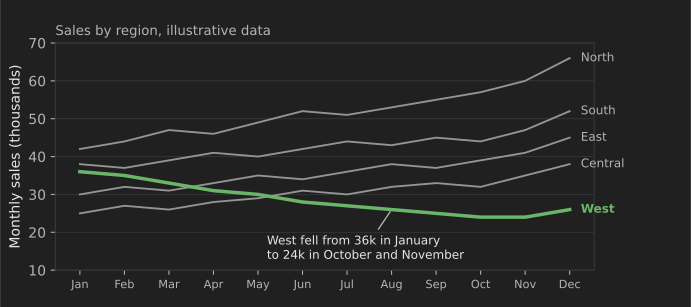
Why it works. Color is the fastest way to direct attention, but only if it is used for one thing. If every series has its own bright color, nothing stands out. A common design practice is to draw context in grey and the subject of the message in one accent color, then explain it with a short annotation.
How to apply it. Write the message as the chart title (a statement, not a label), color the series it is about, and annotate the point that matters on the chart itself.
The "after" bar chart in technique 2 uses the same approach. Here is the code for it:
import matplotlib.pyplot as plt

sales = {"North": 622, "South": 512, "East": 431, "Central": 366, "West": 345}
names = sorted(sales, key=sales.get)            # smallest at the bottom
colors = ["#6ab668" if n == "West" else "#9e9e9e" for n in names]

fig, ax = plt.subplots(figsize=(6, 3))
ax.barh(names, [sales[n] for n in names], color=colors)
for i, n in enumerate(names):                   # label bars directly, drop the x-axis
    ax.text(sales[n] + 8, i, f"{sales[n]}k", va="center")
ax.set_xlim(0, 700)
ax.xaxis.set_visible(False)
for side in ("top", "right", "bottom"):
    ax.spines[side].set_visible(False)
ax.set_title("West had the lowest sales of the five regions", loc="left")
fig.tight_layout()
fig.savefig("regions.png", dpi=150)
print("saved", names)
saved ['West', 'Central', 'East', 'South', 'North']
Matplotlib draws the first bar of barh at the bottom, which is why sorting from smallest to largest puts the largest region on top.
7. Remove clutter that does not carry information
Why it works. Every line, color and label competes for attention. Edward Tufte called the ink that shows data "data-ink" and argued for removing non-data ink that adds nothing (The Visual Display of Quantitative Information, 1983). Treat it as a principle, not a rule to follow to the extreme: some gridlines and labels genuinely help readers.
How to apply it. Compare the before and after charts in technique 2 and remove, one at a time:
- 3D effects, shadows, gradients and background images (never useful in analytical charts);
- heavy gridlines (keep light ones only if readers need to read values);
- borders around the chart and the plot area;
- legends that can be replaced by labeling series directly;
- extra decimal places (
345k, not345,214.37); - rotated text, by switching to horizontal bars.
Then check that the chart still answers its question. If removing something makes the chart harder to read, put it back.
8. Use small multiples instead of one crowded chart
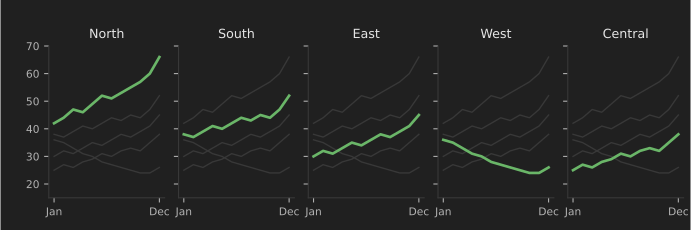
Why it works. When many series share one chart, lines cross and colors run out (a "spaghetti chart"). Small multiples, a term popularized by Tufte, repeat the same small chart once per group with identical scales, so the eye compares shapes across panels.
How to apply it. Keep the axes identical across panels (a shared y-axis), order the panels meaningfully (by size or geography, not alphabetically by default) and, as below, draw the other groups faintly in each panel for context. In Python, seaborn's relplot(..., col="region") or matplotlib's subplots(sharey=True) do this; in Tableau and Power BI, use the small-multiples or trellis options. For many groups and periods at once, a heatmap of a table (rows as groups, columns as periods, a single-hue color scale) is a compact alternative.
9. Choose colors everyone can read
Why it works. About 1 in 12 men has a color vision deficiency, most often difficulty telling red from green (US National Eye Institute). A red-versus-green "bad/good" chart can be unreadable for them. Accessibility guidelines also ask for enough contrast: WCAG 2.2 success criterion 1.4.11 calls for a contrast ratio of at least 3:1 for graphical objects needed to understand content, which its guidance applies to chart lines and segments (W3C).
How to apply it.
- Do not rely on color alone (WCAG 1.4.1): add direct labels, patterns, line styles or position.
- Use few colors: one accent plus grey covers most analytical charts.
- For categories, use a palette designed for color vision deficiency, such as the Okabe–Ito palette from the Color Universal Design guidance; for ordered values, use one hue from light to dark; for values above and below a midpoint, a diverging scale with a neutral middle.
- Avoid rainbow color scales for continuous data: they create false boundaries and are hard to read in grayscale.
- Check your chart with a color-blindness simulator (built into many design tools and browser developer tools) and in grayscale.
10. Design dashboards around decisions
Why it works. A dashboard is a set of charts that people check repeatedly to decide whether to act. When it shows everything, it helps with nothing. Stephen Few's Information Dashboard Design (2006) defined a dashboard as information needed to achieve objectives, arranged on a single screen so it can be monitored at a glance; that is still a good test.
How to apply it.
- Start from the decisions the audience makes and the few metrics behind them; leave the rest for a drill-down page.
- Put the most important numbers top-left, as big figures, where readers of left-to-right languages look first.
- Give every number context: a target, the previous period or the same period last year. "1,240 orders" means little; "1,240 orders, 8% below target" means something.
- Keep chart types and colors consistent across the page, and use color for status or the highlighted item only.
- Show definitions and freshness: what counts as an order, and when the data was last updated.
- Test with a real user: ask them what the dashboard tells them in 10 seconds, and fix whatever they misread.
Power BI, Tableau and Data Studio all support these practices; see 20 data analysis tools for how they compare.
A checklist before you share a chart
- Does the title state the message, and does the chart support it at a glance?
- Is the chart type matched to the question (comparison, time, distribution, relationship, part-to-whole)?
- Do bar charts start at zero, and are categories sorted?
- Is there one accent color, with labels or patterns so color is not the only cue?
- Is everything that does not help removed: 3D, shadows, gradients, heavy gridlines, redundant legends?
- Are units, time period, data source and any exclusions stated?
- Would the chart mislead if someone screenshotted it without the surrounding text?
Where to go next
- Practice by remaking a chart from one of our 25 data analysis projects for beginners, first as quickly as possible, then using this checklist.
- Learn the methods behind the charts in 15 data analysis techniques, and get the data ready with 30 SQL queries for data analysts.
- Browse the matplotlib gallery and Datawrapper Academy for many more worked examples.
References
- Anscombe, F. J. (1973). Graphs in statistical analysis. The American Statistician, 27(1), 17–21.
- Cleveland, W. S. and McGill, R. (1984). Graphical perception: theory, experimentation, and application to the development of graphical methods. Journal of the American Statistical Association, 79(387), 531–554.
- Few, S. (2006). Information Dashboard Design. O'Reilly Media.
- Financial Times Visual Journalism Team. Visual Vocabulary.
- Heer, J. and Bostock, M. (2010). Crowdsourcing graphical perception: using Mechanical Turk to assess visualization design. Proceedings of CHI 2010.
- Okabe, M. and Ito, K. Color Universal Design: how to make figures and presentations that are friendly to colorblind people.
- Tufte, E. R. (1983). The Visual Display of Quantitative Information. Graphics Press.
- US National Eye Institute. Color blindness.
- W3C. Understanding SC 1.4.11: Non-text contrast and Understanding SC 1.4.1: Use of color. WCAG 2.2.