There is no single best data analysis tool. Analysts use a small stack: somewhere to store and query data (usually SQL), somewhere to clean and analyze it (a spreadsheet, Python or R), and somewhere to share results (a BI dashboard or a report). This guide covers 20 tools across those layers, says plainly who each one is for, what it costs to start and what to watch out for, and ends with starter stacks for common goals.
Who it is for. Beginners deciding what to learn first, and working analysts checking what changed in 2026. If you only have time for three tools, learn a spreadsheet, SQL and one BI tool, then add Python or R.
How we chose and checked. We picked tools that are widely used in analyst work, have a free way to start, and cover different jobs, so the list is a toolkit rather than 20 versions of the same thing. Versions, prices and limits were checked against each vendor's own pages or release notes on 25 October 2026 and are linked inline. Prices change and vary by country; treat them as a snapshot. We did not run benchmarks, and we have no commercial relationship with any vendor listed.
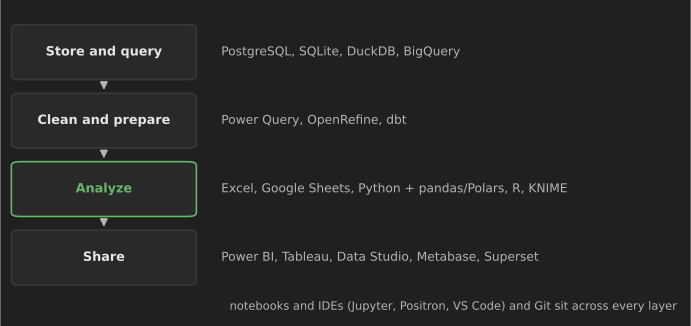
The 20 tools at a glance
| # | Tool | Layer | Best for | Free way to start |
|---|---|---|---|---|
| 1 | Microsoft Excel | Analyze | Everyday business analysis, finance | Excel for the web (free, limited) |
| 2 | Google Sheets | Analyze | Collaborative, lightweight analysis | Free with a Google account |
| 3 | PostgreSQL | Store and query | Learning and using production-grade SQL | Open source |
| 4 | SQLite | Store and query | Practicing SQL with zero setup | Public domain |
| 5 | DuckDB | Store and query | Fast SQL on local CSV and Parquet files | Open source (MIT) |
| 6 | Google BigQuery | Store and query | SQL on large and public datasets | Sandbox, no card |
| 7 | Python + pandas | Analyze | Cleaning, analysis and automation | Open source |
| 8 | Polars | Analyze | Larger-than-comfortable data in Python | Open source |
| 9 | Jupyter and Colab | Across layers | Notebooks that mix code, output and notes | Open source / free tier |
| 10 | R + tidyverse | Analyze | Statistics and publication-quality charts | Open source |
| 11 | RStudio and Positron | Across layers | IDEs built for data work in R and Python | Free desktop editions |
| 12 | Power BI | Share | Dashboards in Microsoft organizations | Desktop is free (Windows) |
| 13 | Tableau | Share | Visual exploration and dashboards | Tableau Public (public only) |
| 14 | Data Studio | Share | Free dashboards on Google data | Free |
| 15 | Metabase | Share | Self-serve questions on a database | Open-source edition |
| 16 | Apache Superset | Share | Open-source BI at scale | Open source (Apache 2.0) |
| 17 | KNIME | Analyze | Visual, no-code workflows | Free desktop |
| 18 | OpenRefine | Clean and prepare | Fixing messy text and categories | Open source |
| 19 | dbt | Clean and prepare | Tested SQL transformations in a warehouse | dbt Core, open source |
| 20 | Git and GitHub | Across layers | Version control and a public portfolio | Free |
Spreadsheets
1. Microsoft Excel
What it is. The default analysis tool in most businesses: formulas, pivot tables, charts, and two features beginners often miss. Power Query (Data > Get & Transform) imports and cleans data with recorded, repeatable steps (Power Query docs), and Python in Excel lets you write pandas code in a cell. Python in Excel runs in Microsoft's cloud, not on your computer, needs internet access and a qualifying Microsoft 365 subscription, and works in Excel for Windows, Mac and the web but not on phones or tablets (Microsoft).
Best for: quick analysis, finance and operations work, and sharing with people who live in Excel. Nearly every analyst job expects it.
Watch out: a worksheet holds at most 1,048,576 rows (Excel limits), and manual copy-paste steps are hard to audit or repeat. Move repeated cleaning into Power Query and large data into a database.
Start with: pivot tables, XLOOKUP, then Power Query.
2. Google Sheets
What it is. A free, browser-based spreadsheet with real-time collaboration, the QUERY function (SQL-like queries on a range), IMPORTRANGE and connectors to BigQuery. Gemini features are available on some Google Workspace plans.
Best for: shared trackers, small analyses, surveys from Google Forms and teaching.
Watch out: a spreadsheet is limited to 20 million cells or 100 MB (Google), and large sheets slow down well before that.
Start with: pivot tables, QUERY and FILTER.
SQL databases and engines
SQL is the skill that transfers between all four tools below, and analyst roles widely expect it. Practice with our 30 SQL queries every data analyst should know, which come with a free practice database.
3. PostgreSQL
What it is. A free, open-source relational database with one of the most complete SQL dialects, including window functions, CTEs and JSON support. PostgreSQL 18 was released on 25 September 2025 (release announcement); PostgreSQL 19 reached its first release candidate on 15 October 2026.
Best for: learning SQL that transfers to most workplaces, and as the database behind many applications analysts query.
Watch out: running a server is extra setup. For learning, a hosted free tier, a Docker container or the in-browser PGlite REPL avoids it.
4. SQLite
What it is. A database in a single file, with no server, built into Python, browsers and phones (sqlite.org). DB Browser for SQLite gives it a free graphical interface.
Best for: practicing SQL with zero setup, and storing data for small projects and scripts.
Watch out: fewer data types than PostgreSQL (DECIMAL values are stored as floating point) and some dialect differences, such as how NULL sorts. Fine for learning; check your workplace's dialect before interviews.
5. DuckDB
What it is. An in-process analytical SQL engine: no server, and it queries CSV, Parquet and JSON files directly, often much faster than loading them into a spreadsheet or pandas. DuckDB 2.0.0 LTS was released on 21 October 2026 with a new SQL parser, a client-server mode and support until at least October 2027; database files written by 2.0 cannot be read by earlier versions (announcement).
Best for: analysts who have outgrown spreadsheets but do not have, or need, a data warehouse; running SQL from Python on local files.
Watch out: it is designed for analysis by one user or process, not as a shared transactional database. Version 2.0 is days old at the time of writing; if you depend on extensions, check they support it before upgrading.
6. Google BigQuery
What it is. Google Cloud's serverless data warehouse. The BigQuery sandbox needs no credit card and gives 10 GiB of storage and 1 TiB of query processing a month, with tables expiring after 60 days (sandbox docs). Google hosts many public datasets you can query immediately.
Best for: practicing SQL on genuinely large data, and teams already using Google Cloud.
Watch out: outside the sandbox, you pay for data scanned. Select only the columns you need and use the query size estimate before running.
Programming languages and notebooks
7. Python with pandas
What it is. The most widely used language for data work, with pandas as its table-manipulation library. pandas 3.0 (21 January 2026) made copy-on-write behavior and a dedicated string type the defaults, which changes how some older code behaves (what's new); pandas 3.1 followed on 22 October 2026.
Best for: repeatable cleaning and analysis, automation of recurring reports, statistics and a path into machine learning.
Watch out: older tutorials rely on chained assignment (df[df.x > 0]["y"] = 1), which no longer works under copy-on-write. Learn from material that covers pandas 2.x or later. Our pandas tips and tricks and Python libraries for data science go further, and Python automation scripts shows report automation.
8. Polars
What it is. A fast DataFrame library written in Rust, with a lazy query engine that optimizes a whole chain of operations before running it (docs). Polars 2.0.0 was published on 6 October 2026.
Best for: data that makes pandas slow or runs out of memory, and analysts who like an expression-based, SQL-like style.
Watch out: fewer tutorials and integrations than pandas, and its API differs, so do not try to learn both at once. Learn pandas first unless your data forces the issue.
9. Jupyter notebooks and Google Colab
What it is. Notebooks mix code, output, charts and written notes in one document (jupyter.org); JupyterLab is the main interface. Google Colab runs notebooks in the browser with nothing to install.
Best for: exploration, teaching, and sharing an analysis with its reasoning.
Watch out: cells run out of order make results impossible to reproduce. Before sharing, restart the kernel and run all cells top to bottom; move code you reuse into .py files.
10. R with the tidyverse
What it is. A language built for statistics, with the tidyverse packages (dplyr, tidyr, ggplot2) for data manipulation and charts. The current release is R 4.6.1 (24 June 2026), with 4.6.2 scheduled for 29 October 2026 (r-project.org).
Best for: statistical analysis, research, public health, academia, and high-quality charts with ggplot2; Quarto and R Markdown for reproducible reports.
Watch out: in many job markets, analyst postings mention Python more often than R, so check postings for the roles you want. Learn one language well rather than both partially.
11. RStudio and Positron
What it is. IDEs designed for data work. RStudio Desktop is the long-standing R environment. Positron, also from Posit, is a newer IDE built on the open-source base of VS Code that treats R and Python equally, with a data explorer and variables pane; it is free to use and source-available under the Elastic License 2.0 (GitHub).
Best for: analysts who want a data-focused IDE rather than a general code editor. VS Code with the Python and Jupyter extensions is a common alternative.
Watch out: Posit says RStudio continues to be supported; you do not need to switch an existing setup that works.
Business intelligence and dashboards
12. Microsoft Power BI
What it is. Microsoft's BI platform: Power BI Desktop to model data and build reports (with Power Query and the DAX formula language), and the Power BI service to share them. Desktop is a free download for Windows; sharing reports needs a paid licence, listed at $14 per user per month for Pro and $24 for Premium Per User, billed yearly (Microsoft pricing, checked 25 October 2026; prices vary by region).
Best for: organizations using Microsoft 365, and analyst roles that list it, which is many.
Watch out: Desktop runs only on Windows. DAX has a learning curve; good data modeling (a star schema) matters more than clever formulas.
13. Tableau
What it is. A visual analytics tool known for fast drag-and-drop exploration. Tableau Public is free, but everything you publish is public, so it suits portfolios and open data, not company data. Paid Tableau Desktop and Tableau Cloud licences cover private work, and Salesforce now also markets Tableau Next, an agent-based analytics product. Browse the Tableau Public gallery to see what is possible.
Best for: visual exploration, dashboards and a public portfolio.
Watch out: never publish confidential data to Tableau Public. Check current licence prices with Salesforce directly.
14. Data Studio (formerly Looker Studio)
What it is. Google's free dashboard tool. Google renamed Looker Studio back to Data Studio in April 2026; the paid edition is Data Studio Pro (release notes). It connects easily to Google Sheets, BigQuery, Google Analytics and Google Ads, and its Conversational Analytics feature became generally available in July 2026.
Best for: free, shareable dashboards on Google data, marketing reporting and portfolios.
Watch out: older tutorials use the names Google Data Studio (before 2022) and Looker Studio (2022–2026) for the same product. Reports on large, unaggregated data can be slow; aggregate in BigQuery first.
15. Metabase
What it is. A BI tool focused on letting non-technical colleagues ask questions of a database through a point-and-click query builder, with SQL available for analysts. The open-source edition is free to self-host under the AGPL (licence); Metabase Cloud and paid editions add hosting and features.
Best for: small and mid-sized teams that want self-serve reporting on a PostgreSQL or MySQL database quickly.
Watch out: self-hosting means you own upgrades, backups and security.
16. Apache Superset
What it is. An open-source (Apache 2.0) BI platform for exploring data and building dashboards on SQL databases (superset.apache.org). Version 6.0 (December 2025) brought a redesigned interface and dark mode, 6.1 followed in May 2026, and release candidates for 7.0 appeared in October 2026 (releases).
Best for: data teams that want open-source BI at scale and can run it themselves; a common alternative to commercial BI.
Watch out: more setup and SQL knowledge needed than Metabase; not a first BI tool for most beginners.
Data preparation and workflow
17. KNIME Analytics Platform
What it is. A free desktop application for building analysis workflows by connecting nodes visually: read, clean, join, aggregate, model, report (KNIME). Since late 2025, new versions arrive about every six weeks.
Best for: analysts who want repeatable, documented workflows without writing code, and teams mixing coders and non-coders.
Watch out: large workflows become hard to read; group nodes into components and annotate them.
18. OpenRefine
What it is. A free, open-source tool for cleaning messy data, running locally in your browser (download). Its clustering feature finds values like "N.Y.", "New York" and "new york " that should be one category, and every step is recorded and can be replayed. Version 3.10.0 was released on 26 February 2026.
Best for: one-off cleaning of inconsistent text, categories and names, especially from surveys, scraped data and public records.
Watch out: it works in memory, so very large files need more RAM or a database.
19. dbt
What it is. A framework for transforming data inside a warehouse using version-controlled SQL SELECT statements, with tests (for example, "this column is unique and never null") and auto-generated documentation (docs). dbt Core is open source (Apache 2.0); dbt Labs and Fivetran completed their merger on 1 June 2026 (Fivetran press release).
Best for: analysts moving toward analytics engineering, and teams that need trustworthy, tested metric definitions.
Watch out: it assumes SQL and Git fluency; learn those first. It does not load data; it transforms data already in the warehouse.
20. Git and GitHub
What it is. Git tracks every change to your SQL, notebooks and scripts; GitHub hosts repositories online, and GitHub Pages can host a free portfolio site.
Best for: everyone who writes queries or code. A GitHub profile with three well-documented projects is a common way for beginners to show their work.
Watch out: never commit passwords, API keys or confidential data. Add data files and .env files to .gitignore.
What about AI assistants?
Most tools above now include an AI assistant, such as Copilot in Excel and Power BI, Gemini in Google Sheets and Data Studio's Conversational Analytics, and general chat assistants can write SQL and pandas code. They are genuinely useful for drafting formulas and queries, explaining unfamiliar code and suggesting charts. Use them like a fast junior colleague: check every number they produce against a query or calculation you understand, and do not paste confidential data into tools your organization has not approved. You still need to know SQL and the basics of statistics to notice when an answer is wrong.
Starter stacks by goal
| Goal | Stack | Why |
|---|---|---|
| First analyst job, $0 budget | Excel or Sheets → SQLite or PostgreSQL → Power BI Desktop or Tableau Public → GitHub | Matches the most common job requirements |
| Microsoft-based employer | Excel + Power Query → SQL Server or PostgreSQL → Power BI | Power Query skills transfer directly into Power BI |
| Google-based employer or marketing | Google Sheets → BigQuery (sandbox) → Data Studio | All free to start and connected |
| Python-first analyst | SQL + DuckDB → pandas in Jupyter or Positron → a BI tool → Git | Reproducible analysis and automation |
| Research and statistics | R + tidyverse in RStudio or Positron → Quarto reports | Strongest statistics ecosystem |
| Growing team without a BI budget | PostgreSQL → dbt Core → Metabase or Superset | Open-source, tested metrics and self-serve dashboards |
How to choose (and what to learn first)
- Read ten job postings for the role you want and count the tools named. Let that, not this list, set your priorities.
- Learn SQL early. It is the most transferable skill here, and every BI tool and language connects to a SQL database.
- Pick one BI tool and one language, not all of them. Concepts such as data modeling, aggregation and chart choice transfer.
- Prove it with projects. Our 25 data analysis projects for beginners suggest which tool fits each project, and 15 data analysis techniques and 10 data visualization techniques cover the methods that matter more than any tool.
References
All accessed 25 October 2026.
- Microsoft. Introduction to Python in Excel; Excel specifications and limits; Power BI pricing.
- Google. Files you can store in Google Drive (Sheets limits); BigQuery sandbox; Data Studio release notes.
- PostgreSQL Global Development Group. PostgreSQL 18 released, 25 September 2025.
- DuckDB. Announcing DuckDB 2.0.0 LTS, 21 October 2026.
- pandas. What's new in 3.0.0, 21 January 2026.
- The R Foundation. The R Project for Statistical Computing (release news).
- Posit. Positron repository and licence.
- Metabase. Licensing.
- Fivetran. Fivetran and dbt Labs complete merger, 1 June 2026.