Most of a data analyst's SQL comes down to a few dozen patterns: filter, group, join, rank, compare with the previous period, and check the data before trusting it. This guide gives you 30 of them, in the order you would learn them, each answering a real business question on the same small online-shop database. Every query shows its actual output, followed by what to watch out for.
Who it is for. You know what a table is and have seen a SELECT statement. You are learning SQL for an analyst role, or you already use it and want the window-function and cohort patterns that come up in real projects and interviews.
How we checked it. All 30 queries were run in October 2026 on PostgreSQL 18.6 (through PGlite, PostgreSQL compiled to WebAssembly) and on SQLite 3.50.4 (through Python's sqlite3 module), and the two databases returned the same results. The outputs shown are PostgreSQL's, copied from the run. Where a query needs different syntax in SQLite or MySQL, the difference is noted under it. MySQL, SQL Server and BigQuery were not tested.
Set up the practice database
Download sql-practice-shop.sql (11 KB) and run it in any SQL tool. It creates five tables of invented data: 15 customers, 8 products, 39 orders from January to June 2026, 61 order lines and 93 website events. It contains a few deliberate problems of the kind found in real data: a customer with no country, a duplicate customer record, a promotional price and some cancelled orders.
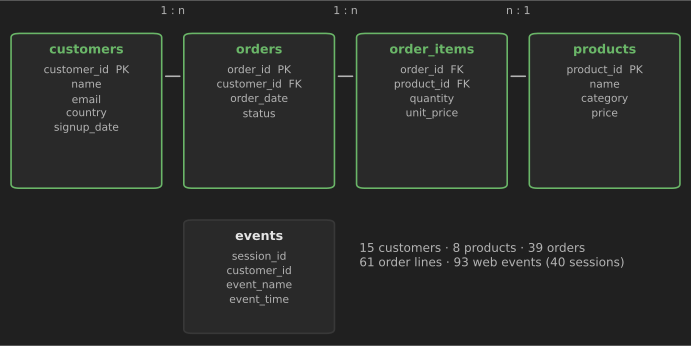
Three free ways to run it, none of which needs a database server:
- SQLite: install DB Browser for SQLite, create a new database and run the file in the Execute SQL tab. Or from Python:
import sqlite3

con = sqlite3.connect("shop.db")
con.executescript(open("sql-practice-shop.sql", encoding="utf-8").read())
print(con.execute("SELECT COUNT(*) FROM orders").fetchone())  # (39,)
- PostgreSQL: on a local install, run
psql -d yourdb -f sql-practice-shop.sql. Without an install, paste the file into the PGlite REPL, which runs PostgreSQL inside your browser. - DuckDB:
duckdb shop.duckdb < sql-practice-shop.sql. DuckDB 2.0, released on 21 October 2026, replaced its PostgreSQL-derived SQL parser (announcement). The file uses only basic statements, but we did not test it on DuckDB.
Two definitions are used throughout. Revenue is the sum of quantity * unit_price over the lines of completed orders (cancelled orders are excluded), and average order value is revenue divided by the number of completed orders. Writing definitions like these down before you query is a habit worth copying: many disagreements about "the numbers" are really disagreements about definitions.
How to use this guide. Before reading each query, try to write it yourself from the question, then compare. Getting it wrong first and fixing it is how SQL sticks.
Select, filter and sort (1–6)
These six queries are the grammar every other query is built from. If any of them feel shaky, practice them until they do not; everything later is a combination of these parts.
1. Filter rows and sort the result
Question: Which customers are in India, oldest sign-up first?
SELECT customer_id, name, signup_date
FROM customers
WHERE country = 'India'
ORDER BY signup_date;
Output (PostgreSQL 18):
customer_id | name       | signup_date
------------+------------+------------
4           | Dev Patel  | 2025-12-15
6           | Farah Khan | 2026-01-12
WHERE keeps the rows that match; ORDER BY sorts what is left. Text values go in single quotes. Without ORDER BY, a database may return rows in any order, and that order can change between runs.
2. Combine conditions with IN and BETWEEN
Question: Which Home or Electronics products cost between 20 and 50?
SELECT name, category, price
FROM products
WHERE category IN ('Home', 'Electronics')
  AND price BETWEEN 20 AND 50
ORDER BY price;
Output (PostgreSQL 18):
name           | category    | price
---------------+-------------+------
Wireless mouse | Electronics | 25.00
USB-C hub      | Electronics | 39.99
Desk lamp      | Home        | 45.00
IN is shorthand for several OR conditions, and BETWEEN includes both ends (20 and 50 would match). Use LIKE 'USB%' for simple pattern matching; in PostgreSQL, ILIKE makes it case-insensitive.
3. Return the top N rows
Question: What are the three most expensive products?
SELECT name, price
FROM products
ORDER BY price DESC
LIMIT 3;
Output (PostgreSQL 18):
name                        | price
----------------------------+-------
Noise-cancelling headphones | 129.00
Desk lamp                   | 45.00
USB-C hub                   | 39.99
LIMIT works in PostgreSQL, MySQL, SQLite, DuckDB and BigQuery. SQL Server uses SELECT TOP 3 ..., and the SQL-standard form FETCH FIRST 3 ROWS ONLY works in PostgreSQL, Oracle and SQL Server (with OFFSET 0 ROWS). If two rows tie for third place, LIMIT picks one arbitrarily; use RANK() (query 19) when ties matter.
4. Count rows, values and distinct values
Question: How many customers do we have, how many have a country, and how many countries?
SELECT COUNT(*)                AS customers,
       COUNT(country)          AS with_country,
       COUNT(DISTINCT country) AS countries
FROM customers;
Output (PostgreSQL 18):
customers | with_country | countries
----------+--------------+----------
15        | 14           | 12
Three different counts from one table. COUNT(*) counts rows, COUNT(country) skips NULLs, and COUNT(DISTINCT country) counts unique non-NULL values. Mixing these up is one of the most common sources of wrong KPIs: "customers" (15) and "customers with a country" (14) are different numbers.
5. Find and replace missing values
Question: Which customers have no country, and how do we label them in a report?
SELECT customer_id, name, COALESCE(country, 'Unknown') AS country
FROM customers
WHERE country IS NULL;
Output (PostgreSQL 18):
customer_id | name        | country
------------+-------------+--------
9           | Ivan Petrov | Unknown
Test for missing values with IS NULL, never = NULL (which is never true). COALESCE returns its first non-NULL argument, so it is the standard way to show a default label.
6. Bucket values with CASE
Question: Which price band does each product fall into?
SELECT name,
       price,
       CASE
         WHEN price < 15  THEN 'budget'
         WHEN price < 50  THEN 'mid-range'
         ELSE 'premium'
       END AS price_band
FROM products
ORDER BY price;
Output (PostgreSQL 18):
name                        | price  | price_band
----------------------------+--------+-----------
Ceramic mug                 | 9.00   | budget
Notebook set                | 12.50  | budget
Wall planner                | 18.00  | mid-range
Wireless mouse              | 25.00  | mid-range
Fountain pen                | 34.00  | mid-range
USB-C hub                   | 39.99  | mid-range
Desk lamp                   | 45.00  | mid-range
Noise-cancelling headphones | 129.00 | premium
CASE is SQL's if-else. Conditions are checked top to bottom and the first match wins, so order them carefully. The same pattern builds age groups, order-size bands and any custom category a report needs.
Group and summarize (7–8)
Grouping turns rows into answers. The rule to remember: every column in SELECT must either be in GROUP BY or inside an aggregate such as COUNT or SUM.
7. Group rows and count them
Question: Which countries have the most customers?
SELECT country, COUNT(*) AS customers
FROM customers
GROUP BY country
ORDER BY customers DESC, country NULLS LAST
LIMIT 5;
Output (PostgreSQL 18):
country  | customers
---------+----------
India    | 2
Portugal | 2
Denmark  | 1
France   | 1
Germany  | 1
GROUP BY produces one row per country. A real dialect difference showed up here: we first wrote ORDER BY customers DESC, country and SQLite put the NULL country first among the ties while PostgreSQL put it last, because SQLite sorts NULLs as the smallest value and PostgreSQL as the largest (SQLite ORDER BY, PostgreSQL sorting). Writing NULLS LAST (supported by PostgreSQL and SQLite 3.30+) makes the result identical everywhere.
8. Filter groups with HAVING
Question: Which countries have at least two customers?
SELECT country, COUNT(*) AS customers
FROM customers
GROUP BY country
HAVING COUNT(*) >= 2
ORDER BY country;
Output (PostgreSQL 18):
country  | customers
---------+----------
India    | 2
Portugal | 2
WHERE filters rows before grouping; HAVING filters groups after it. A quick test: if the condition uses an aggregate such as COUNT(*), it belongs in HAVING. Note the ORDER BY: without it, our two databases returned these two rows in different orders.
Join tables (9–14)
Real questions span tables. Joins combine them; the main risk is that a join quietly duplicates or drops rows, so check row counts whenever you add one.
9. Join three tables
Question: What exactly was in order 1011?
SELECT o.order_id, o.order_date, p.name AS product, oi.quantity, oi.unit_price,
       oi.quantity * oi.unit_price AS line_total
FROM orders AS o
JOIN order_items AS oi ON oi.order_id = o.order_id
JOIN products    AS p  ON p.product_id = oi.product_id
WHERE o.order_id = 1011;
Output (PostgreSQL 18):
order_id | order_date | product                     | quantity | unit_price | line_total
---------+------------+-----------------------------+----------+------------+-----------
1011     | 2026-03-26 | Ceramic mug                 | 3        | 8.10       | 24.30
1011     | 2026-03-26 | USB-C hub                   | 1        | 39.99      | 39.99
1011     | 2026-03-26 | Noise-cancelling headphones | 3        | 129.00     | 387.00
Each JOIN ... ON links a foreign key to the key it refers to. Table aliases (o, oi, p) keep long queries readable. Second dialect lesson: PostgreSQL returns 24.30 for the first line, but SQLite returned 24.299999999999997, because SQLite stores DECIMAL values as floating-point numbers (SQLite datatypes). For money, use exact NUMERIC/DECIMAL types in databases that have them, and round only for display.
10. Aggregate across a join
Question: How many units and how much revenue did each category bring in?
SELECT p.category,
       SUM(oi.quantity)                          AS units,
       ROUND(SUM(oi.quantity * oi.unit_price), 2) AS revenue
FROM orders AS o
JOIN order_items AS oi ON oi.order_id = o.order_id
JOIN products    AS p  ON p.product_id = oi.product_id
WHERE o.status = 'completed'
GROUP BY p.category
ORDER BY revenue DESC;
Output (PostgreSQL 18):
category    | units | revenue
------------+-------+--------
Electronics | 32    | 1291.88
Home        | 39    | 528.30
Stationery  | 28    | 500.50
Revenue is calculated from the order lines (quantity * unit_price), not from the catalog price, because prices change and discounts happen. The filter status = 'completed' excludes cancelled orders; decide that rule once and use it in every revenue query, or your numbers will not agree with each other.
11. Find rows with no match (LEFT JOIN anti-join)
Question: Which customers signed up but never ordered?
SELECT c.customer_id, c.name, c.signup_date
FROM customers AS c
LEFT JOIN orders AS o ON o.customer_id = c.customer_id
WHERE o.order_id IS NULL;
Output (PostgreSQL 18):
customer_id | name        | signup_date
------------+-------------+------------
15          | Omar Haddad | 2026-05-21
A LEFT JOIN keeps every customer even when no order matches, filling the order columns with NULL. Keeping only those NULL rows gives the customers with no orders. This is how you find inactive users, products with no sales or invoices with no payment.
12. Check existence with NOT EXISTS
Question: Which products have never been sold?
SELECT p.product_id, p.name
FROM products AS p
WHERE NOT EXISTS (
  SELECT 1
  FROM order_items AS oi
  WHERE oi.product_id = p.product_id
);
Output (PostgreSQL 18):
product_id | name
-----------+-------------
8          | Wall planner
NOT EXISTS answers the same kind of question as query 11 and is often clearer. Avoid NOT IN (subquery) for this: if the subquery returns a single NULL, NOT IN returns no rows at all.
13. Group by month
Question: How many completed orders and how much revenue per month?
SELECT TO_CHAR(o.order_date, 'YYYY-MM')           AS month,
       COUNT(DISTINCT o.order_id)                  AS orders,
       ROUND(SUM(oi.quantity * oi.unit_price), 2)  AS revenue
FROM orders AS o
JOIN order_items AS oi ON oi.order_id = o.order_id
WHERE o.status = 'completed'
GROUP BY month
ORDER BY month;
Output (PostgreSQL 18):
month   | orders | revenue
--------+--------+--------
2026-01 | 4      | 171.48
2026-02 | 3      | 305.00
2026-03 | 4      | 598.29
2026-04 | 6      | 333.49
2026-05 | 11     | 574.94
2026-06 | 8      | 337.48
Date functions are where SQL dialects differ most. COUNT(DISTINCT o.order_id) matters here: after the join there is one row per order line, so a plain COUNT(*) would count lines, not orders.
SQLite: replace TO_CHAR(o.order_date, 'YYYY-MM') with strftime('%Y-%m', o.order_date). MySQL uses DATE_FORMAT(o.order_date, '%Y-%m'). In PostgreSQL, DATE_TRUNC('month', o.order_date) is the usual choice when you want a real date rather than a text label.
14. Pivot with conditional aggregation
Question: How many orders were completed and cancelled each month?
SELECT TO_CHAR(order_date, 'YYYY-MM')                       AS month,
       SUM(CASE WHEN status = 'completed' THEN 1 ELSE 0 END) AS completed,
       SUM(CASE WHEN status = 'cancelled' THEN 1 ELSE 0 END) AS cancelled
FROM orders
GROUP BY month
ORDER BY month;
Output (PostgreSQL 18):
month   | completed | cancelled
--------+-----------+----------
2026-01 | 4         | 1
2026-02 | 3         | 0
2026-03 | 4         | 0
2026-04 | 6         | 1
2026-05 | 11        | 1
2026-06 | 8         | 0
SUM(CASE WHEN ... THEN 1 ELSE 0 END) turns row values into columns, which works in every SQL database. PostgreSQL, SQLite and DuckDB also accept the shorter COUNT(*) FILTER (WHERE status = 'cancelled').
SQLite: use strftime('%Y-%m', order_date) for the month, as in query 13.
Subqueries and CTEs (15–17)
A common table expression (CTE) is a named, temporary result defined with WITH. CTEs let you build an analysis in readable steps instead of one nested block.
15. Build a KPI summary with a CTE
Question: What are total completed orders, revenue and average order value?
WITH order_totals AS (
  SELECT o.order_id, SUM(oi.quantity * oi.unit_price) AS order_value
  FROM orders AS o
  JOIN order_items AS oi ON oi.order_id = o.order_id
  WHERE o.status = 'completed'
  GROUP BY o.order_id
)
SELECT COUNT(*)                   AS orders,
       ROUND(SUM(order_value), 2) AS revenue,
       ROUND(AVG(order_value), 2) AS avg_order_value
FROM order_totals;
Output (PostgreSQL 18):
orders | revenue | avg_order_value
-------+---------+----------------
36     | 2320.68 | 64.46
The CTE first computes one value per order; the outer query then summarizes those orders. Computing average order value directly from order lines would give the average line value, a different and misleading number.
16. Compare rows with a subquery
Question: Which orders were worth more than twice the average order?
WITH order_totals AS (
  SELECT o.order_id, o.customer_id, SUM(oi.quantity * oi.unit_price) AS order_value
  FROM orders AS o
  JOIN order_items AS oi ON oi.order_id = o.order_id
  WHERE o.status = 'completed'
  GROUP BY o.order_id, o.customer_id
)
SELECT order_id, customer_id, ROUND(order_value, 2) AS order_value
FROM order_totals
WHERE order_value > 2 * (SELECT AVG(order_value) FROM order_totals)
ORDER BY order_value DESC;
Output (PostgreSQL 18):
order_id | customer_id | order_value
---------+-------------+------------
1011     | 6           | 451.29
1006     | 6           | 203.00
1022     | 1           | 144.97
The subquery (SELECT AVG(order_value) FROM order_totals) returns a single number that each row is compared with. The same pattern finds unusually large transactions, slow deliveries or high-cost tickets.
17. Build a one-row-per-customer table
Question: Who are the best customers, and when did they first and last buy?
WITH order_totals AS (
  SELECT o.order_id, o.customer_id, o.order_date,
         SUM(oi.quantity * oi.unit_price) AS order_value
  FROM orders AS o
  JOIN order_items AS oi ON oi.order_id = o.order_id
  WHERE o.status = 'completed'
  GROUP BY o.order_id, o.customer_id, o.order_date
)
SELECT c.customer_id,
       c.name,
       COUNT(t.order_id)            AS orders,
       MIN(t.order_date)            AS first_order,
       MAX(t.order_date)            AS last_order,
       ROUND(SUM(t.order_value), 2) AS total_spent
FROM customers AS c
JOIN order_totals AS t ON t.customer_id = c.customer_id
GROUP BY c.customer_id, c.name
ORDER BY total_spent DESC
LIMIT 5;
Output (PostgreSQL 18):
customer_id | name        | orders | first_order | last_order | total_spent
------------+-------------+--------+-------------+------------+------------
6           | Farah Khan  | 4      | 2026-02-06  | 2026-05-07 | 758.29
1           | Ana Silva   | 5      | 2026-01-27  | 2026-06-15 | 304.44
2           | Ben Okafor  | 4      | 2026-02-27  | 2026-06-09 | 191.99
4           | Dev Patel   | 5      | 2026-01-01  | 2026-05-31 | 181.49
10          | Julia Gomez | 3      | 2026-04-14  | 2026-06-27 | 168.50
Analysts build this customer summary over and over: it feeds churn analysis, RFM scoring (see technique 12 in our data analysis techniques guide) and CRM exports. Note that Ana Silva appears under one ID here; query 29 shows she also has a duplicate customer record.
Window functions (18–25)
A window function computes a value across a set of rows related to the current row without collapsing them the way GROUP BY does. Ranking, running totals, period-over-period change and moving averages are all window functions. They are part of the SQL standard and supported by PostgreSQL, MySQL 8+, SQL Server, BigQuery, Snowflake, DuckDB and SQLite 3.25+ (SQLite window functions, PostgreSQL tutorial).
18. Keep the latest row per group with ROW_NUMBER
Question: What was each customer's most recent completed order?
WITH ranked AS (
  SELECT customer_id, order_id, order_date,
         ROW_NUMBER() OVER (PARTITION BY customer_id
                            ORDER BY order_date DESC, order_id DESC) AS rn
  FROM orders
  WHERE status = 'completed'
)
SELECT customer_id, order_id, order_date
FROM ranked
WHERE rn = 1
ORDER BY customer_id
LIMIT 5;
Output (PostgreSQL 18):
customer_id | order_id | order_date
------------+----------+-----------
1           | 1037     | 2026-06-15
2           | 1034     | 2026-06-09
3           | 1028     | 2026-05-27
4           | 1029     | 2026-05-31
5           | 1036     | 2026-06-11
ROW_NUMBER() numbers rows within each PARTITION BY group in the given order; keeping rn = 1 keeps one row per customer. It is also the standard way to remove duplicates while keeping the newest version of a record. Add a tie-breaker (order_id DESC) so the result is deterministic when two orders share a date.
19. Rank within groups
Question: What is the best-selling product in each category by units?
WITH product_units AS (
  SELECT p.category, p.name, SUM(oi.quantity) AS units
  FROM orders AS o
  JOIN order_items AS oi ON oi.order_id = o.order_id
  JOIN products    AS p  ON p.product_id = oi.product_id
  WHERE o.status = 'completed'
  GROUP BY p.category, p.name
),
ranked AS (
  SELECT category, name, units,
         RANK() OVER (PARTITION BY category ORDER BY units DESC) AS rnk
  FROM product_units
)
SELECT category, name, units
FROM ranked
WHERE rnk = 1
ORDER BY category;
Output (PostgreSQL 18):
category    | name           | units
------------+----------------+------
Electronics | Wireless mouse | 17
Home        | Ceramic mug    | 34
Stationery  | Notebook set   | 21
RANK() gives tied rows the same rank (and skips the next number), so ties for first place both appear. Use DENSE_RANK() to avoid gaps, or ROW_NUMBER() when you need exactly one row.
20. Running total
Question: What is cumulative revenue by month?
WITH monthly AS (
  SELECT TO_CHAR(o.order_date, 'YYYY-MM') AS month,
         SUM(oi.quantity * oi.unit_price) AS revenue
  FROM orders AS o
  JOIN order_items AS oi ON oi.order_id = o.order_id
  WHERE o.status = 'completed'
  GROUP BY month
)
SELECT month,
       ROUND(revenue, 2)                             AS revenue,
       ROUND(SUM(revenue) OVER (ORDER BY month), 2)  AS running_total
FROM monthly
ORDER BY month;
Output (PostgreSQL 18):
month   | revenue | running_total
--------+---------+--------------
2026-01 | 171.48  | 171.48
2026-02 | 305.00  | 476.48
2026-03 | 598.29  | 1074.77
2026-04 | 333.49  | 1408.26
2026-05 | 574.94  | 1983.20
2026-06 | 337.48  | 2320.68
SUM(...) OVER (ORDER BY month) adds up all rows up to the current one. Cumulative views are useful for tracking progress toward a target, such as a quarterly sales goal.
SQLite: same change as query 13 for the month label.
21. Period-over-period change with LAG
Question: How did revenue change from one month to the next?
WITH monthly AS (
  SELECT TO_CHAR(o.order_date, 'YYYY-MM') AS month,
         SUM(oi.quantity * oi.unit_price) AS revenue
  FROM orders AS o
  JOIN order_items AS oi ON oi.order_id = o.order_id
  WHERE o.status = 'completed'
  GROUP BY month
)
SELECT month,
       ROUND(revenue, 2)                                AS revenue,
       ROUND(LAG(revenue) OVER (ORDER BY month), 2)     AS prev_month,
       ROUND(100.0 * (revenue - LAG(revenue) OVER (ORDER BY month))
             / LAG(revenue) OVER (ORDER BY month), 1)   AS pct_change
FROM monthly
ORDER BY month;
Output (PostgreSQL 18):
month   | revenue | prev_month | pct_change
--------+---------+------------+-----------
2026-01 | 171.48  | NULL       | NULL
2026-02 | 305.00  | 171.48     | 77.9
2026-03 | 598.29  | 305.00     | 96.2
2026-04 | 333.49  | 598.29     | -44.3
2026-05 | 574.94  | 333.49     | 72.4
2026-06 | 337.48  | 574.94     | -41.3
LAG(revenue) reads the previous row's value; LEAD reads the next one. Month-over-month percentages on small numbers swing wildly, as the +96% and -44% here show, which is why the next query smooths them.
SQLite: same change as query 13 for the month label.
22. Moving average
Question: What is the three-month moving average of revenue?
WITH monthly AS (
  SELECT TO_CHAR(o.order_date, 'YYYY-MM') AS month,
         SUM(oi.quantity * oi.unit_price) AS revenue
  FROM orders AS o
  JOIN order_items AS oi ON oi.order_id = o.order_id
  WHERE o.status = 'completed'
  GROUP BY month
)
SELECT month,
       ROUND(revenue, 2) AS revenue,
       ROUND(AVG(revenue) OVER (ORDER BY month
                                ROWS BETWEEN 2 PRECEDING AND CURRENT ROW), 2) AS avg_3m
FROM monthly
ORDER BY month;
Output (PostgreSQL 18):
month   | revenue | avg_3m
--------+---------+-------
2026-01 | 171.48  | 171.48
2026-02 | 305.00  | 238.24
2026-03 | 598.29  | 358.26
2026-04 | 333.49  | 412.26
2026-05 | 574.94  | 502.24
2026-06 | 337.48  | 415.30
ROWS BETWEEN 2 PRECEDING AND CURRENT ROW defines the window. In the first two months fewer than three rows exist, so the average uses what is available; label or drop those rows in a report. Note that this window counts rows, so a month with no orders must exist as a row (with zero revenue) or the window silently spans more than three months.
SQLite: same change as query 13 for the month label.
23. Percent of total
Question: What share of revenue comes from each category?
WITH by_category AS (
  SELECT p.category, SUM(oi.quantity * oi.unit_price) AS revenue
  FROM orders AS o
  JOIN order_items AS oi ON oi.order_id = o.order_id
  JOIN products    AS p  ON p.product_id = oi.product_id
  WHERE o.status = 'completed'
  GROUP BY p.category
)
SELECT category,
       ROUND(revenue, 2)                               AS revenue,
       ROUND(100.0 * revenue / SUM(revenue) OVER (), 1) AS pct_of_total
FROM by_category
ORDER BY revenue DESC;
Output (PostgreSQL 18):
category    | revenue | pct_of_total
------------+---------+-------------
Electronics | 1291.88 | 55.7
Home        | 528.30  | 22.8
Stationery  | 500.50  | 21.6
SUM(revenue) OVER () with an empty window is the grand total, repeated on every row. Multiplying by 100.0 (not 100) forces decimal division, which matters in databases where integer division truncates.
24. Split into quartiles with NTILE
Question: How is spending distributed across customers?
WITH spend AS (
  SELECT o.customer_id, SUM(oi.quantity * oi.unit_price) AS total_spent
  FROM orders AS o
  JOIN order_items AS oi ON oi.order_id = o.order_id
  WHERE o.status = 'completed'
  GROUP BY o.customer_id
)
SELECT quartile,
       COUNT(*)                   AS customers,
       ROUND(MIN(total_spent), 2) AS min_spent,
       ROUND(MAX(total_spent), 2) AS max_spent
FROM (
  SELECT customer_id, total_spent,
         NTILE(4) OVER (ORDER BY total_spent DESC) AS quartile
  FROM spend
) AS q
GROUP BY quartile
ORDER BY quartile;
Output (PostgreSQL 18):
quartile | customers | min_spent | max_spent
---------+-----------+-----------+----------
1        | 4         | 181.49    | 758.29
2        | 4         | 93.00     | 168.50
3        | 3         | 62.50     | 88.98
4        | 3         | 21.50     | 27.00
NTILE(4) deals rows into four groups as evenly as possible; with 14 buyers the groups are 4, 4, 3 and 3. The spread is wide: the top quartile spent from 181 to 758, the bottom from 21.50 to 27. Quartiles like these are the building block of RFM segmentation.
25. Time between events
Question: How many days pass between a customer's orders?
WITH gaps AS (
  SELECT customer_id,
         order_date
           - LAG(order_date) OVER (PARTITION BY customer_id ORDER BY order_date) AS days_since_prev
  FROM orders
  WHERE status = 'completed'
)
SELECT COUNT(days_since_prev)          AS repeat_orders,
       ROUND(AVG(days_since_prev), 1)  AS avg_days_between,
       MIN(days_since_prev)            AS min_days,
       MAX(days_since_prev)            AS max_days
FROM gaps;
Output (PostgreSQL 18):
repeat_orders | avg_days_between | min_days | max_days
--------------+------------------+----------+---------
22            | 38.8             | 1        | 137
In PostgreSQL, subtracting two dates gives a whole number of days. On average, a returning customer reorders after about 39 days, but the range (1 to 137 days) is wide, so report the median or a distribution, not just the mean.
SQLite has no date subtraction; use julianday(order_date) - julianday(LAG(order_date) OVER (...)). MySQL: DATEDIFF(order_date, LAG(order_date) OVER (...)).
Business analysis recipes (26–28)
These combine the earlier pieces into answers that managers ask for every week: how many customers come back, how cohorts retain and where a funnel leaks.
26. Repeat purchase rate
Question: What share of buyers ordered more than once?
WITH counts AS (
  SELECT customer_id, COUNT(*) AS orders
  FROM orders
  WHERE status = 'completed'
  GROUP BY customer_id
)
SELECT COUNT(*)                                          AS buyers,
       SUM(CASE WHEN orders >= 2 THEN 1 ELSE 0 END)      AS repeat_buyers,
       ROUND(100.0 * SUM(CASE WHEN orders >= 2 THEN 1 ELSE 0 END) / COUNT(*), 1) AS repeat_rate_pct
FROM counts;
Output (PostgreSQL 18):
buyers | repeat_buyers | repeat_rate_pct
-------+---------------+----------------
14     | 10            | 71.4
Ten of the 14 buyers came back. Watch the denominator: "share of buyers" (14) is not "share of customers" (15, including the one who never ordered). Write the definition next to the number in any report.
27. Cohort retention table
Question: Of the customers who first bought in a given month, how many bought again one, two and three months later?
WITH firsts AS (
  SELECT customer_id, MIN(order_date) AS first_order
  FROM orders
  WHERE status = 'completed'
  GROUP BY customer_id
),
activity AS (
  SELECT f.customer_id,
         TO_CHAR(f.first_order, 'YYYY-MM') AS cohort,
         (EXTRACT(YEAR FROM o.order_date) - EXTRACT(YEAR FROM f.first_order)) * 12
           + EXTRACT(MONTH FROM o.order_date) - EXTRACT(MONTH FROM f.first_order) AS month_offset
  FROM firsts AS f
  JOIN orders AS o ON o.customer_id = f.customer_id AND o.status = 'completed'
)
SELECT cohort,
       COUNT(DISTINCT CASE WHEN month_offset = 0 THEN customer_id END) AS m0,
       COUNT(DISTINCT CASE WHEN month_offset = 1 THEN customer_id END) AS m1,
       COUNT(DISTINCT CASE WHEN month_offset = 2 THEN customer_id END) AS m2,
       COUNT(DISTINCT CASE WHEN month_offset = 3 THEN customer_id END) AS m3
FROM activity
GROUP BY cohort
ORDER BY cohort;
Output (PostgreSQL 18):
cohort  | m0 | m1 | m2 | m3
--------+----+----+----+---
2026-01 | 4  | 0  | 2  | 1
2026-02 | 2  | 1  | 0  | 2
2026-03 | 1  | 0  | 0  | 1
2026-04 | 4  | 2  | 1  | 0
2026-05 | 2  | 1  | 0  | 0
2026-06 | 1  | 0  | 0  | 0
Each row is a cohort (customers grouped by first-purchase month) and each column counts customers active N months later. Read it across: of the 4 customers who started in January, 2 bought again in March (month 2) and 1 in April. Divide each cell by m0 to get retention rates. With real data, cohorts need dozens of customers before the percentages mean much; with a sample this small, treat the table as a demonstration of the method.
SQLite: build the cohort label with strftime('%Y-%m', ...) and the month offset with CAST(strftime('%Y', ...) AS INTEGER) and CAST(strftime('%m', ...) AS INTEGER) in place of EXTRACT. The tested SQLite version is in the details block below.
SQLite version of query 27 (tested)
WITH firsts AS (
  SELECT customer_id, MIN(order_date) AS first_order
  FROM orders
  WHERE status = 'completed'
  GROUP BY customer_id
),
activity AS (
  SELECT f.customer_id,
         strftime('%Y-%m', f.first_order) AS cohort,
         (CAST(strftime('%Y', o.order_date) AS INTEGER) - CAST(strftime('%Y', f.first_order) AS INTEGER)) * 12
           + CAST(strftime('%m', o.order_date) AS INTEGER) - CAST(strftime('%m', f.first_order) AS INTEGER) AS month_offset
  FROM firsts AS f
  JOIN orders AS o ON o.customer_id = f.customer_id AND o.status = 'completed'
)
SELECT cohort,
       COUNT(DISTINCT CASE WHEN month_offset = 0 THEN customer_id END) AS m0,
       COUNT(DISTINCT CASE WHEN month_offset = 1 THEN customer_id END) AS m1,
       COUNT(DISTINCT CASE WHEN month_offset = 2 THEN customer_id END) AS m2,
       COUNT(DISTINCT CASE WHEN month_offset = 3 THEN customer_id END) AS m3
FROM activity
GROUP BY cohort
ORDER BY cohort;
28. Funnel conversion
Question: How many sessions reached each step, from product view to purchase?
WITH steps AS (
  SELECT session_id,
         MAX(CASE WHEN event_name = 'view_product'   THEN 1 ELSE 0 END) AS viewed,
         MAX(CASE WHEN event_name = 'add_to_cart'    THEN 1 ELSE 0 END) AS carted,
         MAX(CASE WHEN event_name = 'begin_checkout' THEN 1 ELSE 0 END) AS checkout,
         MAX(CASE WHEN event_name = 'purchase'       THEN 1 ELSE 0 END) AS purchased
  FROM events
  GROUP BY session_id
)
SELECT SUM(viewed)                                    AS viewed,
       SUM(carted)                                    AS added_to_cart,
       SUM(checkout)                                  AS began_checkout,
       SUM(purchased)                                 AS purchased,
       ROUND(100.0 * SUM(purchased) / SUM(viewed), 1) AS conversion_pct
FROM steps;
Output (PostgreSQL 18):
viewed | added_to_cart | began_checkout | purchased | conversion_pct
-------+---------------+----------------+-----------+---------------
40     | 26            | 15             | 12        | 30.0
The inner query flags, per session, whether each step happened; the outer query counts sessions per step. 12 of 40 sessions bought, a 30% conversion rate. The most sessions are lost between viewing and adding to cart (40 to 26), but the weakest step by rate is cart to checkout: only 15 of 26 carts (58%) reached checkout. This version counts a step even if earlier steps were skipped; for a strict funnel, require each earlier flag too, or compare event times.
Data-quality checks (29–30)
Run checks like these before you trust any number above. They take seconds and catch the problems that otherwise surface in a meeting.
29. Find duplicates after normalizing
Question: Do any customers appear twice under slightly different emails?
SELECT LOWER(TRIM(email))                AS clean_email,
       COUNT(*)                          AS records,
       MIN(customer_id)                  AS keep_id,
       MAX(customer_id)                  AS duplicate_id
FROM customers
GROUP BY LOWER(TRIM(email))
HAVING COUNT(*) > 1;
Output (PostgreSQL 18):
clean_email           | records | keep_id | duplicate_id
----------------------+---------+---------+-------------
ana.silva@example.com | 2       | 1       | 14
Customer 14's email is Ana.Silva@Example.com: a leading space and capitals. LOWER(TRIM(email)) reveals that it is the same address as customer 1. Exact-match duplicate checks miss this; always normalize case and whitespace first. Decide which record to keep (here, the older ID) and merge their orders before calculating per-customer metrics.
30. Run several data-quality checks at once
Question: Is anything in the data obviously wrong?
SELECT 'order items without an order' AS check_name, COUNT(*) AS failures
FROM order_items AS oi
WHERE NOT EXISTS (SELECT 1 FROM orders AS o WHERE o.order_id = oi.order_id)
UNION ALL
SELECT 'non-positive quantity', COUNT(*)
FROM order_items
WHERE quantity <= 0
UNION ALL
SELECT 'order before signup', COUNT(*)
FROM orders AS o
JOIN customers AS c ON c.customer_id = o.customer_id
WHERE o.order_date < c.signup_date
UNION ALL
SELECT 'price differs from catalog', COUNT(*)
FROM order_items AS oi
JOIN products AS p ON p.product_id = oi.product_id
WHERE oi.unit_price <> p.price;
Output (PostgreSQL 18):
check_name                   | failures
-----------------------------+---------
order items without an order | 0
non-positive quantity        | 0
order before signup          | 0
price differs from catalog   | 1
UNION ALL stacks the results of several queries with the same columns. Each check returns a count; anything above zero needs a look. The single "price differs from catalog" row is the 10% promotional price in order 1011, so it is expected, not an error. That is the point of checks: they flag, and a person decides. Teams often save queries like this as scheduled tests, which is what tools such as dbt formalize.
Mistakes that produce wrong numbers
The queries above avoid these, but they are worth listing because each one produces a plausible-looking wrong answer rather than an error:
- Counting lines instead of orders after a join. A join to
order_itemsrepeats each order once per line. UseCOUNT(DISTINCT order_id)or aggregate in a CTE first (queries 13 and 15). - Forgetting which rows count. Revenue with and without cancelled orders differs. Put the rule in one place, such as a CTE or a database view, and reuse it.
= NULLinstead ofIS NULL. It silently matches nothing (query 5).NOT INwith NULLs. One NULL in the subquery makes the condition return no rows; useNOT EXISTS(query 12).- Integer division. In PostgreSQL and SQL Server,
10 / 14is0. Multiply by100.0or cast to a decimal (queries 23 and 26). - Assuming an order without
ORDER BY. Our two databases returned the same two rows in different orders until we sorted them (query 8). - Assuming dialects behave the same. NULL sort order and decimal handling differed between PostgreSQL and SQLite on this very dataset (queries 7 and 9).
- Gaps in time series. A month with no orders produces no row, so
LAGand moving averages skip it. Generate a full calendar (in PostgreSQL, withgenerate_series) and left-join your data to it when gaps are possible.
How to practice after these 30
- Rewrite each query another way. Query 11 with
NOT EXISTS, query 18 with a correlated subquery, query 14 withFILTER. Check that the results match. - Extend the practice data. Add July orders, a new product and a customer with a missing email, then rerun the data-quality checks.
- Move to a real dataset. Our 25 data analysis projects for beginners include eight SQL projects on public data, from a sample music-store database to Google's sample Analytics export in BigQuery.
- Learn your team's dialect. Read the date-function and window-function pages of the official documentation for the database you will use at work.
- Pair SQL with the next tool. Once results leave the database, analysis continues in a spreadsheet, Python or a BI tool; see 20 data analysis tools and our pandas tips for data analysis.
The 15 data analysis techniques guide explains the methods behind several of these queries, such as cohort analysis, funnels and RFM segmentation, in more depth, and 10 data visualization techniques covers how to present the results.
References
- PostgreSQL Global Development Group. Window functions tutorial and Sorting rows (ORDER BY). PostgreSQL documentation.
- SQLite. Window functions, SELECT: the ORDER BY clause and Datatypes in SQLite.
- ElectricSQL. PGlite, PostgreSQL in WebAssembly, used to produce the PostgreSQL outputs.
- DuckDB. Announcing DuckDB 2.0.0 LTS, 21 October 2026.