The best beginner data analysis project answers a specific question with real data and ends with a short written answer, not just a chart. This list gives you 25 projects in three levels, matching the tools analyst roles ask for: spreadsheets, SQL, and BI tools and Python. Each project names a public dataset you can download today, the question to answer, the steps, what to deliver and a stretch goal that makes it portfolio-worthy.
Who it is for. You are learning data analysis, perhaps through a course or certificate, and want practice beyond guided exercises. You need no programming for Level 1, basic SQL for Level 2, and a willingness to learn a BI tool or some Python for Level 3. Our 30 SQL queries for data analysts and 15 data analysis techniques cover the skills these projects use.
How this list differs from our other project lists. Our 101 Python data science projects lean toward Python and machine learning. This list is for the analyst path: business questions, spreadsheets, SQL, dashboards and clear write-ups, mostly on different datasets.
About the datasets. Every dataset page linked below was checked on 25 October 2026. Licences differ: several are open (CC0, CC BY 4.0, the UK Open Government Licence), some have their own terms, and Kaggle needs a free account. Read the terms before you publish results, credit the source, and never publish personal data, including your own bank details from project 1.
How to make a project worth showing
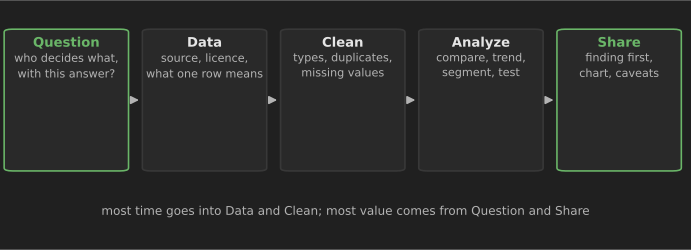
Common advice from hiring-focused guides and analyst communities is consistent: a few complete projects on real, messy data beat many tutorial copies, and overused teaching datasets such as Titanic or Iris do not set you apart. Treat that as experienced opinion rather than measured fact, but it matches what a reviewer can learn from your work. For every project:
- Start with a question someone would pay to answer, such as "which products should we stop stocking?", not "explore the data".
- Write down what one row means and how you cleaned the data. Reviewers check this first.
- Lead with the finding. Your write-up's first line is the answer; method comes after.
- Show one or two good charts, not twenty. Our data visualization techniques explain how.
- State limits honestly: missing data, sample size, what the data cannot tell you.
- Publish it: a GitHub repository with a README, a Tableau Public or Data Studio link, or a short blog post.
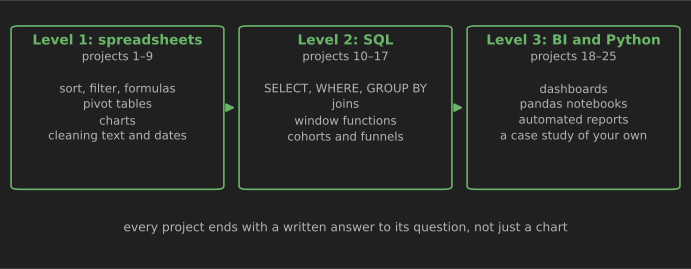
Level 1: spreadsheet projects (1–9)
Use Excel or Google Sheets. Focus on clean tables, pivot tables, a few well-chosen charts and a one-page summary.
1. Budget versus actual: your own spending
Question: where did my money go last quarter, and which categories ran over my plan? Data: a CSV export of your own bank or card transactions (most banks offer one). Keep it private; publish only a version with amounts randomized or categories aggregated. Steps: add a category column (use a lookup table of merchant keywords), build a pivot table of spend by category and month, add a budget column and calculate the variance and variance percentage. Deliver: a one-page variance report with conditional formatting on categories over budget. Stretch: move the categorizing into Power Query so next month's export refreshes with one click.
2. Online retail sales KPI report
Question: which months, countries and products drive revenue for a UK online gift retailer? Data: Online Retail II (UCI Machine Learning Repository, CC BY 4.0): 1,067,371 transaction lines from December 2009 to December 2011. Invoices starting with "C" are cancellations. Steps: the full file is too large for one Excel sheet (1,048,576 rows), so load it through Power Query or start with one year. Compute revenue as quantity × price, exclude cancellations, then pivot by month, country and product. Deliver: a KPI sheet with revenue, orders, average order value and the top 10 products, plus three sentences on what changed between the two years. Stretch: you will reuse this data for cohorts in SQL in project 14; write down your cleaning rules now.
3. Everyday prices tracker
Question: how much have the prices of a few everyday items changed, and when did they jump?
Data: US average price series from the Bureau of Labor Statistics, published on FRED (this link is eggs, per dozen; search FRED for "Average Price" to find bread, milk, gasoline and more). Monthly, with data through September 2026 at the time of writing.
Steps: download three or four series, align them by month, compute year-over-year percentage change and index each to 100 at a base month so they can share one chart.
Deliver: an indexed line chart and a short note on the biggest increases and when they happened.
Stretch: compare the items with the overall consumer price index (CPIAUCSL on FRED) and explain why one item can move very differently from inflation as a whole.
4. What explains happiness rankings?
Question: how much of each country's life-evaluation score do the report's explanatory factors account for, and where are the surprises? Data: the World Happiness Report shares the data behind its main ranking chart for free: three-year average life-evaluation scores with confidence intervals and the estimated contribution of six explanatory factors. Steps: load the spreadsheet, rank countries, compare neighbors and regions, and find countries whose rank looks very different from what the factors suggest. Deliver: a ranked bar chart of 15 selected countries with confidence intervals, and a paragraph on two surprises. Stretch: read how the report computes the factor contributions and explain, in plain words, why "contribution" here does not mean "cause".
5. Seasonality in search interest
Question: when in the year do people search for a product or topic you care about, and is interest growing? Data: Google Trends. Download weekly or monthly interest for three related search terms over five years. Steps: note that Trends values are relative (0–100, scaled to the peak in the chosen period), so compare terms in the same download. Average by month of year to see seasonality, and compare year-over-year. Deliver: a seasonality chart and a recommendation, such as when a shop should start promoting the product. Stretch: repeat for two countries and explain differences in timing.
6. Employee attrition dashboard
Question: which groups of employees leave most often, and what do they have in common? Data: the IBM HR Analytics attrition dataset on Kaggle: 1,470 employees. Its distributors describe it as a fictional dataset created by IBM data scientists (tidymodels reference), so state that in your write-up. Steps: compute attrition rates (not counts) by department, job role, overtime, tenure band and distance from home. Watch small groups: a rate based on 20 people is noisy. Deliver: a one-screen dashboard with an overall attrition rate and the three most different groups. Stretch: add a simple test of whether the overtime difference is larger than chance (technique 7 in our techniques guide).
7. Hotel booking cancellations
Question: which bookings get cancelled, and how should a hotel plan for it? Data: the hotel booking demand datasets (Antonio, de Almeida and Nunes, Data in Brief, 2019): about 119,000 bookings at a resort hotel and a city hotel in Portugal, arriving between July 2015 and August 2017, with 31 variables. A cleaned CSV is in the TidyTuesday repository for 11 February 2020. Steps: compute cancellation rates by hotel type, lead time band, deposit type, market segment and arrival month. Deliver: a short memo to a revenue manager: the three biggest cancellation drivers and a suggestion, such as deposit rules for long-lead bookings. Stretch: estimate how many rooms a hotel could safely overbook in a peak month, and state your assumptions.
8. Your own music listening history
Question: how do my listening habits change by hour, weekday and season, and which artists did I skip most? Data: your own Spotify data. In your account's privacy settings you can request your streaming history (the past year) or extended streaming history (the account's lifetime) as JSON files (Spotify: understanding my data). Steps: convert the JSON to a table (Power Query can read JSON), convert times from UTC to your time zone, and sum minutes played by hour, weekday, month and artist. Deliver: a personal "year in review" page with four charts and your own commentary. Stretch: define "skip" (for example, played under 30 seconds) and find which artists you skip most relative to how often you play them.
9. Clean a messy museum collection
Question: how has the Museum of Modern Art's collection grown by decade of acquisition, medium and artist nationality? Data: MoMA's collection data on GitHub (CC0): about 160,000 artworks and 16,000 artists. MoMA notes that much of it is incomplete and not curator-approved, which makes it good cleaning practice. Steps: use OpenRefine or Power Query to split multi-artist rows, standardize date strings such as "c. 1960" and "1960–65", and cluster inconsistent medium labels. Keep a log of every rule and how many rows it changed. Deliver: a before-and-after cleaning log plus two charts of acquisitions by decade and medium. Stretch: join the artworks and artists tables and analyze how the share of works by women artists has changed by acquisition decade, with a clear note on missing gender data.
Level 2: SQL projects (10–17)
Load data into SQLite, PostgreSQL, DuckDB or BigQuery. Keep your queries in .sql files in a GitHub repository, with a README that states the question and the answer.
10. Music store sales analysis
Question: which genres, countries and sales agents generate the most revenue? Data: the Chinook database, a sample digital media store (artists, albums, tracks, invoices, customers, employees) available as a single SQL script for SQLite, PostgreSQL, MySQL, SQL Server and others. Its sales data is randomly generated, so treat findings as practice. Steps: join invoices to invoice lines, tracks and genres; rank genres by revenue per country with a window function; compare sales agents by revenue per customer. Deliver: five business questions, each with its SQL query and a one-sentence answer. Stretch: find customers who have not bought in the last year of data and estimate the revenue at risk.
11. A century and a half of baseball
Question: how have home runs, strikeouts and team payrolls changed over time? Data: the Lahman Baseball Database, hosted by SABR, with batting and pitching statistics from 1871 through the 2025 season, in SQL and CSV versions. Steps: aggregate per season, compute rates per game rather than totals (seasons differ in length), and use window functions for each player's career totals. Deliver: a short article with three charts on how the game has changed, with queries in the appendix. Stretch: test a popular claim, such as "more strikeouts mean more home runs", by comparing seasons and teams, and explain why correlation here is not causation.
12. City complaints: what, where and how fast
Question: which complaint types are most common in each borough, and how long do they take to close? Data: NYC 311 Service Requests on NYC Open Data. It is very large, so filter to one year or one complaint category before downloading. Steps: compute counts by borough and type, resolution time as closed date minus created date (handle missing closed dates), and median rather than mean resolution times. Deliver: a table of the slowest complaint types per borough and a note on data quality problems you found. Stretch: look at seasonality (heating complaints in winter, noise in summer) by month.
13. Flight delays by airline and airport
Question: which airlines and airports have the worst on-time performance, and at what times of day? Data: the US Bureau of Transportation Statistics' Reporting Carrier On-Time Performance download (1987 to present; the latest month available at the time of writing was August 2026). Choose the fields you need and download one month at a time. Steps: load a few months into DuckDB or SQLite, compute the share of flights delayed 15 minutes or more by carrier, origin airport and departure hour, and separate cancellations. Deliver: a ranked table and one chart of delay rate by hour of day. Stretch: compare delay causes (carrier, weather, airspace, late aircraft) and explain why late-arriving aircraft cascade through the day.
14. Customer retention cohorts
Question: what share of customers who first bought in a given month buy again later? Data: the Online Retail II data from project 2, loaded into a database. Steps: find each customer's first purchase month, compute months since first purchase for each order, and build a cohort table of distinct active customers; query 27 in our SQL guide shows the pattern. Exclude rows without a customer ID and say how many you dropped. Deliver: a cohort retention table (as percentages) with a short interpretation. Stretch: remember that the first cohort includes customers who bought before the data starts, so it looks unusually loyal; explain this and exclude it.
15. E-commerce funnel in BigQuery
Question: where do website visitors drop out between viewing a product and buying?
Data: Google's obfuscated GA4 sample e-commerce dataset, bigquery-public-data.ga4_obfuscated_sample_ecommerce.events_*, covering November 2020 to January 2021. Query it free in the BigQuery sandbox. Google notes the data is obfuscated, with placeholder values, and is not fully consistent.
Steps: count users or sessions reaching view_item, add_to_cart, begin_checkout and purchase; compare by device category and traffic source. Select only the columns you need to keep scanned data small.
Deliver: a funnel chart and a paragraph on the weakest step.
Stretch: write the funnel as a reusable SQL view and document its definitions.
16. Restaurant inspection grades
Question: which cuisines and neighborhoods have the most critical violations, and do grades improve after re-inspection? Data: DOHMH New York City Restaurant Inspection Results on NYC Open Data. Steps: note that each row is a violation, not an inspection, so aggregate carefully; deduplicate to one row per inspection, then compute rates by cuisine and borough, and use window functions to compare each restaurant's consecutive inspections. Deliver: a short report with one map or table and a clear statement of what one row means. Stretch: check whether results differ for chains and independent restaurants, explaining how you identified chains.
17. Bike share: members versus casual riders
Question: how do annual members and casual riders use the bikes differently, and what would persuade casual riders to join? Data: Divvy trip data from Chicago's bike share, released monthly under the Divvy Data License Agreement. It excludes staff trips and trips under 60 seconds. Steps: combine 12 months, compute ride length, remove impossible values, and compare members and casual riders by ride length, weekday, hour, month and station. Deliver: three recommendations backed by charts. Stretch: this is the case study used in Google's Data Analytics certificate, so thousands of versions exist; make yours different by adding weather data or analyzing station-level patterns for one neighborhood.
Level 3: BI and Python projects (18–25)
Build something interactive or automated, and publish it.
18. Coffee shop sales dashboard in Power BI
Question: when are the busiest hours and days, and which products should a coffee shop promote? Data: "Coffee Shop Sales" from the Maven Analytics Data Playground, transaction records from a fictitious New York City coffee shop. Other free datasets there work too. Steps: build a date table, a star schema (sales fact table, product and store dimensions), and measures for revenue, transactions and average ticket. Add a heatmap of sales by hour and weekday. Deliver: a two-page Power BI report with a short "key findings" text box. Power BI Desktop is free on Windows; Tableau Public works for this project on any computer. Stretch: add a what-if parameter showing revenue impact if the slowest hour's sales rose by 10%.
19. Road safety story in Tableau Public
Question: when and where do serious road collisions happen in Great Britain, and who is most at risk? Data: the UK Department for Transport's road safety open data, based on police-reported personal-injury collisions (STATS19), under the Open Government Licence. Steps: join the collision, vehicle and casualty files on their shared reference; analyze severity by time of day, day of week, road type, speed limit and casualty type. Deliver: a three-panel Tableau Public story, with every chart titled by its finding. Stretch: read the government's guidance on the data's limits (collisions not reported to police are missing) and add a short "what this data cannot show" panel.
20. College cost versus earnings with pandas
Question: for a field of study you care about, which colleges offer the best earnings relative to cost? Data: the US Department of Education's College Scorecard, with institution-level files (costs, aid, outcomes) and field-of-study files that include earnings after graduation. Steps: in a Jupyter notebook, load and merge the files, handle the many suppressed values (privacy-protected small counts), and compute a simple earnings-to-cost ratio. Deliver: a notebook that runs top to bottom and a scatter plot of cost against earnings with a few colleges labeled. Stretch: explain in your write-up why this is not a causal "return on investment" (students differ before they enroll).
21. Short-term rental market in one city
Question: how many listings in a city are entire homes run by hosts with several listings, and where are they concentrated? Data: Inside Airbnb publishes listings, calendar and review files per city under CC BY 4.0, plus neighborhood boundaries as GeoJSON. Steps: clean the price column (stored as text with currency symbols), group by neighborhood and room type, and identify multi-listing hosts. Deliver: a notebook with a neighborhood table and a map, plus a balanced summary that notes the data is a snapshot scraped from public listings. Stretch: compare two snapshots a year apart to see what changed.
22. A TidyTuesday week
Question: whatever the week's dataset invites; pick one specific question before you start. Data: TidyTuesday, a weekly community project that publishes a new, cleaned dataset with a description. Steps: spend two to four hours: load, explore, answer one question and make one polished chart. R and Python are both welcome. Deliver: your chart and code, shared publicly with the TidyTuesday tag, and a look at what others made. Stretch: repeat for four weeks; seeing other people's approaches to the same data is one of the fastest ways to improve.
23. Marketing dashboard in Data Studio
Question: which channels and landing pages bring visitors who buy? Data: the Google Analytics demo account, open to any Google user, with data from the Google Merchandise Store (web) and the Flood-It! game (app and web). Access is view-only. Steps: connect Data Studio (formerly Looker Studio) to the demo property, chart sessions, conversion rate and revenue by default channel group, and add date and device filters. Deliver: a shared Data Studio report with a summary panel stating the top insight. Stretch: compare two date ranges and explain one change you can see, and add a note on what the view-only demo data cannot tell you about a real business.
24. An automated weekly KPI report
Question: can last week's key numbers arrive without anyone running a query? Data: any dataset from earlier projects, or the free practice database from our SQL guide. Steps: write a Python script that runs your SQL queries, compares the week with the previous week and the same week last year, and writes an HTML or Excel report. Schedule it with Windows Task Scheduler or cron; see our Python automation scripts for scheduling and safe file handling. Deliver: the script, a sample report and a README explaining how to run it. Stretch: add data-quality checks that stop the report and send an alert if row counts drop sharply or values are impossible.
25. Your own question, end to end
Question: one that you, a local business or a community group genuinely wants answered. Data: public data you find (city and national open-data portals, the BigQuery public datasets, FRED) or data an organization lets you use with permission. Steps: write the question and the decision it informs, find and document the data, clean it with a logged set of rules, analyze it with the simplest technique that answers the question, and present it. Deliver: a case study: question, answer, two or three charts, method, limits and next steps. This is the project to lead your portfolio with. Stretch: share it with the people who asked the question and record what they did with it; that outcome is the strongest line on a CV.
Which projects to do first
You do not need all 25. A balanced beginner portfolio is three to five projects:
| Goal | Suggested projects |
|---|---|
| First analyst job, Excel-heavy roles | 2, 7, 18, plus one SQL project (10 or 14) |
| SQL-heavy roles (tech, e-commerce) | 10, 14, 15, 17 |
| Marketing analytics | 5, 15, 23 |
| Public sector and research | 9, 12, 19, 20 |
| Show automation and Python | 20, 21, 24 |
| Stand out | 25, built on one of the others |
Then read 20 data analysis tools to pick the tools these projects need, and come back to the 15 data analysis techniques when a project calls for cohorts, tests or segmentation.
Sources
Dataset pages and documentation linked above were checked on 25 October 2026. Key references:
- Antonio, N., de Almeida, A. and Nunes, L. (2019). Hotel booking demand datasets. Data in Brief, 22, 41–49.
- Chen, D. (2012). Online Retail II. UCI Machine Learning Repository.
- Google. BigQuery sample dataset for Google Analytics ecommerce web implementation and Google Analytics demo account.
- Museum of Modern Art. MoMA collection.
- Society for American Baseball Research. Lahman Baseball Database.
- UK Department for Transport. Road safety open data.
- US Department of Education. College Scorecard data.