Data analysis techniques are repeatable methods for turning a question and a table into an answer you can defend. Most analyst work uses a small set of them again and again: summarize, clean, compare groups, relate variables, test whether a difference is real, follow change over time, segment customers and find what is unusual. This guide explains 15 of them, each with what it is, when to use it, runnable Python code with its real output, how to read the result and what goes wrong.
Who it is for. Aspiring and junior analysts, and anyone who can load a CSV into a spreadsheet or Python and now wants to know which method fits which question. The code uses Python with pandas, but every technique also works in SQL, a spreadsheet or R; the method matters more than the tool.
How we checked it. Every code block was run in October 2026 with Python 3.13, pandas 3.0.3, NumPy 2.3.5, SciPy 1.18.1, statsmodels 0.15.0 and scikit-learn 1.9.0, with warnings treated as errors, and the printed output is pasted unchanged. (pandas 3.1 was the newest release at the time; nothing here depends on the difference.)
About the data. The examples use one synthetic dataset of about 9,800 online orders over two years, generated by the setup code below with a fixed random seed. Synthetic data lets every reader reproduce the numbers exactly and lets us plant known problems (duplicates, inconsistent labels, refunds, one impossible value) so you can see each technique catch them. Treat the results as demonstrations of the methods, not facts about any real business.
Set up the example data
Install the libraries once (pip install pandas scipy statsmodels scikit-learn), then run this block first. Each later block builds on the variables it creates, so run them in order, in one notebook or script.
Show the setup code (creates the raw orders table)
import numpy as np
import pandas as pd

rng = np.random.default_rng(7)
days = pd.date_range("2024-01-01", "2025-12-31", freq="D")
t = np.arange(len(days))
rate = 9 * (1 + 0.0008 * t) * np.where(days.dayofweek >= 5, 1.35, 1.0) * np.where(days.month == 12, 1.5, 1.0)
counts = rng.poisson(rate)

n = counts.sum()
order_date = np.repeat(days.values, counts)
channel = rng.choice(["web", "app", "marketplace"], size=n, p=[0.5, 0.3, 0.2])
region = rng.choice(["North", "South", "East", "West"], size=n, p=[0.35, 0.25, 0.25, 0.15])
items = 1 + rng.poisson(1.2, size=n)
discount = rng.choice([0, 0, 0, 10, 20], size=n)
base = np.exp(rng.normal(2.9, 0.45, size=n))
value = items * base * np.where(channel == "app", 1.12, 1.0) * (1 - discount / 100 * 0.6)
weights = 1 / np.arange(1, 1201) ** 0.9
customer_id = rng.choice(np.arange(1, 1201), size=n, p=weights / weights.sum())

raw = pd.DataFrame({
    "order_id": np.arange(1, n + 1),
    "order_date": order_date,
    "customer_id": customer_id,
    "region": region,
    "channel": channel,
    "items": items,
    "discount_pct": discount,
    "order_value": value.round(2),
})
# realistic mess: typos in labels, missing regions, duplicated rows, refunds and two bad values
mess = rng.choice(n, size=40, replace=False)
raw.loc[mess[:15], "region"] = raw.loc[mess[:15], "region"].str.lower() + " "
raw.loc[mess[15:25], "region"] = None
raw.loc[mess[25:30], "order_value"] = -raw.loc[mess[25:30], "order_value"]
raw.loc[mess[30], "order_value"] = 98000.0
raw = pd.concat([raw, raw.sample(12, random_state=1)], ignore_index=True)
print(raw.shape)
(9862, 8)
raw has one row per order: order_id, order_date, customer_id, region, channel (web, app or marketplace), items, discount_pct and order_value. The setup also builds in a weekend uplift, a December peak and slow growth, so the time-series techniques have something to find.
Understand the data (1–3)
1. Descriptive statistics
What it is. Summarize a column with a few numbers: count, center (mean, median), spread (standard deviation, percentiles) and range. It is the first thing to run on any numeric column and often the last thing a stakeholder reads.
Use it when: Always, before anything else; and in every report, as the context for the headline number.
print(raw["order_value"].describe().round(2))
print("skew:", round(raw["order_value"].skew(), 1))
clean_values = raw.loc[raw["order_value"].between(0, 5000), "order_value"]
print("mean:", round(clean_values.mean(), 2), "median:", round(clean_values.median(), 2))
count     9862.00
mean        54.07
std        986.92
min       -129.88
25%         21.76
50%         35.38
75%         56.43
max      98000.00
Name: order_value, dtype: float64
skew: 99.1
mean: 44.18 median: 35.39
Reading the result. The raw column has a mean of 54.07 but a median of 35.38, a standard deviation of 987 and a maximum of 98,000. That gap is the clue: a single impossible order value (planted in the setup) inflates the mean and standard deviation, while the median barely moves. After excluding values outside 0–5,000, the mean drops to 44.18 and the median stays at 35.39.
Watch out. Report the median (and a percentile or two) for skewed data such as prices, incomes, order values and response times; the mean alone describes a customer who does not exist. Skewness above about 1 is a quick signal that the mean and median will disagree.
2. Data cleaning and validation
What it is. Find and fix the problems that make numbers wrong: duplicate rows, inconsistent labels, wrong data types, missing values and impossible values. Cleaning is not a phase you finish; it is a set of explicit, repeatable decisions.
Use it when: Before any analysis, and again whenever new data arrives.
before = len(raw)
orders = (
    raw.drop_duplicates()
       .assign(region=lambda d: d["region"].str.strip().str.title(),
               order_date=lambda d: pd.to_datetime(d["order_date"]))
)
refunds = orders[orders["order_value"] < 0]
suspicious = orders[orders["order_value"] > 5000]
orders = orders[orders["order_value"].between(0, 5000)]
print("rows:", before, "->", len(orders))
print("duplicates removed:", before - len(raw.drop_duplicates()))
print("refunds set aside:", len(refunds), "| suspicious values:", len(suspicious))
print("missing region:", orders["region"].isna().sum())
print(orders["region"].value_counts(dropna=False))
rows: 9862 -> 9844
duplicates removed: 12
refunds set aside: 5 | suspicious values: 1
missing region: 10
region
North    3410
East     2511
South    2426
West     1487
NaN        10
Name: count, dtype: int64
Reading the result. Twelve exact duplicates are removed; region labels such as "north " are normalized to "North"; five negative values (refunds) and one implausible order are set aside, not deleted, so they can be reported separately; and 10 orders with no region are kept, but counted, so readers know the regional totals exclude them.
Watch out. Never clean silently. Keep a short log of each rule and how many rows it touched, as the printout does, and keep the raw data unchanged. The rule "between 0 and 5,000" is a business decision; write down why you chose it.
3. Exploratory data analysis (EDA)
What it is. Look at the data from several angles before testing anything: column types, distributions, extreme percentiles, and how a few key measures vary across groups. The term comes from John Tukey's 1977 book Exploratory Data Analysis, which argued for looking at data before confirming hypotheses about it.
Use it when: At the start of every project, to find questions worth asking and problems worth fixing.
print(orders.dtypes.to_string())
print(orders[["items", "discount_pct", "order_value"]].quantile([0.01, 0.5, 0.99]).round(2))
print(orders.groupby("channel")["order_value"].agg(["count", "median"]).round(2))
order_id                 int64
order_date      datetime64[us]
customer_id              int64
region                     str
channel                    str
items                    int64
discount_pct             int64
order_value            float64
      items  discount_pct  order_value
0.01    1.0           0.0         7.98
0.50    2.0           0.0        35.38
0.99    5.0          20.0       160.31
             count  median
channel
app           2943   38.62
marketplace   2013   34.68
web           4888   33.94
Reading the result. The types are right (dates are datetimes, labels are pandas 3's new str type). Half of orders have two items or fewer, 99% have five or fewer, and the 99th percentile of order value is 160. The app channel has a higher median order value (38.62) than web (33.94), which is worth testing properly (technique 7).
Watch out. Always plot as well as summarize. Anscombe's quartet (1973) is four small datasets with nearly identical means, variances and correlations that look completely different when plotted (Anscombe, 1973). See our data visualization techniques for which chart to use.
Compare and relate (4–6)
4. Segmentation and group comparison
What it is. Split the data by one or more categories and compare a measure across the groups. In pandas it is groupby or pivot_table; in SQL, GROUP BY; in a spreadsheet, a pivot table. It is the single most-used technique in business analysis.
Use it when: Whenever someone asks "which region / product / channel / customer type is doing best or worst?"
summary = (
    orders.groupby(["region", "channel"], dropna=False)
          .agg(orders=("order_id", "count"), revenue=("order_value", "sum"),
               avg_value=("order_value", "mean"))
          .round(1)
)
print(summary.head(6))
pivot = orders.pivot_table(index="region", columns="channel", values="order_value",
                           aggfunc="sum", margins=True).round(0)
print(pivot)
                    orders  revenue  avg_value
region channel
East   app             741  36239.0       48.9
       marketplace     537  24366.1       45.4
       web            1233  53144.5       43.1
North  app            1048  50602.0       48.3
       marketplace     669  28650.3       42.8
       web            1693  70231.7       41.5
channel       app  marketplace       web       All
region
East      36239.0      24366.0   53144.0  113750.0
North     50602.0      28650.0   70232.0  149484.0
South     36275.0      19360.0   51010.0  106644.0
West      19120.0      14031.0   31536.0   64688.0
All      142236.0      86408.0  205922.0  434566.0
Reading the result. North is the largest region (149,484 in revenue), and in every region the app channel has the highest average order value (the printout shows the first six rows; the full table confirms it for South and West too). The All row and column (margins=True) give totals that should match the overall revenue, a quick consistency check.
Watch out. Compare rates and averages, not just totals: a group can lead in revenue because it is bigger, not better. Watch group sizes, too; an average over 12 orders is much noisier than one over 1,200. And beware Simpson's paradox, where a trend in every subgroup reverses in the combined data because group sizes differ.
5. Correlation analysis
What it is. Measure how strongly two numeric variables move together, from -1 (perfectly opposite) through 0 (no linear relationship) to +1 (perfectly together). Pearson correlation measures linear relationships; Spearman correlation works on ranks, so it captures any consistently increasing or decreasing relationship and is less sensitive to outliers.
Use it when: To screen which variables are related, before modeling or as a quick sanity check.
cols = ["items", "discount_pct", "order_value"]
print(orders[cols].corr(method="pearson").round(2))
print(orders[cols].corr(method="spearman").round(2))
              items  discount_pct  order_value
items          1.00          0.00         0.68
discount_pct   0.00          1.00        -0.07
order_value    0.68         -0.07         1.00
              items  discount_pct  order_value
items          1.00         -0.00         0.74
discount_pct  -0.00          1.00        -0.08
order_value    0.74         -0.08         1.00
Reading the result. Order value correlates strongly with the number of items (0.68 Pearson, 0.74 Spearman) and only weakly and negatively with discount (-0.07). Spearman is higher for items because the relationship is consistent but not a straight line.
Watch out. Correlation is not causation, and a correlation near zero does not mean no relationship (a U-shape can have zero correlation). One extreme value can create or hide a correlation, which is why we cleaned first. Always look at a scatter plot.
6. Regression analysis
What it is. Estimate how an outcome changes with several inputs at once, holding the others constant. Ordinary least squares (OLS) linear regression is the workhorse; its coefficients are readable as "the expected change in the outcome for a one-unit change in this input".
Use it when: When you need to separate the effects of several factors, such as items, discount and channel, or to make a simple, explainable prediction.
import statsmodels.formula.api as smf

model = smf.ols("order_value ~ items + discount_pct + C(channel)", data=orders).fit()
print(model.params.round(2))
print(model.conf_int().round(2).rename(columns={0: "low", 1: "high"}))
print("R-squared:", round(model.rsquared, 3))
Intercept                     5.50
C(channel)[T.marketplace]    -5.68
C(channel)[T.web]            -5.54
items                        20.24
discount_pct                 -0.29
dtype: float64
                             low   high
Intercept                   4.20   6.81
C(channel)[T.marketplace]  -7.01  -4.35
C(channel)[T.web]          -6.61  -4.47
items                      19.82  20.67
discount_pct               -0.35  -0.24
R-squared: 0.476
Reading the result. Each extra item adds about 20.24 to the expected order value (95% interval 19.82 to 20.67); each percentage point of discount lowers it by about 0.29; and, compared with the app (the baseline category), marketplace and web orders are about 5.6 lower. R-squared of 0.476 means these inputs explain about half of the variation in order value.
Watch out. Report the confidence intervals, not just the coefficients. A regression on observational data describes associations; it shows that discounted orders are smaller, not that discounts cause smaller baskets. Check residuals for patterns, and do not extrapolate far outside the data. We used the statsmodels formula API, which reports intervals and tests by default.
Test whether differences are real (7–8)
7. Hypothesis testing
What it is. Decide whether a difference you observe is likely to be real or could easily be random noise. A test compares the observed difference with what you would expect if there were no true difference, and returns a p-value: the probability of seeing a difference at least this large if there were truly none.
Use it when: Before acting on a difference between two groups, such as channels, regions or time periods.
from scipy import stats

app = orders.loc[orders["channel"] == "app", "order_value"]
web = orders.loc[orders["channel"] == "web", "order_value"]
res = stats.ttest_ind(app, web, equal_var=False)
diff = app.mean() - web.mean()
ci = res.confidence_interval(confidence_level=0.95)
print(f"app mean {app.mean():.2f}, web mean {web.mean():.2f}, diff {diff:.2f}")
print(f"Welch t = {res.statistic:.2f}, p = {res.pvalue:.2g}, 95% CI {ci.low:.2f} to {ci.high:.2f}")
print("Mann-Whitney p =", f"{stats.mannwhitneyu(app, web).pvalue:.2g}")
app mean 48.38, web mean 42.18, diff 6.19
Welch t = 7.86, p = 4.6e-15, 95% CI 4.65 to 7.74
Mann-Whitney p = 2.3e-15
Reading the result. App orders average 6.19 more than web orders, with a 95% confidence interval of 4.65 to 7.74 and a very small p-value. The non-parametric Mann–Whitney test, which compares the distributions without assuming normality, agrees. The difference is very unlikely to be noise.
Watch out. We used Welch's t-test (equal_var=False), which does not assume equal variances and is a recommended default (Delacre, Lakens and Leys, 2017). A small p-value says a difference is unlikely to be zero, not that it is large or important; that is why the confidence interval matters more. The American Statistical Association's statement on p-values is a short, worthwhile read (Wasserstein and Lazar, 2016). And with very large samples, tiny differences become "significant".
8. A/B testing
What it is. A randomized experiment: users are randomly split between a control (A) and a variant (B), and an outcome such as conversion is compared. Randomization is what lets you read the difference as caused by the change.
Use it when: To evaluate a change you can deploy to a random subset of users: a new checkout page, a price display, an email subject line.
from statsmodels.stats.proportion import proportions_ztest, confint_proportions_2indep
from statsmodels.stats.power import NormalIndPower
from statsmodels.stats.proportion import proportion_effectsize

conversions = np.array([412, 468])   # control, variant
visitors = np.array([10_000, 10_000])
z, p = proportions_ztest(conversions, visitors)
low, high = confint_proportions_2indep(conversions[1], visitors[1], conversions[0], visitors[0])
print(f"control {conversions[0]/visitors[0]:.2%}, variant {conversions[1]/visitors[1]:.2%}")
print(f"z = {z:.2f}, p = {p:.3f}, lift 95% CI {low:.2%} to {high:.2%}")

effect = proportion_effectsize(0.046, 0.041)
needed = NormalIndPower().solve_power(effect_size=effect, alpha=0.05, power=0.8)
print("visitors needed per group to detect 4.1% -> 4.6%:", round(needed))
control 4.12%, variant 4.68%
z = -1.93, p = 0.054, lift 95% CI -0.01% to 1.13%
visitors needed per group to detect 4.1% -> 4.6%: 26105
Reading the result. The variant converted at 4.68% against 4.12% for control. The p-value is 0.054 and the 95% interval for the difference runs from just below zero to 1.13 percentage points, so the result is inconclusive at the usual 5% level. (The z statistic is negative only because control was listed first.) The power calculation explains why: to reliably detect a lift from 4.1% to 4.6%, you need about 26,105 visitors per group, and this test had 10,000.
Watch out. Decide the sample size and the success metric before the test, and do not stop early the moment the p-value dips below 0.05 ("peeking"), which inflates false positives. Check that the split was actually random (similar group sizes and pre-test behavior). Kohavi, Tang and Xu's Trustworthy Online Controlled Experiments (Cambridge University Press, 2020) is the standard practical reference. These counts are invented for the example.
Analyze change over time (9–11)
9. Time series analysis
What it is. Analyze data ordered in time: trend (long-run direction), seasonality (repeating patterns by weekday or month) and noise. Core tools are resampling to a regular frequency, rolling averages, year-over-year comparisons and decomposition.
Use it when: For any metric tracked over time: sales, traffic, sign-ups, tickets, inventory.
daily = orders.set_index("order_date")["order_value"].resample("D").sum()
weekly = daily[:"2025-12-28"].resample("W").sum()   # stop at the last complete week
print(weekly.rolling(4).mean().tail(3).round(0))
by_weekday = daily.groupby(daily.index.day_name()).mean().round(0)
print(by_weekday.reindex(["Monday", "Wednesday", "Friday", "Saturday", "Sunday"]))
monthly = daily.resample("MS").sum()
yoy = (monthly / monthly.shift(12) - 1).dropna()
print("Dec 2025 vs Dec 2024:", f"{yoy.iloc[-1]:.1%}")

from statsmodels.tsa.seasonal import STL
stl = STL(daily, period=7).fit()
print("trend Jan 2024 -> Nov 2025:", round(stl.trend["2024-01-15"]), "->", round(stl.trend["2025-11-15"]))
order_date
2025-12-14    6137.0
2025-12-21    6504.0
2025-12-28    7099.0
Freq: W-SUN, Name: order_value, dtype: float64
order_date
Monday       543.0
Wednesday    530.0
Friday       526.0
Saturday     702.0
Sunday       745.0
Name: order_value, dtype: float64
Dec 2025 vs Dec 2024: 17.7%
trend Jan 2024 -> Nov 2025: 478 -> 698
Reading the result. Weekend days bring in about a third more revenue than weekdays (around 700–745 against 525–545). December 2025 revenue was 17.7% above December 2024; comparing a month with the same month a year earlier removes the seasonal effect that a month-over-month comparison would include. STL decomposition (Cleveland et al., 1990; statsmodels STL) separates the weekly pattern from the trend, which rose from about 478 to 698 a day.
Watch out. Watch for partial periods: the last week of 2025 ends on Wednesday 31 December, so the code stops at the last complete week, 28 December. A partial final week or month looks like a sudden drop on every dashboard that forgets this. Also check for missing dates before rolling calculations (resample fills them with zeros for sums).
10. Cohort analysis
What it is. Group customers by when they started (their first-purchase month) and track what share of each group is active in later months. Cohorts separate "are we keeping customers better?" from "are we just acquiring more of them?".
Use it when: For retention, churn and lifetime-value questions in subscriptions, e-commerce and apps.
o = orders[["customer_id", "order_date"]].copy()
o["month"] = o["order_date"].dt.to_period("M")
o["cohort"] = o.groupby("customer_id")["month"].transform("min")
o["age"] = (o["month"] - o["cohort"]).apply(lambda d: d.n)
cohorts = o.groupby(["cohort", "age"])["customer_id"].nunique().unstack(fill_value=0)
retention = cohorts.div(cohorts[0], axis=0)
print(retention.loc["2024-01":"2024-04", [0, 1, 2, 3, 6]].round(2))
age        0     1     2     3     6
cohort
2024-01  1.0  0.38  0.39  0.34  0.37
2024-02  1.0  0.21  0.17  0.20  0.15
2024-03  1.0  0.13  0.16  0.24  0.15
2024-04  1.0  0.23  0.19  0.23  0.20
Reading the result. Row 2024-01 shows that 38% of customers whose first order was in January 2024 ordered again a month later, and 37% in month 6. Later cohorts retain at roughly 13–24%.
Watch out. That January number is inflated by a classic artifact: the data starts in January 2024, so every long-standing customer who ordered that month looks like a "new" January customer. The first cohort or two of any dataset is contaminated this way (left-censoring); exclude them or use a true sign-up date. The same calculation in SQL is query 27 of our SQL guide.
11. Funnel analysis
What it is. Count how many users reach each step of a process (visit, view, add to cart, checkout, purchase) and compute the conversion between steps. The step with the weakest conversion is usually the best place to look for improvements.
Use it when: For sign-up flows, checkout processes, onboarding and any multi-step journey.
funnel = pd.Series({"visited": 20_000, "viewed product": 9_400, "added to cart": 2_350,
                    "began checkout": 1_290, "purchased": 880})
report = pd.DataFrame({
    "users": funnel,
    "step_conversion": (funnel / funnel.shift(1)).round(3),
    "overall": (funnel / funnel.iloc[0]).round(3),
})
print(report)
                users  step_conversion  overall
visited         20000              NaN    1.000
viewed product   9400            0.470    0.470
added to cart    2350            0.250    0.118
began checkout   1290            0.549    0.064
purchased         880            0.682    0.044
Reading the result. Overall, 4.4% of visitors purchase. The weakest step is product view to cart (25%); checkout to purchase converts at 68%. A team would usually start investigating the product page.
Watch out. The counts here are invented. Define clearly whether a step counts users or sessions and whether a user must complete earlier steps (a strict funnel). Funnels show where users drop off, not why; pair them with session recordings, surveys or an A/B test. Query 28 in our SQL guide builds a funnel from raw event rows.
Segment customers (12–13)
12. RFM analysis
What it is. Score each customer on Recency (days since last purchase), Frequency (number of purchases) and Monetary value (total spend), usually in quartiles or quintiles, then name segments from the score combinations. It is simple, explainable and needs only an orders table.
Use it when: For customer segmentation in retail, e-commerce and any repeat-purchase business, especially to target retention campaigns.
snapshot = orders["order_date"].max() + pd.Timedelta(days=1)
rfm = orders.groupby("customer_id").agg(
    recency=("order_date", lambda d: (snapshot - d.max()).days),
    frequency=("order_id", "count"),
    monetary=("order_value", "sum"),
)
rfm["R"] = pd.qcut(rfm["recency"], 4, labels=[4, 3, 2, 1]).astype(int)
rfm["F"] = pd.qcut(rfm["frequency"].rank(method="first"), 4, labels=[1, 2, 3, 4]).astype(int)
rfm["M"] = pd.qcut(rfm["monetary"], 4, labels=[1, 2, 3, 4]).astype(int)
rfm["segment"] = np.select(
    [(rfm["R"] >= 3) & (rfm["F"] >= 3), (rfm["R"] <= 2) & (rfm["F"] >= 3), rfm["R"] >= 3],
    ["champions", "at risk", "recent, low frequency"],
    default="lapsed",
)
print(rfm.groupby("segment").agg(customers=("R", "size"), avg_orders=("frequency", "mean"),
                                 avg_spend=("monetary", "mean")).round(1))
                       customers  avg_orders  avg_spend
segment
at risk                      159         5.3      243.4
champions                    398        20.0      879.2
lapsed                       398         1.8       77.6
recent, low frequency        160         2.1       97.0
Reading the result. 398 "champions" average 20 orders and 879 in spend; 159 "at risk" customers bought often in the past but not recently, a natural target for a win-back campaign.
Watch out. Ranking frequency before cutting (rank(method="first")) is needed because many customers share the same order count and qcut cannot split ties. The segment rules are a business choice; change them to fit your context. Quartile cut-offs shift as the data changes, so fix the thresholds if you need segments to be comparable over time.
13. Cluster analysis
What it is. Let an algorithm group similar records without predefined labels. k-means, the most common method, assigns each point to the nearest of k centers. Compared with RFM rules, clustering can find groupings you did not think of, at the cost of being harder to explain.
Use it when: To explore natural segments in customers, products or locations when you have several numeric features.
from sklearn.cluster import KMeans
from sklearn.preprocessing import StandardScaler
from sklearn.metrics import silhouette_score

X = np.log1p(rfm[["recency", "frequency", "monetary"]])
Xs = StandardScaler().fit_transform(X)
for k in (2, 3, 4, 5):
    labels = KMeans(n_clusters=k, n_init=10, random_state=0).fit_predict(Xs)
    print(k, "clusters, silhouette:", round(silhouette_score(Xs, labels), 3))
km = KMeans(n_clusters=3, n_init=10, random_state=0).fit(Xs)
print(rfm.assign(cluster=km.labels_).groupby("cluster")[["recency", "frequency", "monetary"]].median().round(0))
2 clusters, silhouette: 0.435
3 clusters, silhouette: 0.379
4 clusters, silhouette: 0.336
5 clusters, silhouette: 0.354
         recency  frequency  monetary
cluster
0            8.0       22.0     926.0
1          245.0        2.0      65.0
2           48.0        5.0     226.0
Reading the result. The silhouette score, which measures how well separated the clusters are (from -1 to 1), is highest for 2 clusters (0.435). We still chose 3, because the three groups are easy to describe: frequent recent buyers (median 22 orders), occasional buyers, and customers who have not bought in about eight months. That trade-off between a statistical score and usefulness is normal; state it rather than hide it.
Watch out. Scale features first (k-means uses distances, so a feature measured in thousands dominates one measured in units), and log-transform skewed features such as spend. k-means assumes roughly round, similar-sized clusters. Results depend on the random start; n_init=10 runs it ten times and keeps the best. See the scikit-learn clustering guide.
Find the unusual and the important (14–15)
14. Outlier and anomaly detection
What it is. Flag values that are unusually far from the rest. Simple, robust methods are usually enough: Tukey's fences (values beyond 1.5 times the interquartile range from the quartiles) and the robust z-score, which uses the median and the median absolute deviation (MAD) instead of the mean and standard deviation.
Use it when: To catch data errors, fraud, system incidents and unusual days before they distort averages.
q1, q3 = raw["order_value"].quantile([0.25, 0.75])
iqr = q3 - q1
iqr_flags = raw[(raw["order_value"] < q1 - 1.5 * iqr) | (raw["order_value"] > q3 + 1.5 * iqr)]
print("IQR fences:", round(q1 - 1.5 * iqr, 2), "to", round(q3 + 1.5 * iqr, 2), "| flagged:", len(iqr_flags))
logv = np.log(raw.loc[raw["order_value"] > 0, "order_value"])
lq1, lq3 = logv.quantile([0.25, 0.75])
print("flagged on the log scale:", int(((logv < lq1 - 3 * (lq3 - lq1)) | (logv > lq3 + 3 * (lq3 - lq1))).sum()))

median = daily.median()
mad = (daily - median).abs().median()
robust_z = 0.6745 * (daily - median) / mad
print("days with |robust z| > 3.5:", int((robust_z.abs() > 3.5).sum()))
print(robust_z.abs().sort_values(ascending=False).head(3).round(1))

resid = stl.resid
robust_resid = 0.6745 * (resid - resid.median()) / (resid - resid.median()).abs().median()
flagged = robust_resid[robust_resid.abs() > 3.5].round(1)
print("days flagged after removing trend and weekly pattern:", len(flagged))
print(flagged)
IQR fences: -30.24 to 108.43 | flagged: 496
flagged on the log scale: 1
days with |robust z| > 3.5: 8
order_date
2025-12-07    4.9
2025-12-14    4.8
2025-12-11    3.9
Name: order_value, dtype: float64
days flagged after removing trend and weekly pattern: 3
order_date
2024-06-23    3.6
2024-12-23    4.0
2025-01-25    4.5
Name: resid, dtype: float64
Reading the result. Applied to raw order values, Tukey's fences flag 496 orders, because order values are skewed and the method expects a roughly symmetric distribution. On the log scale with wider fences, only one value is flagged: the planted 98,000. For daily revenue, the robust z-score (with the 3.5 cut-off suggested by Iglewicz and Hoaglin; see the NIST/SEMATECH handbook) flags 8 days, but seven of them are in December, the expected seasonal peak. After removing trend and the weekly pattern with STL, 3 days remain.
Watch out. No anomaly was planted in the daily data, so those last 3 days are most likely noise, and every threshold flags something. Remove known patterns (seasonality, trend) before looking for anomalies, transform skewed data first, and treat flags as a list to investigate, not a list to delete.
15. Pareto and ABC analysis
What it is. Sort items by their contribution (revenue per customer or product) and look at the cumulative share. The Pareto principle, the observation that a minority of causes often accounts for a majority of effects ("80/20"), is a rule of thumb, not a law. ABC analysis turns the curve into classes: A items make up the first 80% of value, B the next 15%, C the rest.
Use it when: To prioritize: which customers to give account managers, which products to keep in stock, which defects to fix first.
revenue = orders.groupby("customer_id")["order_value"].sum().sort_values(ascending=False)
share = revenue.cumsum() / revenue.sum()
top20 = int(len(revenue) * 0.2)
print("customers:", len(revenue))
print(f"top 20% of customers ({top20}) bring {share.iloc[top20 - 1]:.1%} of revenue")
print("customers needed for 80% of revenue:", int((share < 0.8).sum()) + 1)
abc = pd.cut(share, [0, 0.8, 0.95, 1.0], labels=["A", "B", "C"])
print(abc.value_counts().sort_index())
customers: 1115
top 20% of customers (223) bring 73.3% of revenue
customers needed for 80% of revenue: 318
order_value
A    317
B    386
C    412
Name: count, dtype: int64
Reading the result. The top 20% of customers (223 of 1,115) generate 73.3% of revenue, and 318 customers are needed to reach 80%. So the pattern here is closer to 73/20 than 80/20, a reminder to measure rather than assume the ratio.
Watch out. Concentration can be a risk as much as an opportunity: if 30% of customers bring 80% of revenue, losing a few hurts. Repeat the analysis by period; the A list changes over time.
How to choose a technique
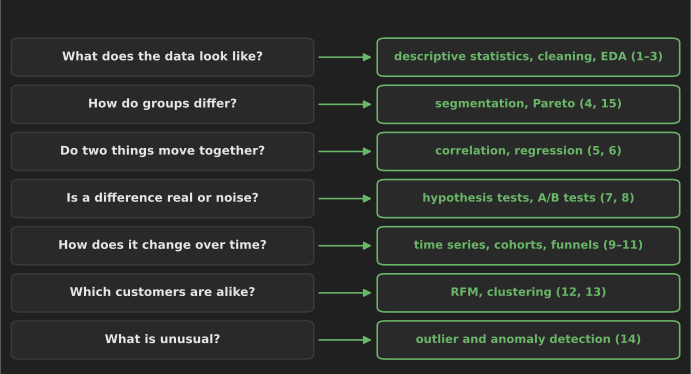
Start from the decision, not the method. Write down who will use the answer and what they will do differently depending on it; then pick the simplest technique that answers that question. A few rules of thumb:
| If the question is… | Start with | Move to, if needed |
|---|---|---|
| "What happened?" | Descriptive statistics, segmentation (1, 4) | Pareto, time series (15, 9) |
| "Is this difference real?" | Confidence interval and test (7) | A randomized A/B test (8) |
| "What drives this?" | Segmentation, correlation (4, 5) | Regression, then an experiment (6, 8) |
| "Are we keeping customers?" | Repeat rate, cohorts (10) | RFM, clustering (12, 13) |
| "Where do users drop off?" | Funnel (11) | A/B test on the weakest step (8) |
| "Is something wrong?" | Validation checks (2) | Anomaly detection on residuals (14) |
Three habits make any technique more trustworthy:
- Clean and validate first, and log every rule (technique 2). Most wrong conclusions come from data problems, not from the wrong statistical test.
- Report uncertainty. A difference without a confidence interval, or a segment without its size, invites over-reading.
- Separate description from cause. Techniques 1–6 and 9–15 describe patterns; only a randomized experiment (8) supports a causal claim on its own.
Where to go next
- Practice on real data. Our 25 data analysis projects for beginners apply these techniques to public datasets, from hotel cancellations to bike-share trips.
- Do it in SQL. Segmentation, cohorts, funnels, RFM quartiles and data-quality checks all appear as tested queries in 30 SQL queries every data analyst should know.
- Present it. 10 data visualization techniques covers how to show the results so readers see the point.
- Go deeper. For the statistics behind techniques 5–8, read our probability and statistics concepts for data science; for more pandas, the pandas tips and tricks; and for choosing software, 20 data analysis tools.
References
- Anscombe, F. J. (1973). Graphs in statistical analysis. The American Statistician, 27(1), 17–21.
- Cleveland, R. B., Cleveland, W. S., McRae, J. E. and Terpenning, I. (1990). STL: A seasonal-trend decomposition procedure based on loess. Journal of Official Statistics, 6(1), 3–73.
- Delacre, M., Lakens, D. and Leys, C. (2017). Why psychologists should by default use Welch's t-test instead of Student's t-test. International Review of Social Psychology, 30(1).
- Iglewicz, B. and Hoaglin, D. (1993). How to Detect and Handle Outliers. ASQC Quality Press. Summarized in the NIST/SEMATECH e-Handbook of Statistical Methods.
- Kohavi, R., Tang, D. and Xu, Y. (2020). Trustworthy Online Controlled Experiments. Cambridge University Press.
- Tukey, J. W. (1977). Exploratory Data Analysis. Addison-Wesley.
- Wasserstein, R. L. and Lazar, N. A. (2016). The ASA statement on p-values: context, process, and purpose. The American Statistician, 70(2), 129–133.
- Library documentation: SciPy
ttest_ind, statsmodels formulas, statsmodels STL, scikit-learn clustering.