AI tools do not make money by themselves. What they do is make a person faster at work someone already pays for: writing and editing, design, video, voice, code, translation and automation. The people earning with AI in 2026 are mostly freelancers and creators who use it to deliver more, better work per hour, not people pressing a button to generate content in bulk, which platforms are increasingly demonetizing. This guide covers 10 AI tools, the paid work each one supports, what it costs, and the rules that can get your account or income taken away.
The short answer. Pick a skill clients pay for, then add the one or two tools that speed it up: a general assistant such as Claude, ChatGPT or Gemini for writing, research and analysis; Canva or Midjourney for visuals; Descript and ElevenLabs for video and audio; GitHub Copilot for code; and n8n for automation. Keep a human in charge of accuracy, originality and disclosure.
How we wrote this. Prices come from each vendor's pricing or documentation page on 25 October 2026, at monthly billing in U.S. dollars; where a page did not load for us, we say "check current pricing" rather than repeat third-party figures. We have not run paid client projects with these tools, so this is a guide to what each tool is for, not a hands-on review. Prices and features change often. This article is general education, not legal, tax or financial advice.
Where AI fits in earning money
AI is now ordinary at work: in the Federal Reserve's 2025 household survey, one in four U.S. workers had used generative AI for their job in the prior month, and 44% agreed it would save them time (Federal Reserve, May 2026). That cuts both ways. Clients know AI makes routine drafts cheap, so they pay for what it does not do well: expertise, judgment, taste, accuracy and accountability.
Four rules shape what you can sell:
- Copyright. The U.S. Copyright Office concluded in January 2025 that AI outputs can be protected only where a human author has determined sufficient expressive elements, and that prompts alone are not enough; human selection, arrangement and modification of AI output can be protected (U.S. Copyright Office). If a client needs to own the work, your human contribution matters.
- Book platforms. Amazon KDP requires you to disclose AI-generated text, images or translations, even if you edited them; AI-assisted editing and brainstorming do not need disclosure (KDP).
- YouTube. Creators must disclose realistic altered or synthetic content, such as a real person saying something they did not, while scripts, thumbnails and minor edits made with AI do not need disclosure (YouTube Help). Its monetization policy on "inauthentic" (mass-produced or repetitive) content, clarified in July 2025, means templated AI videos without original value risk losing monetization (Search Engine Journal).
- Clients and confidentiality. Many contracts restrict putting client data into third-party tools, or require you to say when you use AI. Ask, and follow the tool's data settings.
The 10 tools at a glance
| # | Tool | Best for | Entry paid price (monthly) | Free option |
|---|---|---|---|---|
| 1 | Claude | Writing, editing, research, analysis, code | Pro $20 ($17/mo billed yearly) | Yes |
| 2 | ChatGPT | Writing, research, images, everyday tasks | Check current pricing | Yes |
| 3 | Gemini | Research, Google Workspace tasks | Check current pricing | Yes |
| 4 | Canva | Social graphics, presentations, simple video | Check current pricing | Yes |
| 5 | Midjourney | Illustration and concept images | Basic $10 | No |
| 6 | ElevenLabs | Voiceover and narration | Starter $6 | Yes (no commercial license) |
| 7 | Descript | Podcast and video editing by transcript | From $16 | Yes |
| 8 | GitHub Copilot | Coding | Pro $10 | Yes |
| 9 | n8n | Workflow automation | Self-hosted Community Edition free | Yes |
| 10 | DeepL | Translation drafts | Check current pricing | Yes |
The 10 tools
1. Claude: writing, editing, research and analysis
Claude, from Anthropic, drafts and edits long documents, summarizes research, analyzes spreadsheets and writes code. Anthropic lists Pro at $20 a month on monthly billing or $17 a month billed annually ($200 a year), with Max from $100 a month for heavier use (Claude pricing).
Paid work it supports: editing and rewriting for clients, research briefs, report drafting, data cleanup and analysis, documentation, and turning interviews or notes into articles. It handles long documents well, which suits editing and research jobs.
Watch out: check every fact, figure and citation yourself; AI assistants can state wrong things confidently. Our guide to the most important LLMs explains how these models work.
2. ChatGPT: a general-purpose assistant
OpenAI's ChatGPT covers similar ground: drafting, brainstorming, research with web search, image generation and data analysis. It offers a free tier and several paid plans; check OpenAI's pricing page for current prices, since its plans changed several times in 2025–2026.
Paid work it supports: content outlines and drafts you then edit, product descriptions, customer email templates, first-pass research, and simple images for social posts. Many freelancers keep one general assistant and learn it deeply rather than paying for several.
Watch out: generic, unedited AI text is what clients increasingly refuse to pay for. Your value is in the editing, accuracy and voice.
3. Gemini: research and Google Workspace
Google's Gemini is built into Gmail, Docs, Sheets and Drive for paid users, and Google sells it in tiered Google AI Plus, Pro and Ultra plans (Google One); check the page for current prices in your country.
Paid work it supports: virtual assistant work for clients who live in Google Workspace (summarizing threads, drafting replies, building spreadsheets), and research summaries. If your clients use Google tools, working where they work saves time.
Watch out: only connect a client's account with their explicit permission.
4. Canva: design for non-designers
Canva's templates and built-in AI features (image generation, background removal, resizing and text tools) let non-designers produce professional social graphics, presentations, flyers and short videos. It has a free plan and paid plans; check Canva's pricing page, since the price of Pro has changed during 2026.
Paid work it supports: social media management packages, presentation design, small-business marketing materials, and printables or templates sold as digital products.
Watch out: template-based work is easy to copy. Sell a consistent brand look and reliable delivery, not one-off designs.
5. Midjourney: illustration and concept images
Midjourney generates high-quality images from text prompts and is popular for concept art, illustration and mood boards. Plans are Basic $10, Standard $30, Pro $60 and Mega $120 a month (20% less billed annually), and companies with more than $1 million in gross annual revenue must use the Pro or Mega plan (Midjourney). Only Pro and Mega include Stealth Mode; on other plans your images are visible in Midjourney's gallery, which matters for confidential client work.
Paid work it supports: concept art and mood boards for agencies, book-cover drafts (refined by a designer), illustrations for articles and course materials.
Watch out: purely AI-generated images may not be protected by copyright (U.S. Copyright Office), so clients who need exclusive rights may want human-made or substantially human-modified art. Avoid prompting for living artists' styles or trademarked characters.
6. ElevenLabs: voiceover and narration
ElevenLabs creates natural-sounding speech from text, clones voices with consent and dubs into other languages. Prices start with Starter at $6 a month, the first tier to include a commercial license, then Creator at $22 and Pro at $99 (ElevenLabs). The free plan does not include a commercial license.
Paid work it supports: narration for explainer videos and e-learning, voiceovers for YouTube channels, audio versions of articles, and multilingual dubbing for clients.
Watch out: only clone a voice you have rights to use, and disclose synthetic voices where platforms or clients require it. Realistic synthetic content on YouTube can require a label (YouTube Help).
7. Descript: editing audio and video by editing text
Descript transcribes recordings so you can edit video and podcasts by editing the transcript, remove filler words, and clean up audio. It has a free plan and paid plans from $16 a month (Descript).
Paid work it supports: podcast editing, turning long videos into short clips with captions, cleaning up webinars and course recordings. Editing is one of the most outsourced creator tasks, and tools like this let one editor handle more clients.
Watch out: automatic edits still need a human pass for pacing, accuracy and context.
8. GitHub Copilot: coding faster
GitHub Copilot suggests and writes code in your editor and can work through multi-step tasks. Copilot Free costs nothing with limited use, Pro is $10 a month and Pro+ is $39 (GitHub Docs).
Paid work it supports: freelance web development, small automation scripts for businesses, data scripts and internal tools. If you are learning to code for freelance work, our Python automation scripts and Python projects for beginners are practical places to start.
Watch out: you are responsible for the code you deliver, including security and licensing. Review and test everything.
9. n8n: workflow automation as a service
n8n connects apps and AI models into automated workflows: route form submissions, summarize emails, update a CRM, post content on a schedule. The self-hosted Community Edition is free under n8n's Sustainable Use License for workflows you or your organization build; hosting n8n as a service for others or letting outsiders build workflows needs a commercial license, while installing it on a client's own server as a consultant is generally allowed (n8n support). Zapier and Make are paid, hosted alternatives.
Paid work it supports: setting up automations for small businesses, such as lead capture, invoicing reminders, AI-drafted replies for review, and reporting. Automation consulting is a growing freelance niche because many businesses know they should automate but do not know how.
Watch out: automations that send messages or move money need human review steps and careful testing.
10. DeepL: translation drafts
DeepL produces machine translations that many translators use as a first draft and then post-edit. It has free and paid plans; check current pricing on its site.
Paid work it supports: translation and post-editing for businesses, localizing product listings and websites, and multilingual customer support. Fluency is still the skill being paid for: clients pay you to catch what the machine gets wrong.
Watch out: do not paste confidential client documents into a free tier unless its terms allow it, and certified translations usually need a qualified human translator.
Do the subscriptions pay for themselves?
A typical creator stack from the prices above (Claude Pro $20, Descript from $16, Midjourney Basic $10 and ElevenLabs Starter $6) costs $52 a month. At $25 an hour of paid work, that is about 2.1 billable hours a month to break even; at $15 an hour, about 3.5 hours.
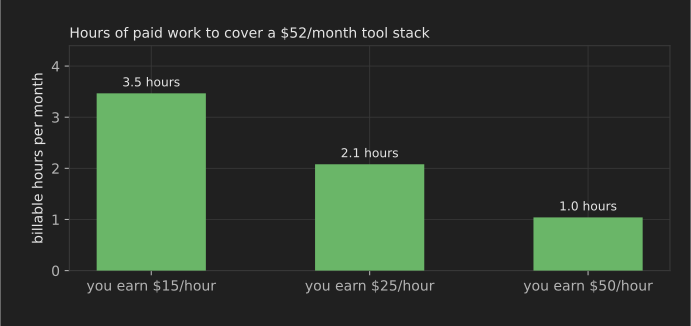
The math is easy to justify once you have clients, and a waste before you do. Start free, then pay for the one tool that removes your biggest bottleneck. Subscriptions used for business are generally deductible business expenses in the U.S.; keep the receipts.
AI money-making claims to ignore
- "Make $10,000 a month with AI on autopilot." If it worked, the seller would not need to sell it. Platforms are actively demonetizing mass-produced AI content.
- Faceless channels built only from AI scripts and stock clips. YouTube's inauthentic-content policy targets mass-produced, repetitive videos (Search Engine Journal).
- Bulk AI books. KDP requires AI disclosure and removes content it judges misleading or disappointing to customers (KDP).
- "AI trading bots" with guaranteed returns. Guaranteed returns are a classic investment-fraud red flag (Investor.gov).
- Undisclosed AI-written reviews or testimonials. Fake reviews break platform rules and consumer-protection law.
How to start this week
- Choose one paid skill from our list of 25 ways to make money online.
- Pick the one tool above that speeds that skill up, on its free tier.
- Produce three portfolio samples, noting in each what you did yourself and where AI helped.
- Pitch real clients, deliver, and upgrade the tool only when the work justifies it.
FAQ
Can you really make money with AI tools?
Yes, mostly by using them to deliver paid services faster: writing and editing, design, video and podcast editing, voiceovers, coding, translation and automation. Selling raw AI output with no human value added is getting harder as platforms tighten their rules.
What is the best free AI tool to make money?
A general assistant's free tier (Claude, ChatGPT or Gemini) covers the widest range of paid work. Canva's free plan is the most useful for visual work, and GitHub Copilot Free for coding.
Do I have to disclose that I used AI?
It depends on the platform and the client. KDP requires disclosure of AI-generated content; YouTube requires labels for realistic synthetic media; many clients ask in their contracts. When unsure, disclose.
Can I copyright work made with AI?
In the U.S., not purely AI-generated material; human authorship is required. Your own writing, edits, selection and arrangement can be protected (U.S. Copyright Office). Rules differ by country.
Related reading
- 25 ways to make money online in 2026 for beginners
- 30 ways to make money from home without investing much
- AI in business operations, marketing and sales
- 10 open-source LLM families to know in 2026
References
All accessed 25 October 2026.
- Board of Governors of the Federal Reserve System. Economic Well-Being of U.S. Households in 2025: Employment and Job Quality (May 2026).
- U.S. Copyright Office. Copyright Office Releases Part 2 of Artificial Intelligence Report (29 January 2025).
- Amazon Kindle Direct Publishing. Content Guidelines.
- YouTube Help. Disclosing use of altered or synthetic content.
- Search Engine Journal. YouTube targets mass-produced content in monetization update (July 2025).
- Anthropic. Claude pricing.
- Google. Google One AI plans.
- Midjourney. Comparing Midjourney Plans.
- ElevenLabs. Pricing.
- Descript. Pricing.
- GitHub Docs. Plans for GitHub Copilot.
- n8n. Which license do I need for my use case?.
- U.S. Securities and Exchange Commission. Investor Alert: Social Media and Investing, Avoiding Fraud.